Warning
To avoid data loss, please remove the SSD cache in the "UGREEN NAS" before
removing any M.2 SSD. This will provide added protection in case the system is
using it for caching.
Warning
To avoid potential fires, explosions, or other electrical hazards, please do NOT
use non-Ugreen power adapters or uncertified power adapters.
Powering On
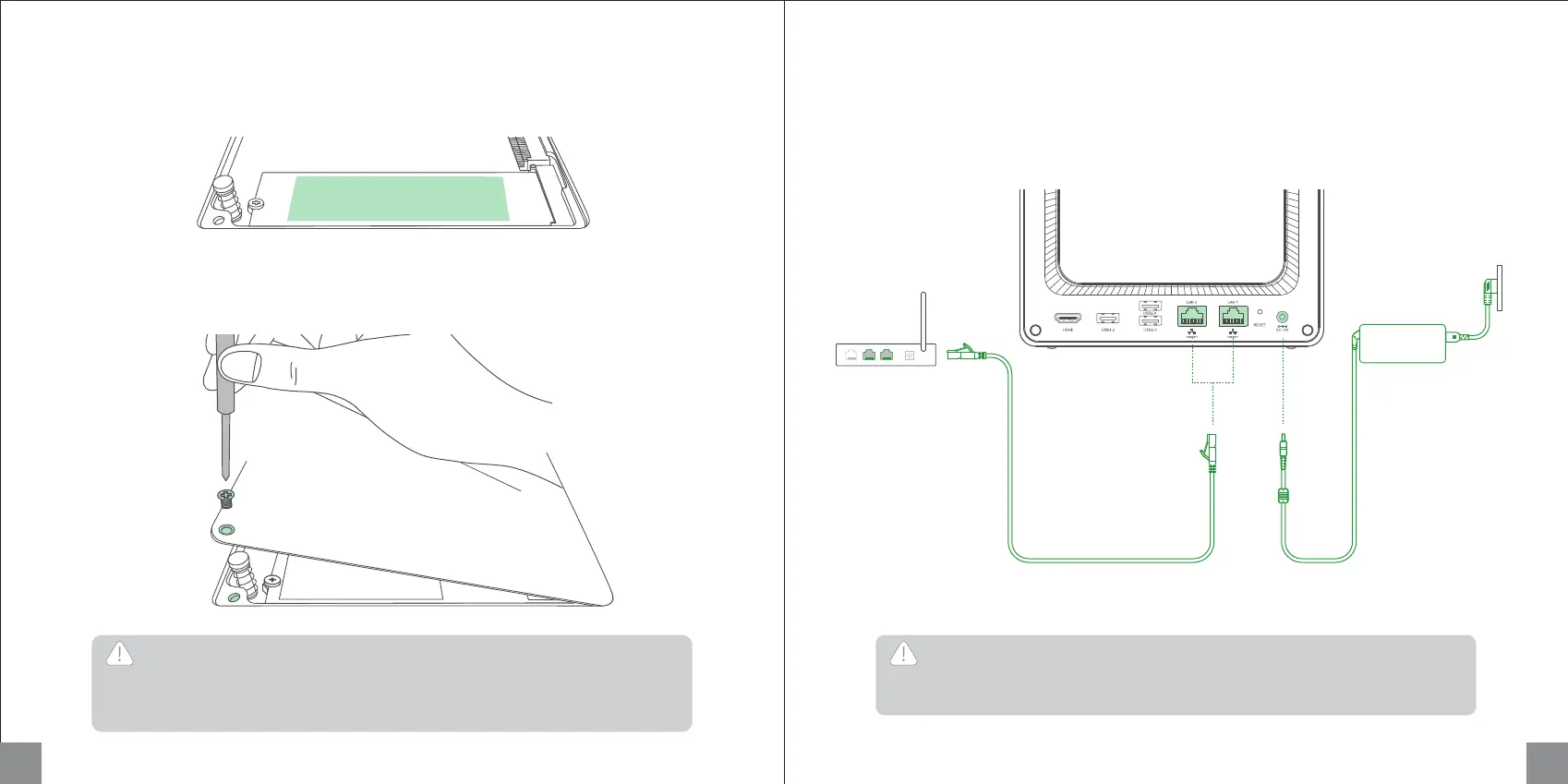
Use Ethernet cable to connect NAS to a LAN port on a router. Connect the power supply to the device,
then short press the power button to turn it on.
Tips: After powering on, you can download "UGREEN NAS" then go to "Control Panel" > "Hardware &
Power" to select automatic startup after powering on.
Included power
adapter
(DC 19V/7.9A)
LAN
4. Peel off the the film of silicone pad and stick it on the front-facing surface of the SSD.
11 12
5. Reinstall the panel and power on the NAS. After successful boot up, go to the "UGREEN NAS" app
to set the SSD cache.



 To Next Page