7 8
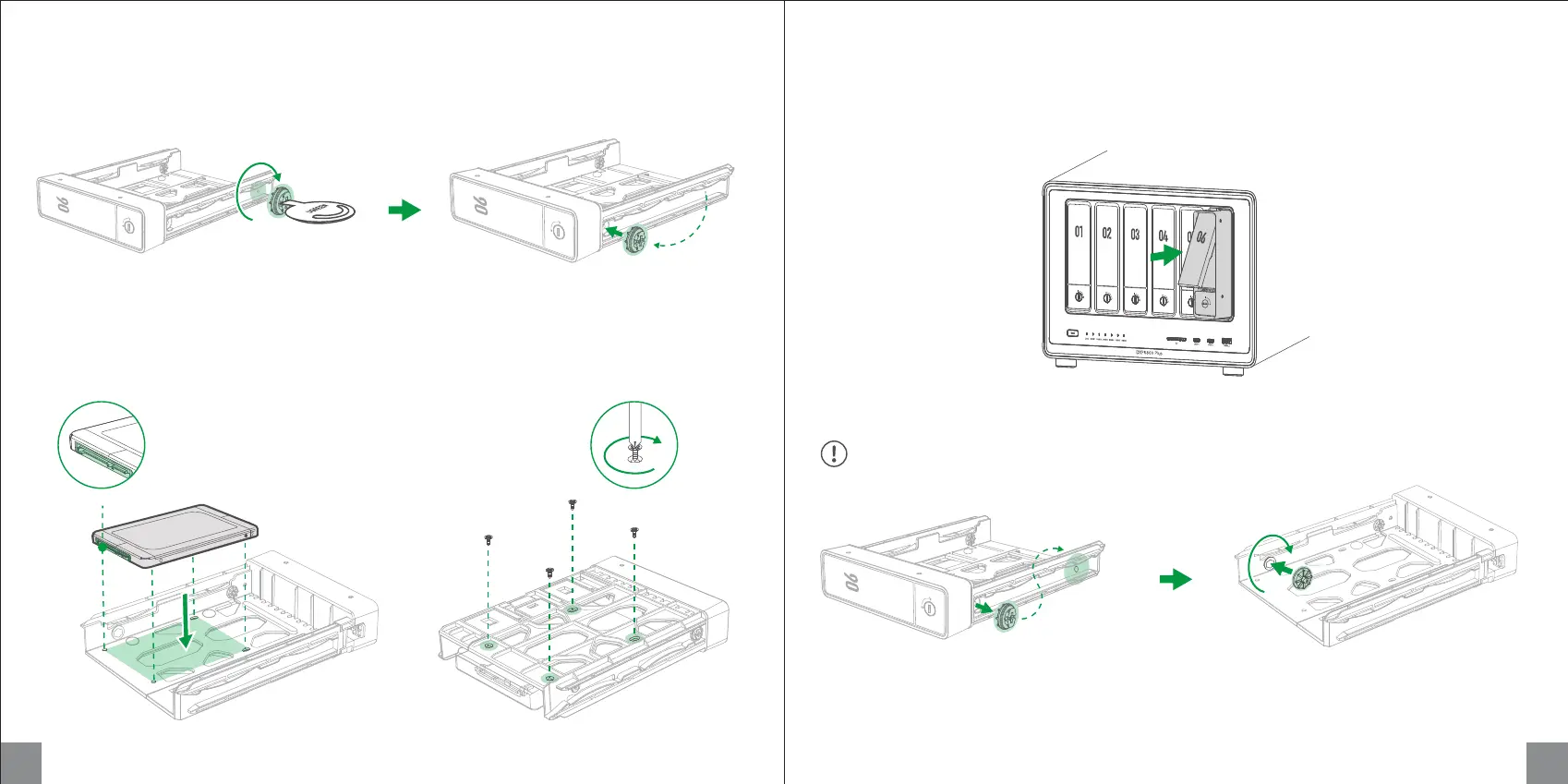
2. Install the drive: Place drive on the tray. Ensure the
holes on the bottom of the drive are aligned with the
holes on the tray.
Remove fastening pin on the rear end Attach it to the hole near the tray head
3. Secure the drive: Flip tray to the back,
tighten the screws to secure the drive in
place.
4. Load the tray into the bay: Insert the loaded drive tray into the empty drive bay and lock it.
For installing 3.5-inch hard drives, please remember to move the fastening pin back to the rear end.
Installing 2.5-inch Hard Drives (Screwdriver Required)
1. Remove the fastening pin: Use the drive tray key to move the rear end fastening pin into the fixed
hole near the tray.
Hard drive pins face down
Remove the pin from the hole near the tray head Attach it from inside of the drive tray
Rotate it clockwise to lock it in place


 To Next Page