VLS Service Manual - REV2015.04
Table of Contents
Component Removal and Replacement
Page | 39
Component Removal and Replacement
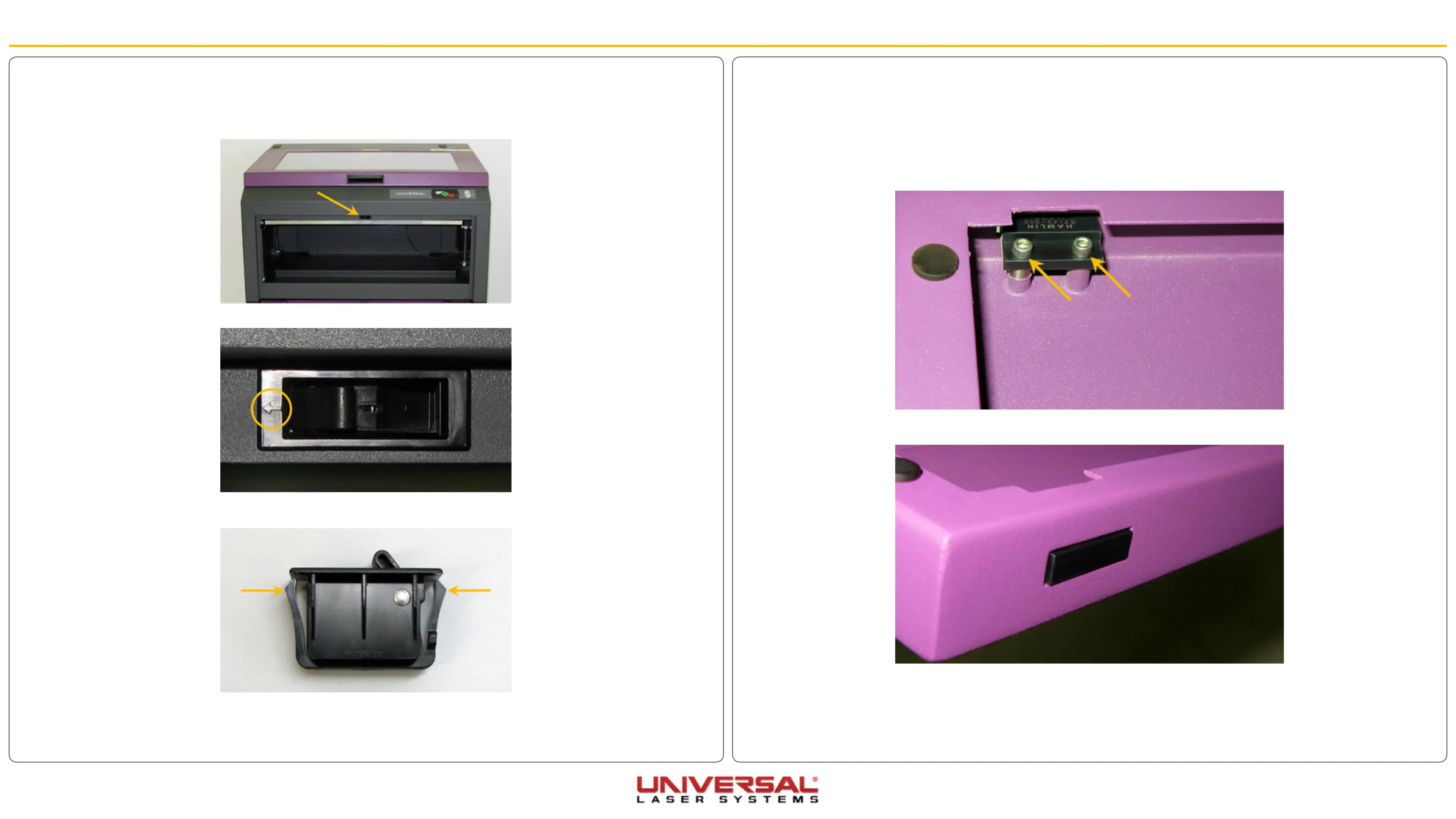
Front Door Proximity Sensors
1. Open the front door and locate the two proximity sensor magnets located along the left and right edges
of the door.
2. Remove the two screws holding each proximity sensor magnet in place and set them aside. Remove
the magnets.
3. Installation is opposite of removal. Ensure the magnet is flush with the front door frame or slightly
sticking out.
4. Plug in and power ON the VLS. Open and close the door. Check to see if the door open light on the
keypad turns on and off (red flashing light) when you open and close the door. Or check the UCP to
see if the system is indicating that a door is open.
Front Door Latch Catch
1. Open the front door all the way to its resting position.
2. Locate the front door latch catch(es) noting the direction the imprinted arrows are pointing.
3. Remove the latch catch(es) by pressing the sides of the latch catch together and pushing it out of the
opening.
4. Installation is the opposite of removal. Ensure the imprinted arrows are pointing the same direction as
when removed.


 To Next Page