VLS Service Manual - REV2015.04
Table of Contents
Electronics
Page | 71
Electronics
Thermal Sensor/Com Board
1. Power OFF and unplug the VLS system.
2. Open the Rear Cover to its resting position.
3. Remove the laser and set it aside in a safe place.
4. Follow the CPU procedure up to step 7.
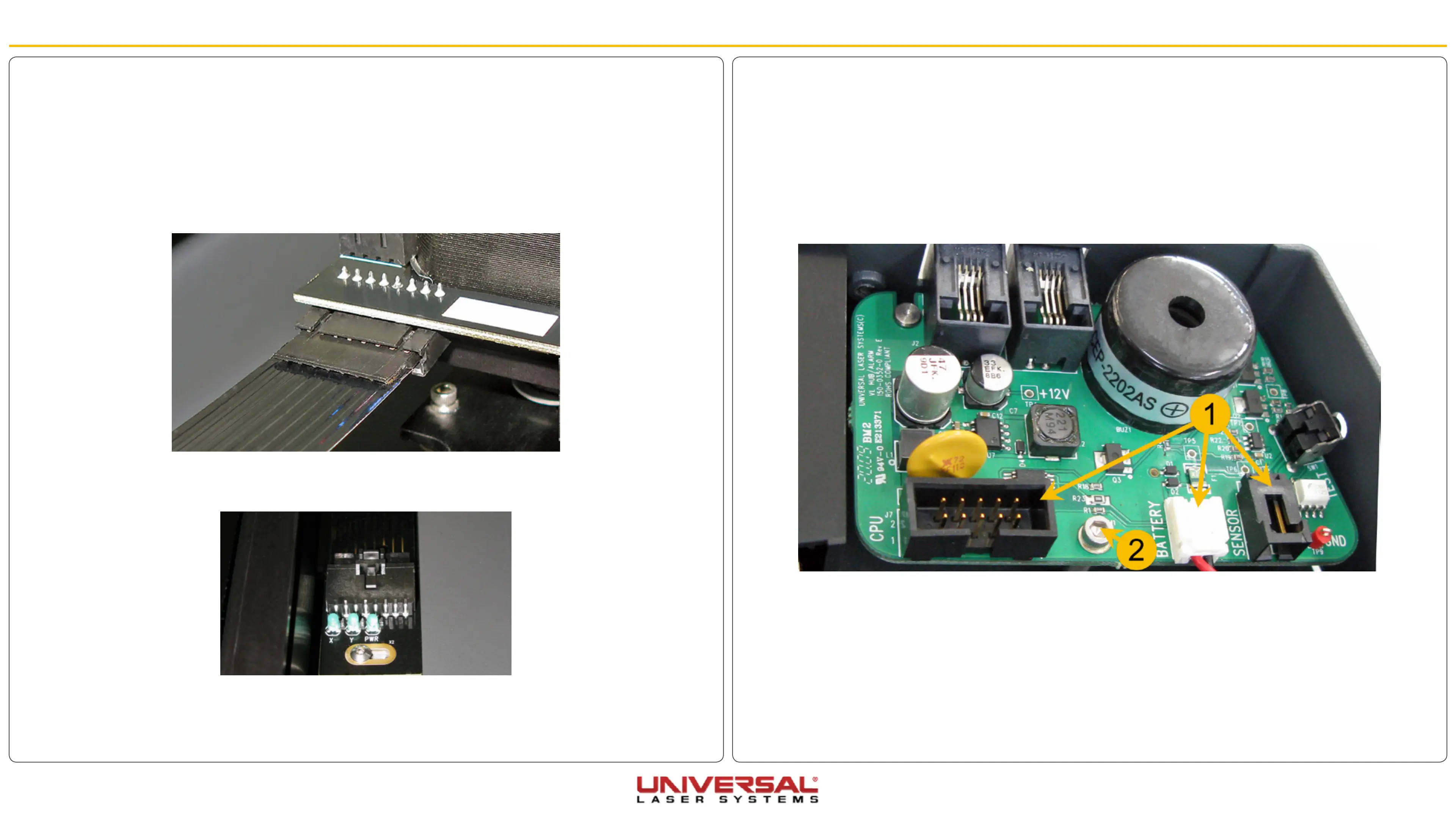
5. Locate the Thermal Sensor/Com Board and disconnect (1) the main cable, as well as the battery
connection and the sensor cable for the Thermal Snap Switch (sensor).
6. Remove the mounting screw (2) from the thermal sensor/com board and slide the board out, being
careful not to damage the testing button.
7. Installation is opposite of removal.
Flex Cable
1. Power OFF and unplug the VLS system.
2. Open the Top Door.
3. Move the X-axis arm toward the back of the system.
4. Locate and disconnect one side of the Flex Cable from the Upper Flex Board by pressing the plastic tab
on the bottom side of the connector and gently pulling the plastic piece.
5. The Lower Flex Board is located on the right-hand side near the pressure cylinder. Unplug the other
side of the Flex Cable from the Lower Flex Board by pressing on the plastic tab and gently pulling the
connector.
6. Installation is opposite of removal.


 To Next Page