3
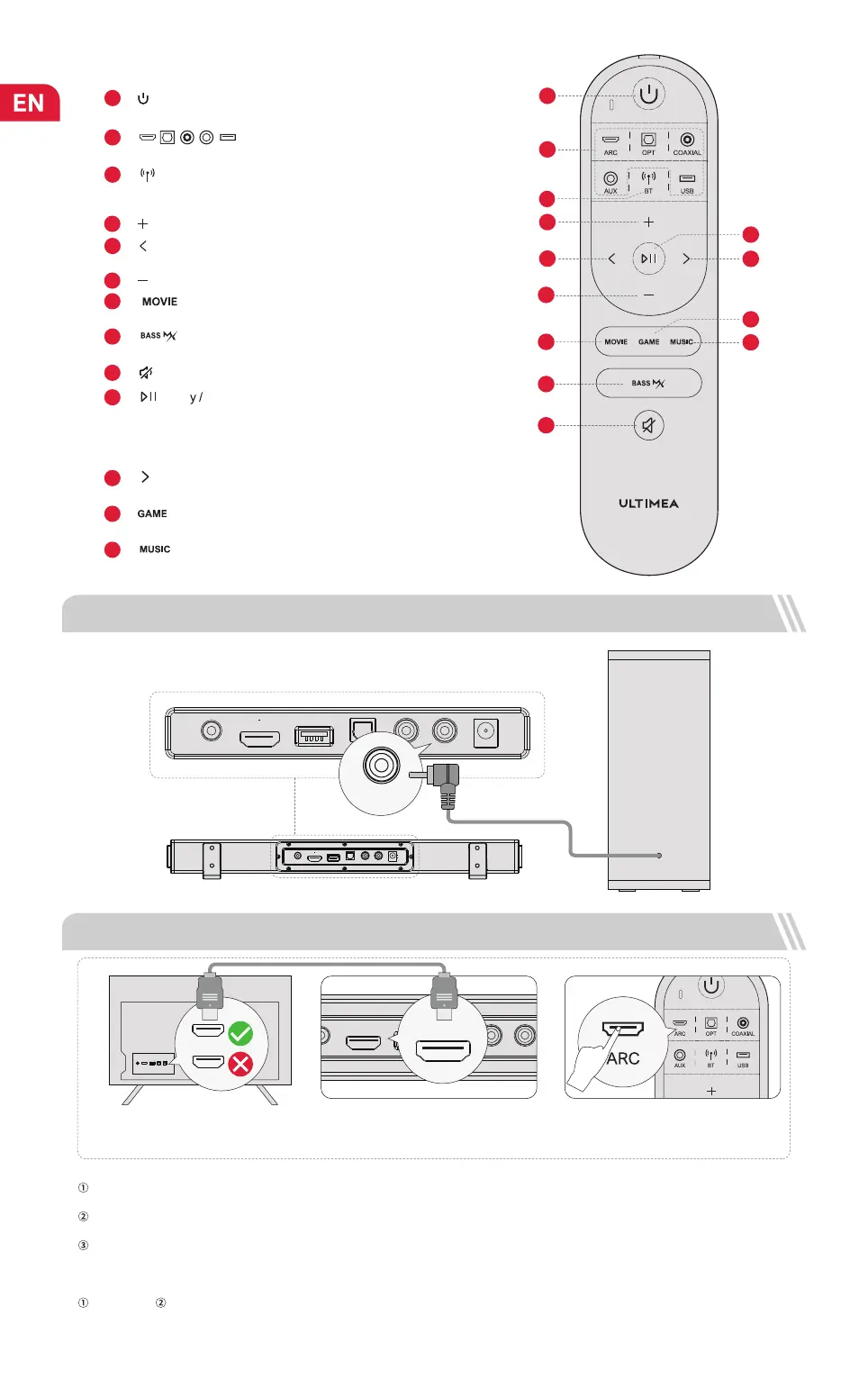
Press to switch to BT channel and enter pairing mode.
Hold for 3 second to disconnect.
“ ”: Bluetooth
4
“ ”: Volume Up.
6
“ ”: Volume Down.
7
Press to switch to Movie mode, the display will show: “
Eq01”.
“ ”:
8
Press to enhance the Bass, press again to restore to normal bass.
“ ”: BASSMX
9
“ ”: Mute Recover the volume.
10
In BT and USB mode: Press to switch between Play and Pause, the
display will show “PAUS”.
USB mode: Hold for 3 seconds to switch between USB single loop
playback and list loop playback, the display will show “ALL” or “ONE
”.
“ ”: Pla
Pause
8
1
2
3
4
5
6
7
9
12
13
10
11
Remote Control
1
Press to power on / Hold for 3 seconds to power off.
“ ”
:
Power
“ ”
:
ARC / OPT / COAX / AUX / USB
Press to switch channels.
2
5
BT and USB mode: skip to previous track.
“ ”: Previous
11
BT and USB mode: skip to next track.
“ ”: Next Button
Press to switch to Game mode, the display will show: “ Eq02”.
12
“ ”:
13
Press to switch to Music mode, the display will show: “
Eq03
”.
“ ”:
3 CONNECT TO SUBWOOFER
4 CONNECT TO THE TV VIA ARC
ARC
USB
AUX
OPTICAL
COAXIAL
SUB OUT
DC IN
ARC USB
AUX
OPTICAL
COAXIAL
SUB OUT
DC IN
ARC
HDMI
What’s the difference between: HDMI IN, HDMI ARC, HDMI eARC?
HDMI IN is a standard HDMI input that allows you to connect devices to your TV or audio system. It supports audio and video signals, but it does not
support audio return channel (ARC) or enhanced audio return channel (eARC) functionality.
HDMI ARC is a special HDMI port that supports two-way communication between your TV and audio system. This means that audio can be sent from
your TV to your audio system, and audio system can send audio back to your TV.
HDMI eARC (Enhanced Audio Return Channel) is an updated version of HDMI ARC that supports higher quality audio formats such as Dolby Atmos
and DTS:X.
Note:
When ARC is connected, your TV remote control can control the soundbar and TV simultaneously:
Turn on/off Adjust the volume
If there is no sound: try setting the TV audio output to PCM: TV Settings > Home > Settings> Sound > Digital Audio Output > PCM.
ARC USB
AUX
OPTICAL COAXIAL
SUB OUT
DC IN
Steps 01:
Connect one end of the HDMI cable to the
ARC/eARC port on the back of your TV.
Steps 02:
Then connect the other end into the HDMI
ARC port of the soundbar.
Steps 03 :
Press “ARC” button on the remote contorl
to select “ARC” input.
SUB OUT
ARC
02
/


 To Next Page