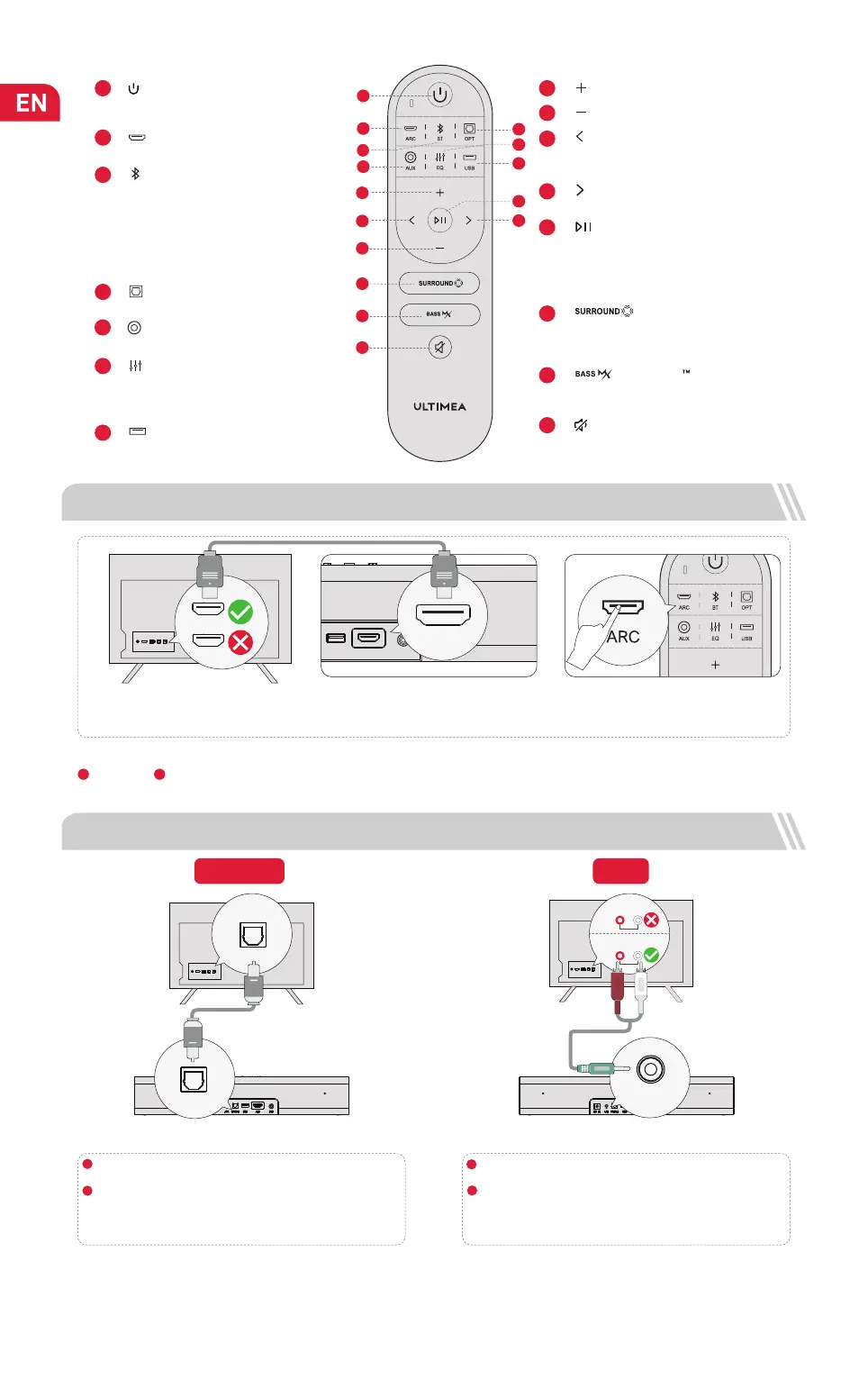
3 CONNECT TO TV VIA ARC
eARC/ARC
HDMI
Note: Please turn on the "CEC" function on your TV.
When ARC is connected, your TV remote control can control the soundbar and TV simultaneously:
Turn on/off Adjust the volume
If there is no sound: try setting the TV audio output to PCM: TV Settings > Home > Settings > Sound > Digital Audio Output > PCM
Steps 1:
Connect one end of the HDMI cable to the
eARC / ARC port on the back of your TV.
Steps 2:
Then connect the other end to the ARC
port of the soundbar.
Steps 3:
Press “ARC” button on the remote control
to select “ARC” input.
ARC
1 2
3
“ ”: BT
5
“ ”: AUX
Remote Control
1
Press to power on / Hold for 3 seconds to
power off.
“ ”
:
Power Button
“ ”
:
ARC
Press to switch to HDMI ARC channel.
2
6
Press to switch to AUX channel.
“ ”: EQ
4
Press to switch to OPTICAL channel.
“ ”: OPT
Press to switch among Movie, Dialogue,
Music mode, the display will show:
“Eq 1”, “Eq 2”, “Eq 3”.
7
“ ”: USB
Press to switch to USB channel.
9
1
2
3
5
4
6
7
8
10
14
13
12
11
15
Press to switch to BT channel and enter
pairing mode.
Hold for 3 seconds to disconnect current
device and choose to connect to a new
device manually on your mobile phone /
PC / TV (BT ID: Poseidon D50).
“ ”: Volume Up
“ ”: Volume Down
8
Press to adjust surround sound level,
the display will show:
“ST-1”, “ST 0”, “ST 1”.
“ ”: SURROUND
9
Press to adjust bass level, the display will
show: “BS-3”, “BS-2”, “BS-1”, “BS 0”, “BS 1”.
“ ”: BASSMX
10
“ ”: Mute / Recover the volume.
For BT and USB mode only:
Skip to previous track.
11
“ ”: Previous
14
“ ”: Play/ Pause
15
BT and USB mode: Skip to next track.
“ ”: Next
13
12
For BT and USB mode only.
USB mode: Hold for 3 seconds to
switch between single loop
playback and list loop playback.
4 CONNECT TO TV VIA OPTICAL / AUX
In Optical Mode: If there is no sound, try setting the TV audio output to PCM: TV Settings > Home > Settings > Sound > Digital Audio Output > PCM
OPTION 1: OPTICAL
Note: If audio is playing from the internal TV speakers, mute or
minimize the TV volume.
Note: Please remember to unplug the AUX cable from TV and
Soundbar when you want to switch to other mode.
Make sure the optical plug is inserted correctly as it shows in the
picture. Do not insert the plug upside down and break the optical.
OPTICAL
DIGITAL AUDIO
OUT
OPTICAL
OPTICAL
OPTICAL
OPTION 2: AUX
Connect the 3.5mm to 3.5mm Audio Cable to your TV's AUDIO
OUT port.
Not support AUDIO IN port on TV.
AUX
AUX
AUDIO OUTPUT
R
L
AUDIO IN
R
L
1
2
1
2
Make sure the TV's port is OPTICAL OUT, connect both sides
of the cable to OPTICAL, for both the TV and the soundbar.
02


 To Next Page