EN
Notice: The projection image size refers to the
distance of the diagonal of the image size instead
of the length of the image size.
Auto Focus
●
Turn the device towards a suitable projection
surface or wall, the Poseidon E40 will enter autofocus
until get a clear image.
●
Press "F+" / "F-" on the remote control to
manually adjust the focus. Please carefully observe
the focus icon until get a clear image.
Focus Manual
●
The Poseidon E40 supports Auto keystone, Vertical
correction, Horizontal correction and remote
Corner Correction.
Keystone Correction
●
When the projector image is distorted, it will perform
auto keystone correction to restore the image to a
rectangle. If you nd the auto keystone correction
does not work as well as before, follow the instructions
below to optimize it.
Auto Keystone
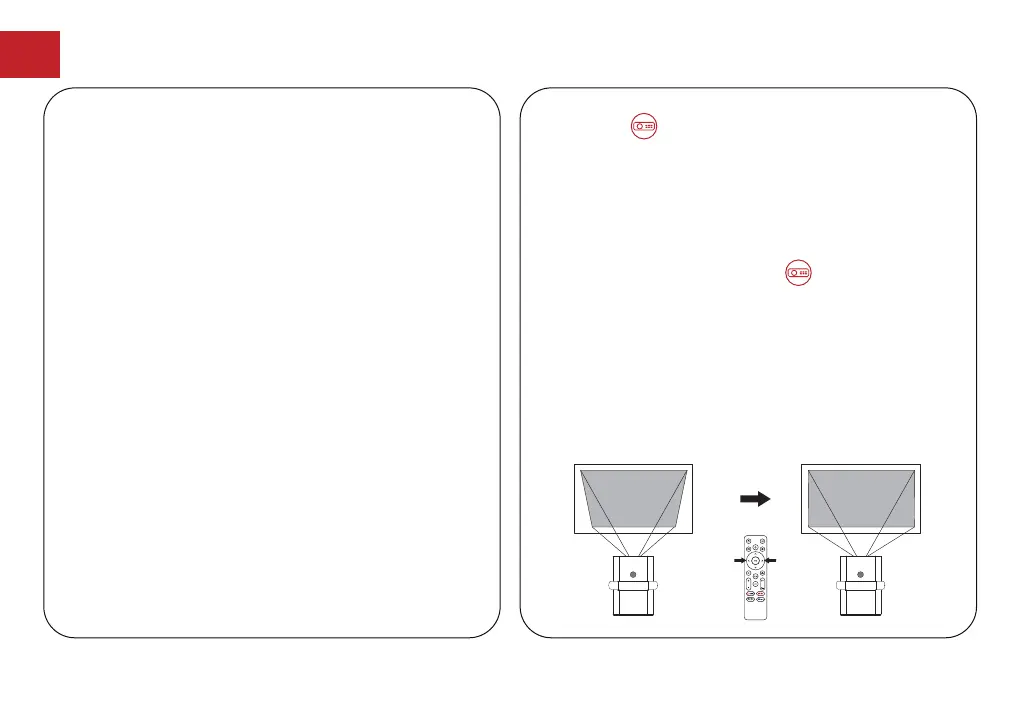
When xing your projector in a place and use Vertical /
Horizontal correction. Press the button to go to
projector home menu, select [Settings]
->[Projection
Settings]
->[Keystone Settings]. Please turn off Auto
keystone correction and go back to the previous menu.
Select [Vertical Correction] / [Horizontal Correction],
press left or right button on the remote control to adjust.
●
Press the button to go to projector home menu,
[Settings]->[Projection Settings]->[Keystone Settings].
●
Select [Calibration Settings] and adjust the projector
for the correct image.
Vertical / Horizontal correction
Vertical Correction
09



 To Next Page