16
Play Through External Sound Devices
Via AUX Cable
Bluetooth Speaker Mode
① Connect one end of the 3.5mm AUX cable to the
AUX port on this projector.
② Connect the other end of the 3.5mm AUX cable to
the AUX port on headphones or external speakers.
③ Playback on the projector.
Press the button to pop up the shortcut menu.
●
Press the navigation button to select the desired
option.
●
Press or button to adjust parameter.
●
Press button to save.
Press the projection shortcut button to enter the
homepage of the projector, select [Bluetooth Speaker]
in the carousel menu, and operate according to the
prompts.
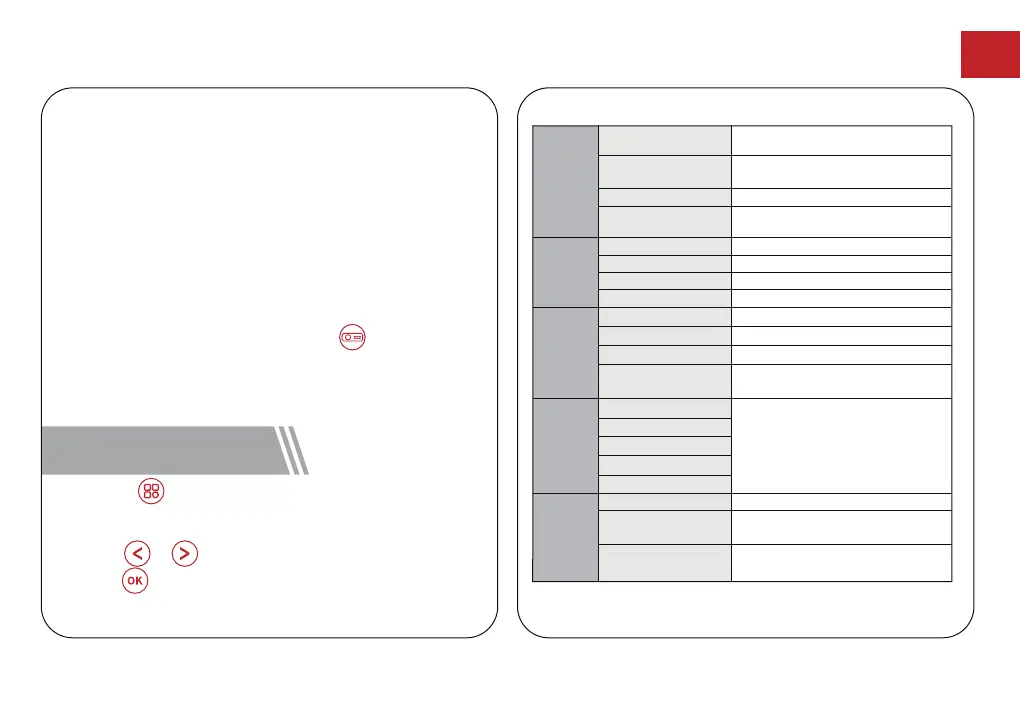
Provides more detailed tone
Provides home theater-style sound
Keeps natural looking colors with a
balance of warm and cool tones
Provides more picture details and
color sharpness
Provides warm colors with lower light
Provides cold color temp
Provides cold normal temp
Provides cold warm temp
Manually set the Red, Green and Blue
Manually set the Brightness, contrast,
Saturation, Sharpness and Hue
Manually set the sound of each
frequency band
Save energy and extend the lifespan
of the projector
Zoom in or out of the projection image
Image
Mode
Color
Temp
Sound
Mode
Projection
Setting
Shutdown
Timer
Standard
Soft
Cold
Normal
Warm
Personal
Light
Personal
Music
Movie
Standard
Off
10min
20min
30min
60min
Zoom In/Out
Perform keystone correction
Fast Keystone
Correction
Reset keystone correction
Keystone
Correction Reset
Provides standard tones
Personal
EN
11 Shortcut Menu



 To Next Page