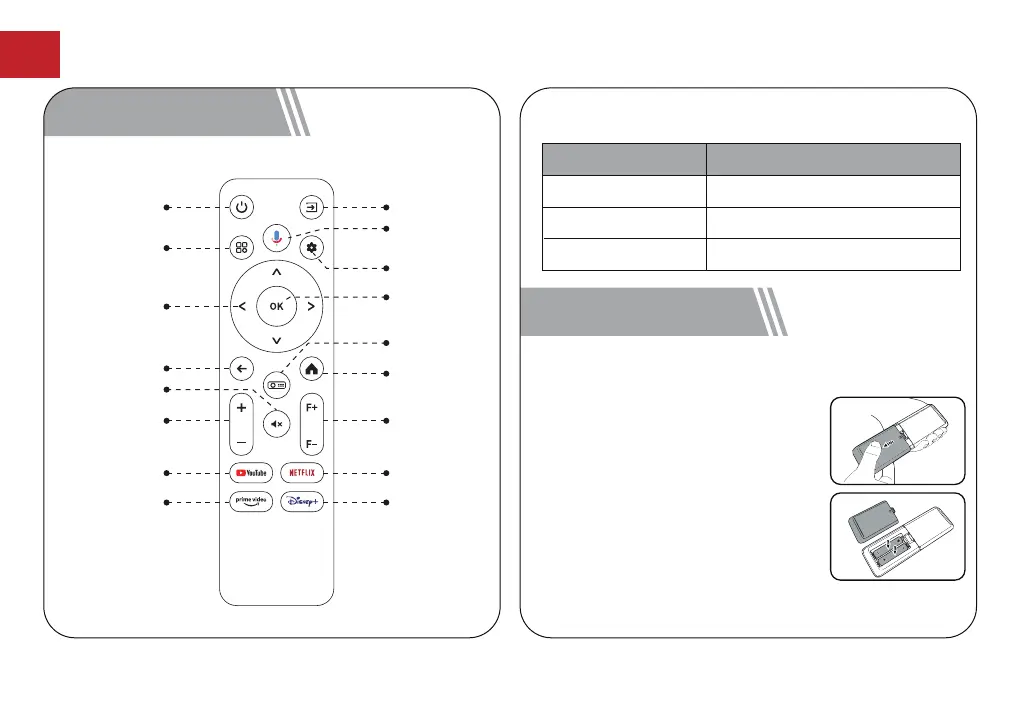
4 Remote Control
Power Switch
Input Source
Quick Menu
Activate the
Google Assistant
Setup
Navigate Buttons
OK
Return
Projector
Homepage
Android TV
Homepage
Volume
Mute
Focus
Youtube Netflix
Prime Video Disney+
LED Indication
Steady Blue
Steady Red
Light Off
Powered On
Standby Mode
Powered Off
LED Status Description
5 Get Started
Prepare the Remote Control
●
Open the battery holder cover of
the remote control.
●
Install two AAA batteries. Make
sure to match the polarity (+/-)
indicated and put back the cover.
●
Please refer to the on-screen
instructions to pair the remote
control with the Poseidon E40.
●
The distance between the remote
and the projector should not
exceed 10 m/33 ft.
EN
07



 To Next Page