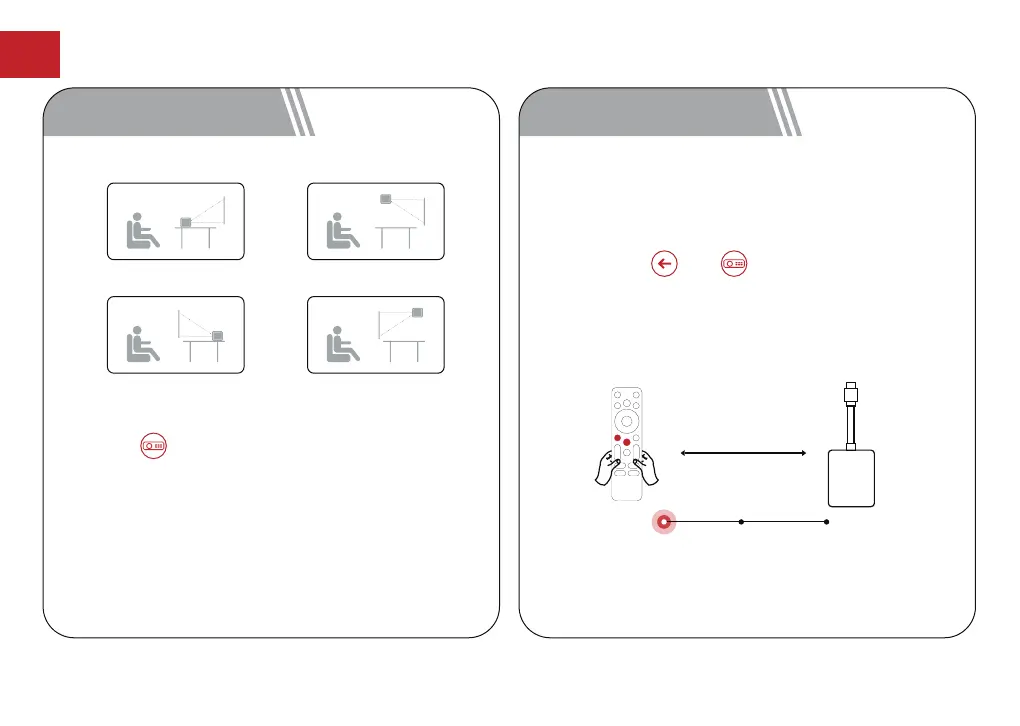
Power on the projector and you will enter Bluetooth
remote pairing page. Follow the on-screen instructions
to complete the pairing.
① Please hold the remote near the projector
② Long press and together for about 10
seconds.
③ When the screen shows "Connected Successfully",
your remote LED indicator turns off, and the remote
control is paired.
20cm
Prepare Connecting Connected
7 Pair Remote Control6 Projection Settings
EN
Press the button, [Settings]->[Projection
Settings]
->[Projection Mode], select Desktop Front
Projection/Desktop Rear Projection/Ceiling Front
Projection/Ceiling Rear Projection.
Desktop Front Projection Ceiling Front Projection
Desktop Rear Projection Ceiling Rear Projection
11



 To Next Page