Need help?
Do you have a question about the UMIDIGI F3 and is the answer not in the manual?
Diagram and description of the front and bottom components of the phone, including ports and the power button.
Diagram and description of the back and side components of the phone, including cameras, buttons, and SIM slot.
Instructions for inserting a Nano-SIM card into the designated slot, including orientation and precautions.
Guidance on installing a TF (MicroSD) card into the phone, noting orientation and safety measures.
Instructions on selecting the primary SIM card for 4G network and preferred network type settings.
Guide to connecting the device to available Wi-Fi networks, including password entry and public networks.
Instructions for enabling Bluetooth, searching for devices, and pairing for data transmission.
Steps to configure and enable a portable Wi-Fi hotspot for sharing the mobile data connection.
 General
| Display Size | 6.7 inches |
|---|---|
| Resolution | 2400 x 1080 pixels |
| RAM | 8 GB |
| Storage | 128 GB |
| Main Camera | 48 MP + 8 MP + 5 MP |
| Front Camera | 16 MP |
| Battery Capacity | 5150 mAh |
| Operating System | Android 12 |
| Dimensions | 168.3 x 76.6 x 8.75 mm |
| Connectivity | 4G, Wi-Fi, Bluetooth, GPS |
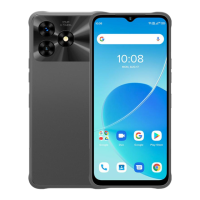
| Colors | Black |

 To Next Page