29
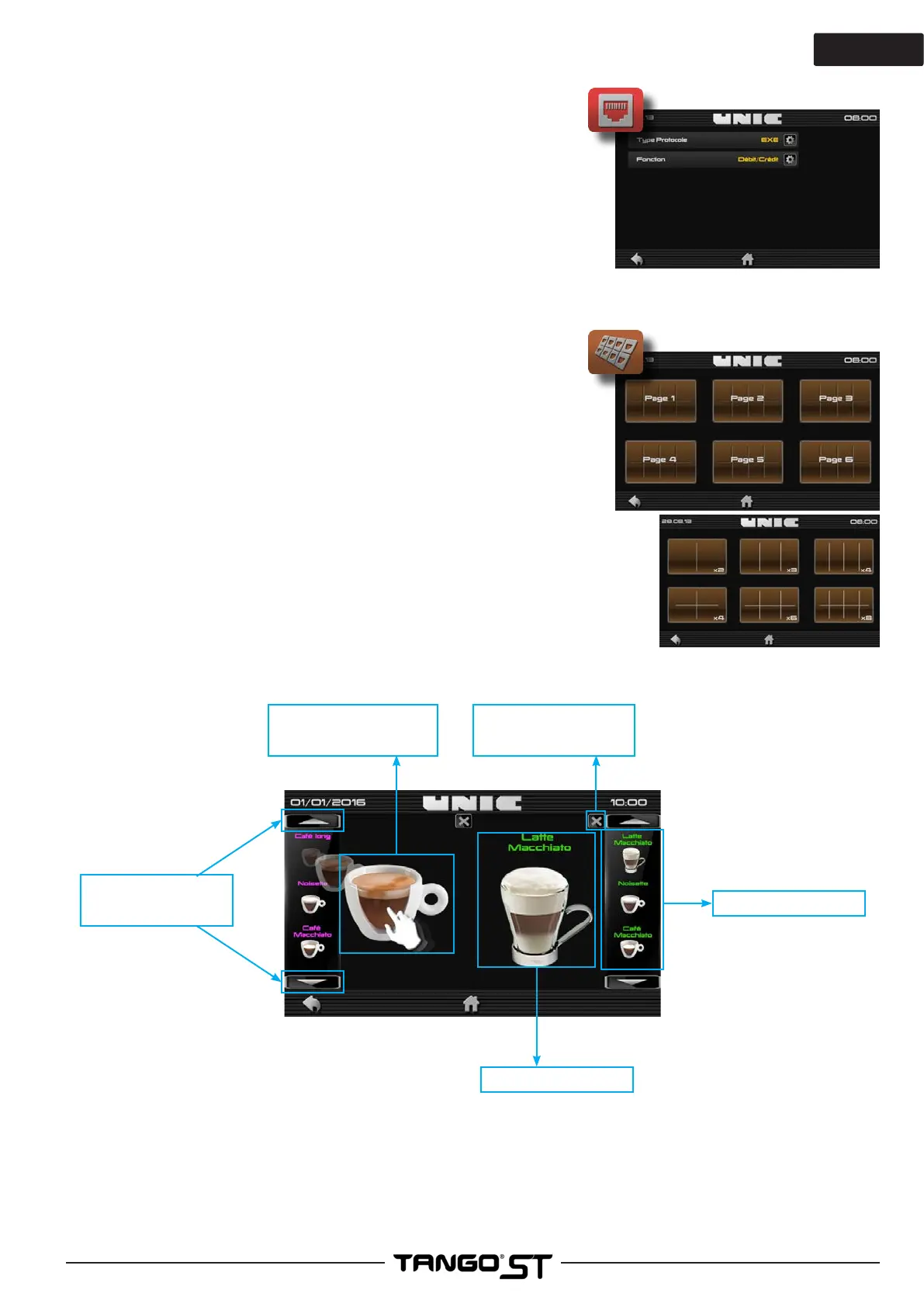
►Keyboard Menu creation
A maximum of 6 pages can be created:
SOLO: Up to 8 products per page, for 48 products maximum
DUO: Up to 8 products per page, for 96 products maximum
To delete an entire keyboard; press and hold the keyboard
thumbnail until it disappears.
Example with a Solo:
- Select the number of products desired (from 2 to 8)
- Slide the desired beverages into the boxes.
- To change, slide the new product into the desired box.
- Scroll with the directional arrows to navigate through all the
products.
(The name of the product is displayed in the color of the grinder)
Directional arrows
Product selected
Delete the drink
List of products
Slide the desired
product into the box
►Computer connection
Protocol type: EXE / MDB
Permits selection of the type of computer connection:
- Credit / Debit
- Debit / Credit
- RS 232



 To Next Page