EasyManua.ls Logo

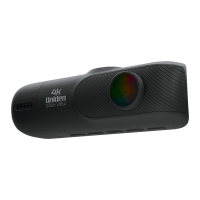
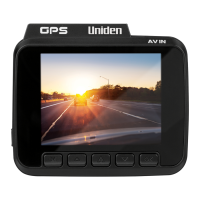
Uniden iGO CAM 80 - User Manual

Uniden iGO CAM 80
24 pages
Print Icon
To Next Page IconTo Next Page
Loading...
iGO CAM 80
Accident CAM
Vehicle Recorder
For more exciting new products please visit our website:
Australia: www.uniden.com.au

Questions and Answers

  • D
    Douglas LongAug 15, 2025
    What to do if my Uniden iGO CAM 80 Dash Cameras says SD Card Error?
    • K
      Kyle KingAug 15, 2025
      If your Uniden Dash Cameras displays an SD Card Error, format the SD card. Ensure that you are using a recommended SD card specifically designed for dash cam use.
  • W
    williamreedAug 18, 2025
    Why is my Uniden iGO CAM 80 video unclear?
    • C
      Cindy RamosAug 18, 2025
      If the video recorded by your Uniden Dash Cameras is unclear, check the lens for fingerprints or dirt. Make sure to keep the lens clean at all times.
  • H
    hserranoAug 21, 2025
    What to do if my Uniden iGO CAM 80 device crashes or freezes?
    • T
      Thomas MasonAug 21, 2025
      If your Uniden Dash Cameras crashes or freezes, use a pin to press the ‘Reset’ button. This will restart the device.
  • C
    Cheyenne MunozAug 25, 2025
    How to fix dark images while recording water/sky on Uniden Dash Cameras?
    • C
      charleshawkinsAug 25, 2025
      If you are getting dark images when recording water or sky with your Uniden Dash Cameras, adjust the exposure setting.
  • D
    Derrick ConwayAug 27, 2025
    How to fix the colour of the images on Uniden Dash Cameras?
    • T
      taylor51Aug 27, 2025
      To correct the color of images taken with your Uniden Dash Cameras, set the ‘white balance’ setting to automatic.
  • S
    silvamichelleAug 30, 2025
    Why my Uniden Dash Cameras cannot take photos or record videos?
    • P
      Paul ObrienAug 31, 2025
      If your Uniden Dash Cameras is unable to take photos or record videos, make sure that the SD card is correctly inserted and properly formatted. Also, ensure you are using the recommended type of SD card, which is a minimum 8GB Class 10 card.
  • T
    timothyruizSep 2, 2025
    Why does my Uniden iGO CAM 80 display turns off after a few minutes?
    • B
      Brooke McintyreSep 2, 2025
      If the display on your Uniden Dash Cameras turns off after a few minutes, check the LCD Auto Off setting and select Always On.
  • D
    Diana SmithSep 5, 2025
    Why is there cross-stripe interference in an image from Uniden Dash Cameras?
    • E
      Erin PenaSep 5, 2025
      Cross-stripe interference in an image from your Uniden Dash Cameras is due to the light frequency. Change the light frequency depending on the light source to resolve this.
  • D
    Darrell WoodsSep 8, 2025
    Why does my Uniden iGO CAM 80 feels warm during operation?
    • V
      vanessajonesSep 8, 2025
      It is normal for the Uniden Dash Cameras to get warm during operation. However, if the camera is exposed to high temperatures for an extended period, it might fail to boot up. If this happens, cool it down and try again.
  • L
    Lance DavisSep 12, 2025
    Why the recorded video doesn’t show mapping information on the Uniden Player?
    • T
      Tina MillerSep 12, 2025
      If the recorded video doesn’t show mapping information on the Uniden Player, ensure that your PC is connected to the internet.

Summary

Important Safety Instructions

Controls & Indicators

LED Indicator

Glows red when recording, green when charging.

LCD Screen

Displays device status, menus, and video feed.

Menu;Mode Buttons

Controls navigation, mode switching, and confirmation.

Installation

Mounting Location

Choose a spot on the windshield that doesn't obstruct view or safety features.

Windshield Mount Attachment

Instructions for attaching the mount bracket to the device and windshield.

GPS Signal Considerations

Factors affecting GPS reception and optimal placement advice.

Operation

Micro SD Card Usage

Insert and format SD card; recommended specifications and capacity.

Power On

Power Off

Record Mode

Starting and Stopping Recording

How to initiate and cease video recording using the device buttons.

Record Menu Settings

Video Resolution and Image Quality

Setting video resolution and image detail for recordings.

General Settings Menu

WiFi Hotspot and App Connectivity

Enabling WiFi for app control and data transfer.

SD Card Management (Storage & Format)

Checking SD card capacity and formatting for optimal use.

Connecting to a PC

Viewing Recorded Files with Uniden Player

Using the App

Troubleshooting

Common Device Issues and Solutions

Addresses problems like recording failures, unclear video, and SD card errors.

Warranty Claims and Support

Uniden iGO CAM 80 Specifications

General IconGeneral
Video Resolution1080p Full HD
Loop RecordingYes
G-SensorYes
Night VisionYes
GPSYes
Parking ModeYes
StorageMicroSD card up to 64GB
BatteryRechargeable Li-ion battery
Power Source12V car adapter

Related product manuals