UBio-X Face User Guide 9
UNIONCOMMUNITY Co., Ltd.
Address: 12F, Munjeong Daemyeong Valeon bldg, 127 Beobwon-ro Songpa-gu,
Seoul, Korea (zip code: 05836)
Tel: +82-2-6488-3000, Fax: +82-2-6488-3099,
E-Mail: sales@unioncomm.co.kr; http://www.unioncomm.co.kr
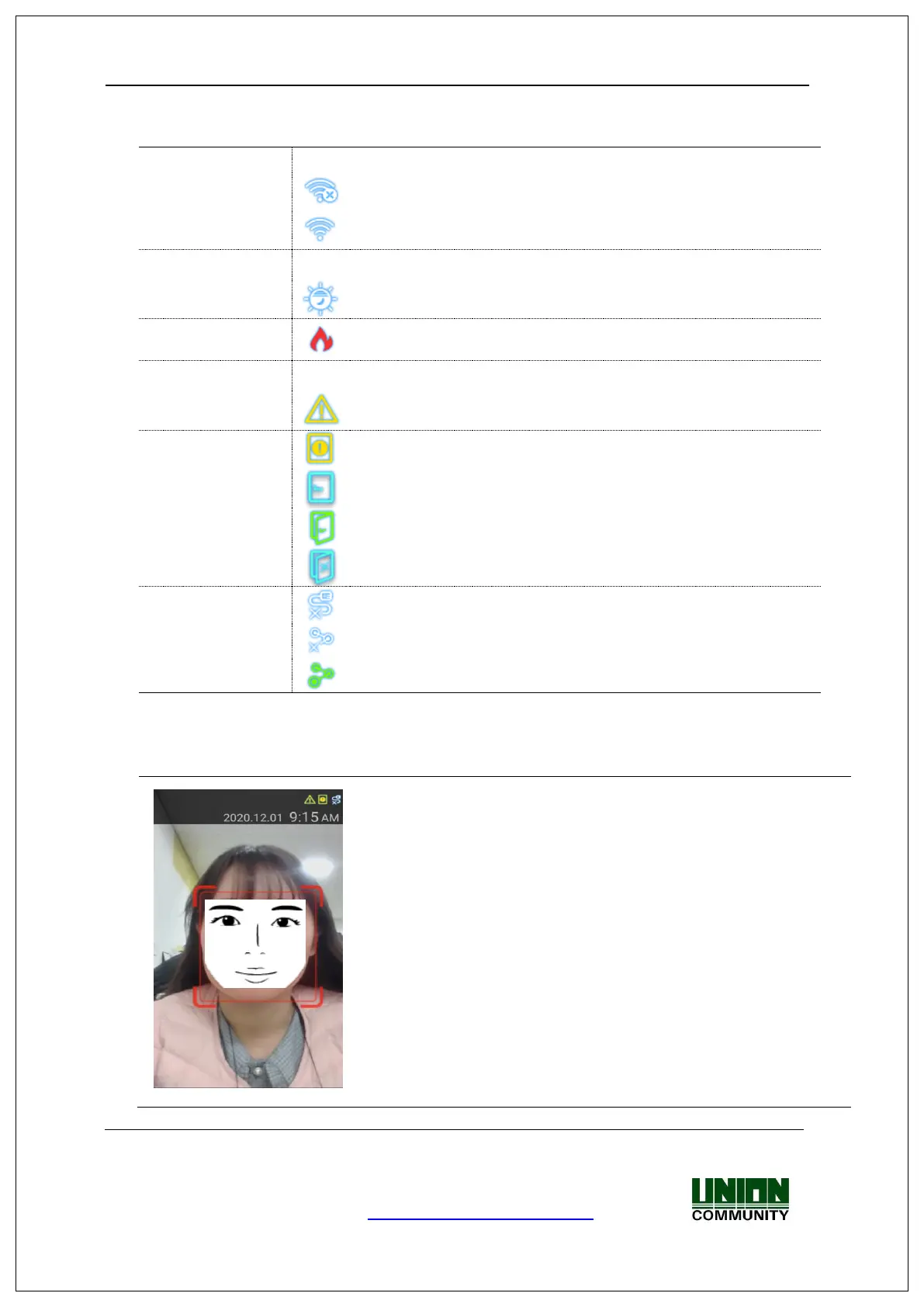
: There is no connected Wi-Fi dongle.
: Wi-Fi connection is not activated
: Wi-Fi connection is activated
: Detect the high illumination status.
: Detect the low illumination status
: Fire Alarm is activated. (on connecting Fire detection
sensor)
: Tamper switch is activated. (Terminal is disassembled.)
: Door status is not sensed.
: Door is opened abnormally
: LAN cable is not connected.
: Disconnected to the server even if LAN cable is connected.
: Connected to the server. (Online)



 To Next Page
 Loading...