EasyManua.ls Logo

Universal M-18 - Alternator Repair Procedure; Alternator Troubleshooting; Removing Back Cover

Default Icon
180 pages
Print Icon
To Next Page IconTo Next Page
To Previous Page IconTo Previous Page
Loading...
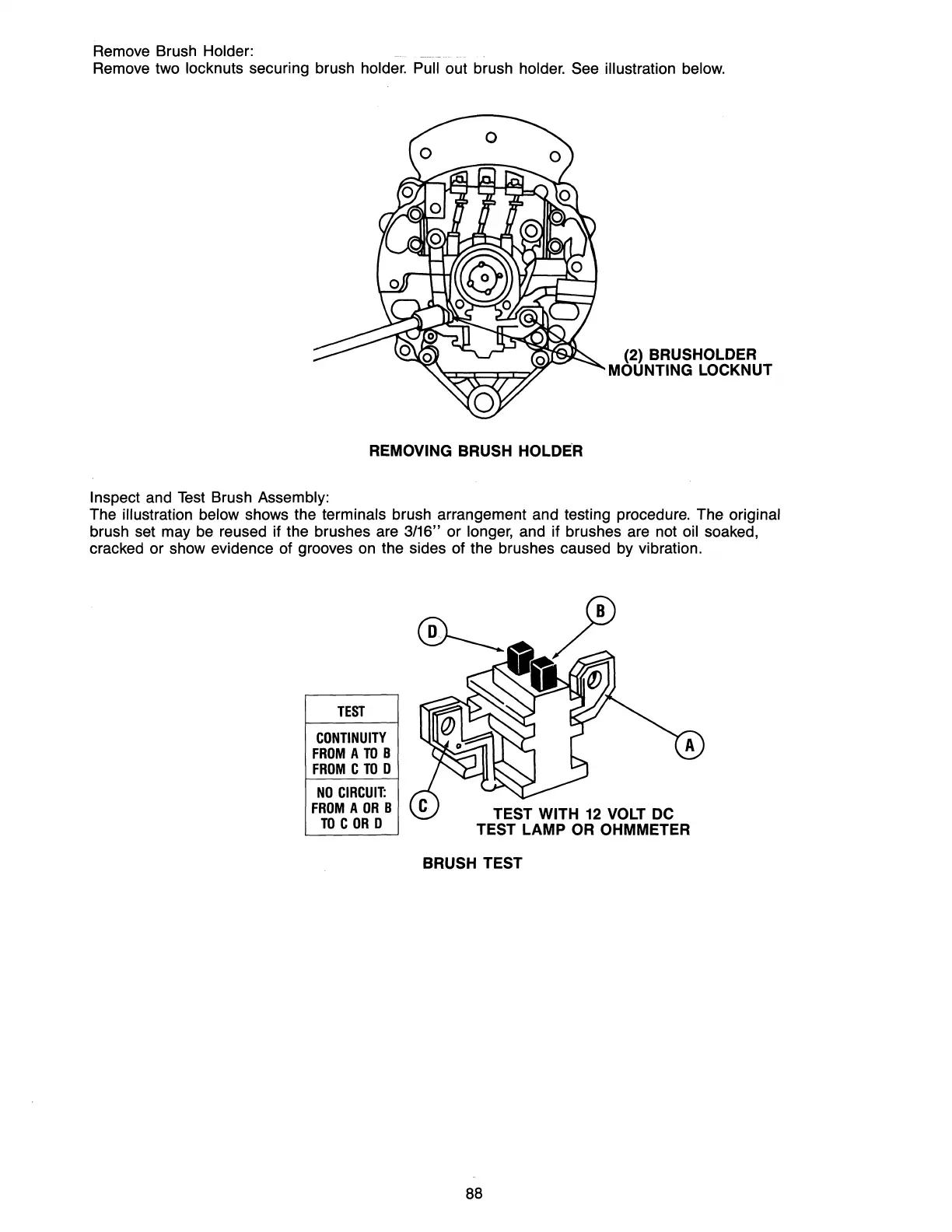
Remove Brush Holder:
Remove two locknuts securing brush holder. Pull out brush holder. See illustration below.
(2) BRUSHOLDER
MOUNTING LOCKNUT
REMOVING
BRUSH HOLDE'R
Inspect
and
Test
Brush Assembly:
The illustration below shows the terminals brush arrangement and testing procedure. The original
brush set may be reused if the brushes are 3/16" or longer, and if brushes are not oil soaked,
cracked or show evidence of grooves on the sides of the brushes caused by vibration.
TEST
CONTINUITY
FROM
A
TO
B
FROM
C
TO
0
NO
CIRCUIT:
FROM
A
OR
B
TO
C
OR
0
TEST WITH
12
VOLT
DC
TEST LAMP
OR
OHMMETER
BRUSH TEST
88

Table of Contents

Related product manuals