EasyManua.ls Logo

UPERFECT M160K01 - Chapter 06 Q&A; Save Settings

Default Icon
10 pages
Print Icon
To Next Page IconTo Next Page
To Previous Page IconTo Previous Page
Loading...
Chapter 06
Q&A
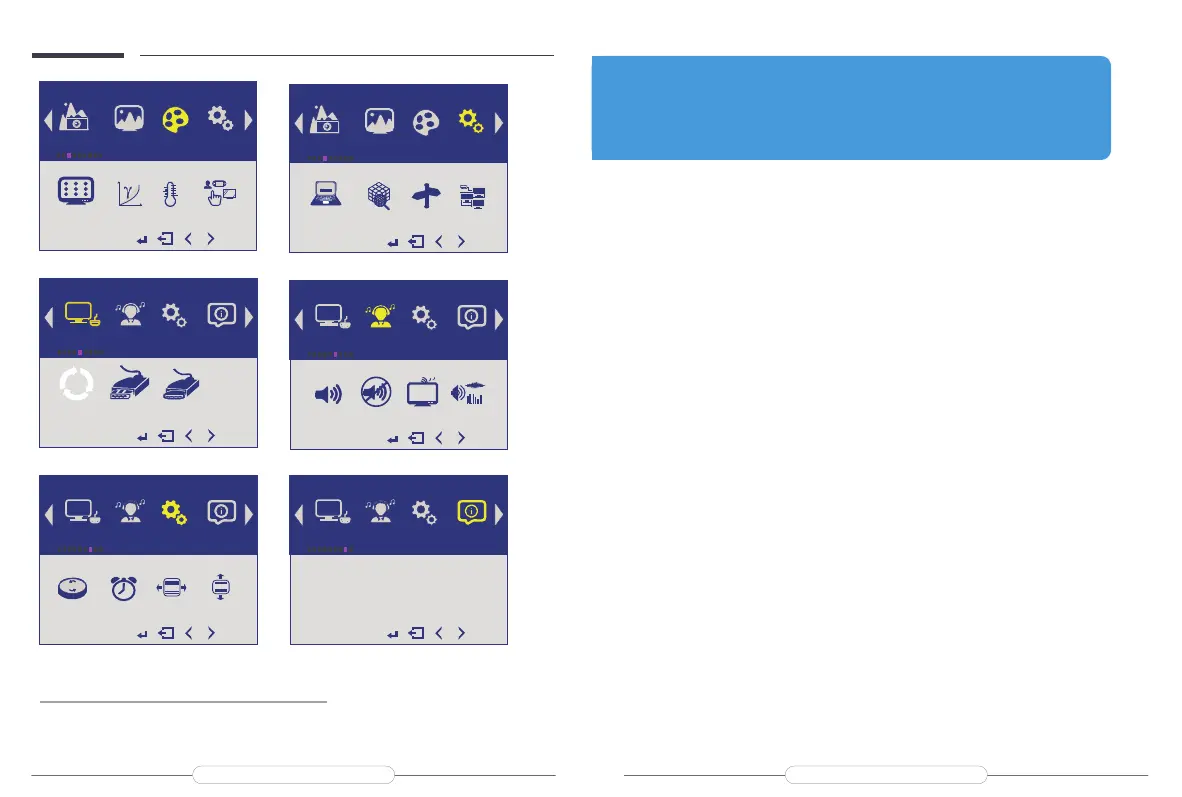
SAVE SETTINGS
How to save all the settings of the monitor?
1.If it is an HDMI signal source, the monitor settings can be directly

then you can save the settings.
Input Audio
Other
Information
AutoSelect
 
AUTO
Input
R
G
B
Picture
Display
Color Advance
PaneIUniformity Gamma TemperatureColorEffects
R
G
B
Color
Input
Audio Other Information
  Volume   Mute
  StandAlong
  AudioSource
Z
Z
Z...
Audio
G
R
B
Picture Display Color Advance
DDCCI Ultra Vivid DP Option DPMST
DDCCI
DP
1.1
1.2
Advance
Input Audio Other Information
  Reset    MenuTime OSDHPosition   OSDVPosition
OSD
OSD
Reset
Other
Input Audio Other Information
D3 : HDMI
1920x1080@60.0H
H:67.5KHZZ
HDCPDisabled
Information
Abnormalconditionsoccurred-likethesplashscreenorspotswhenusingthe
monitor.






ThedisplayisTURN-ON,shows"NOSIGNAL"or"POWERSAVING".









MyphoneisaGooglebrand,butIcannotconnectitdirectlytothedisplay





Q:
A:
Q:
A:
Q:
A:
Email: help@uperfectmonitor.com Email: help@uperfectmonitor.com

Related product manuals