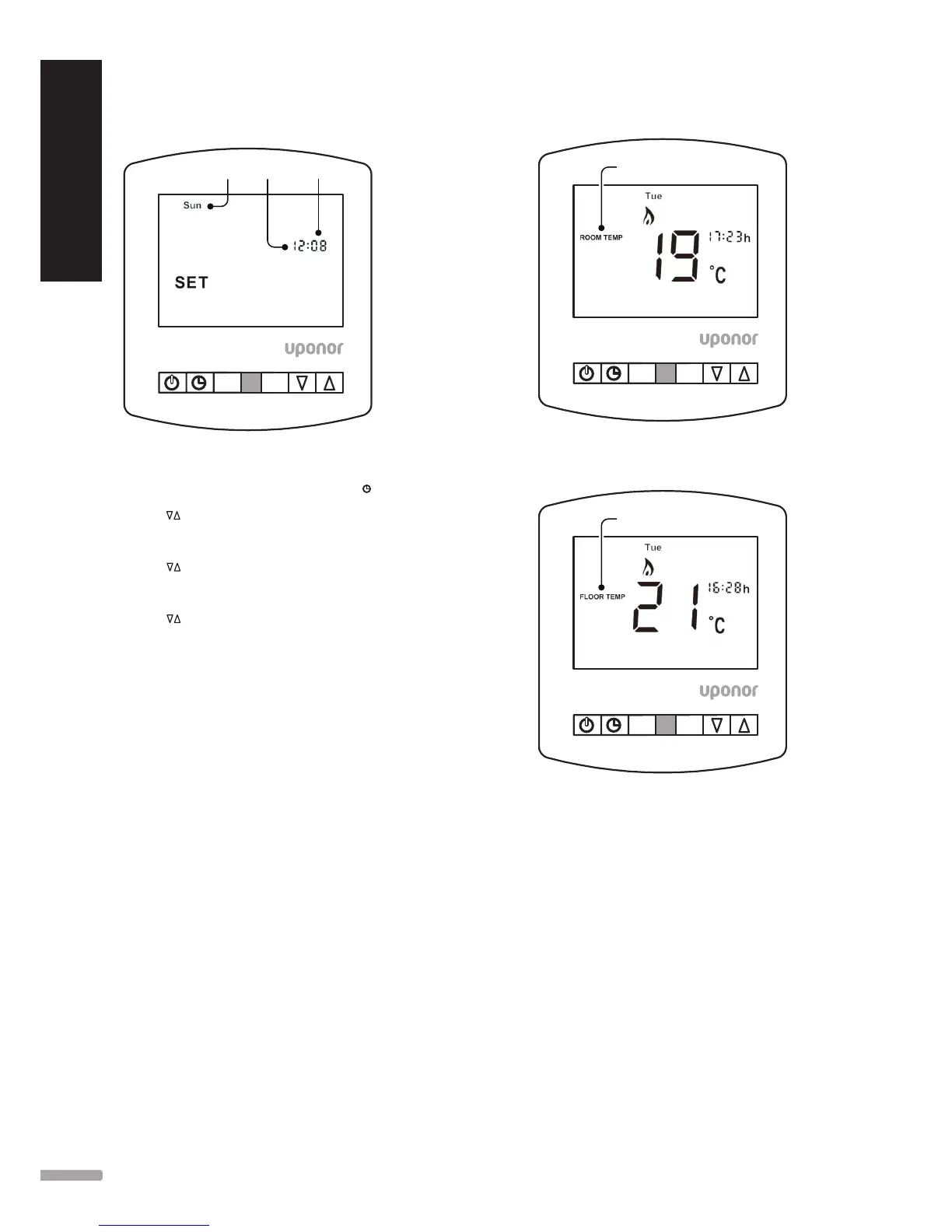
5.3 Set the Clock
HA
Day HoursMinutes
To set the clock, follow these steps.
1. With the thermostat turned ON, press the
twice.
2. Use
to set the hours.
3. Press
H to confirm settings.
4. Use
to set the minutes.
5. Press
H to confirm settings.
6. Use
to set the day of the week.
7. Press
A to confirm settings and return to main
display.
5.4 Temperature Display
This thermostat can show room and floor temperatures,
depending on if is set up to use an air sensor, floor
sensor or both. The display will clearly show which
sensor is being controlled.
When the thermostat is set to use both sensors, the
room temperature will be displayed.
To view the floor temperature, follow this step:
1. Press and hold
A until Floor Temp is displayed on
screen.
Floor temperature will display for 5 seconds.
HA
Floor Temperature
Note: Built in air sensor only MUST NOT be used to
control electric underfloor heating. Floor sensor only or
built in air & floor sensor together must be used.
8




 To Next Page