Page 3SL20
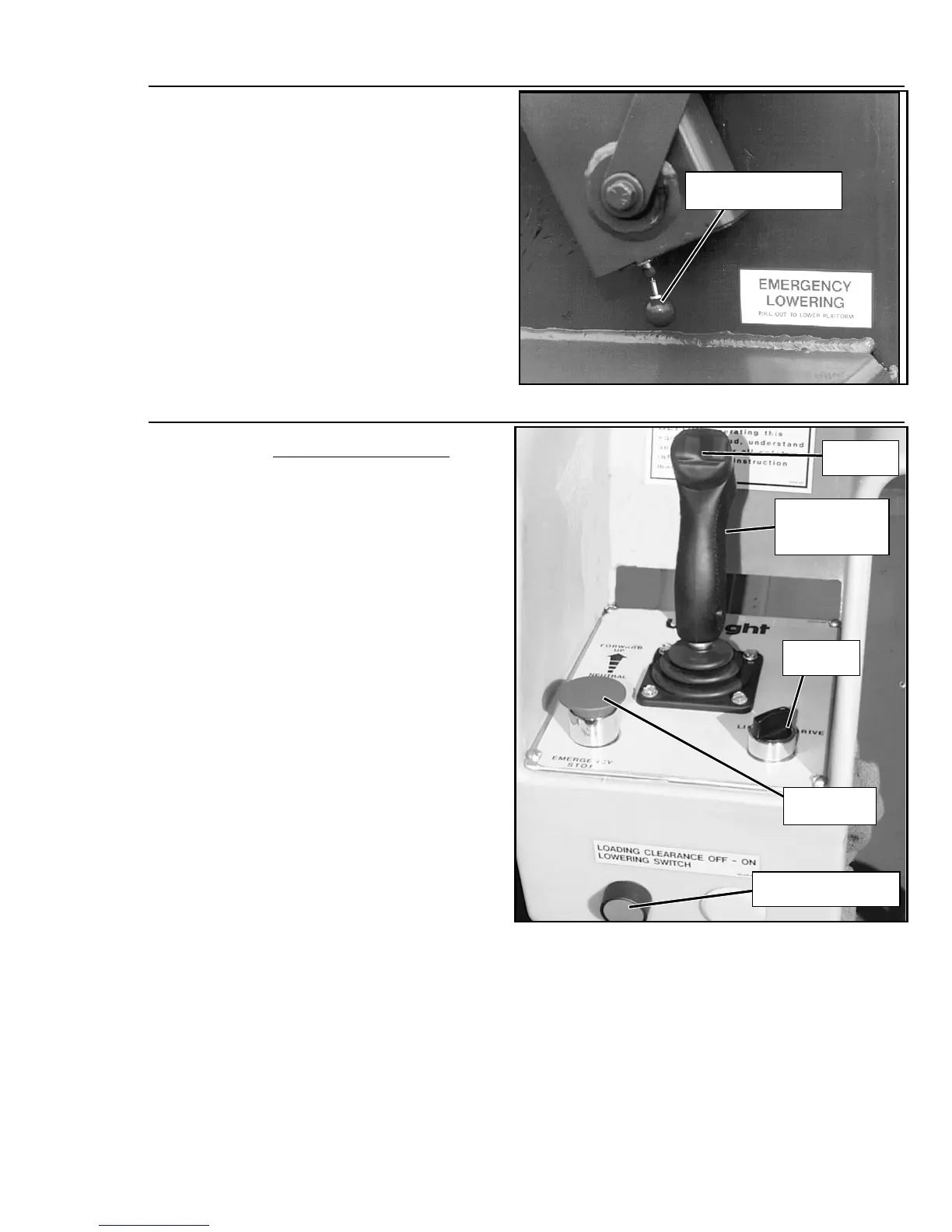
Figure 2:
Emergency Lowering Knob
16. Turn the Chassis Key Switch to
DECK.
17. Close and secure module covers.
18. Check that route is clear of obsta-
cles (persons, obstructions, holes,
drop-offs, bumps, and debris), is
level, and is capable of supporting
the wheel loads.
19. Mount the platform and properly
close the entrance.
Figure 3:
Platform Controls
20. PLATFORM CONTROLS.
Tu r n
theDrive/LiftSwitchtoDRIVE.
While holding in the Interlock
Switch, move the Control Handle
to FORWARD, then REVERSE, to
check for speed control.
21. Push the Steering Switch RIGHT,
then LEFT, to check for steering
control.
22. Turn the Drive/Lift Switch to LIFT.
Grasp the Control Handle,
depress the Interlock Switch and
push it forward to check platform
lift controls. Raise the platform to
full elevation.
23. Pull back on the Control Handle.
The platform should descend and
the audible lowering alarm should
sound.
24. The Platform will descend to the
Loading Clearance Height, then
stop. Check around the base of
the platform to ensure that no one
is in contact with the machine.
25. Press the Loading Clearance Low-
ering Switch and pull back on the
Control Handle to lower platform
completely.
26. Push the Platform Emergency
Stop Switch button to check for
proper operation. All the machine functions should be disabled. Pull out the Platform Emer-
gency Stop Switch to resume.
Emergency Lowering
Knob
Steering
Switch
Drive/Lift
Switch
Emergency
Stop Switch
Loading Clearance
Lowering Switch
Control Handle
with Interlock
Switch


 To Next Page