22
DS4057-001C
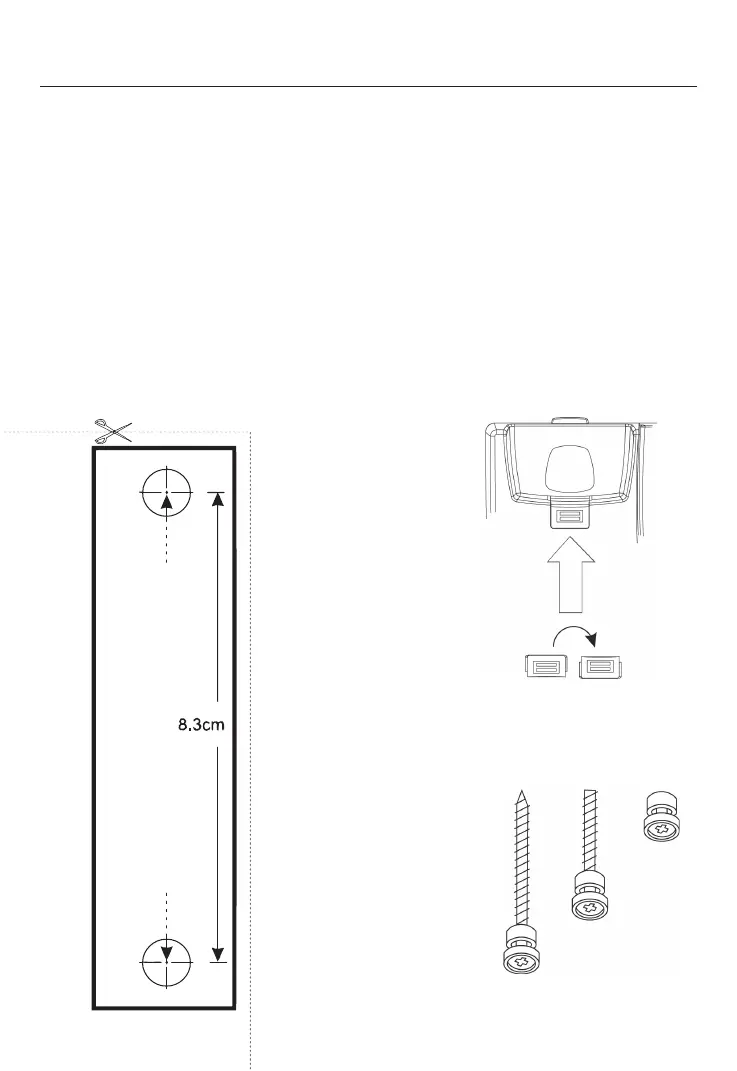
Remove and
rotate 180°
Insert screws
Insert screws
Figure 1
Figure 3
Figure 2
WALL MOUNTING
The phone can be wall mounted if user needed. When wall mounting, user has to change the
position of the handset hook guide & fi x the base unit on the wall, the steps as below.
1. To change the position of handset hook guide.
a. Remove the handset hook guide by sliding upwards.
b. Rotate 180 degrees and reinsert. The handset hook guide will ready for wall mounting.
(Figure 1)
2. Fix the base unit on the wall
a. Choose a location close to telephone wall jack.
b. Draw mark 8.3 cm vertically apart on the wall. (you can use Figure 2)
c. To check the location of mark before drilling to make sure no any wiring or hidden pipes
behind the wall.
d. Drill and then insert screws into the wall and leaving the heads around 2 millimeters out
of the wall, adjusting it if necessary. (Figure 3)
e. Fix the base unit on the wall.




 To Next Page