17
DS4057-001C
INSTALLATION
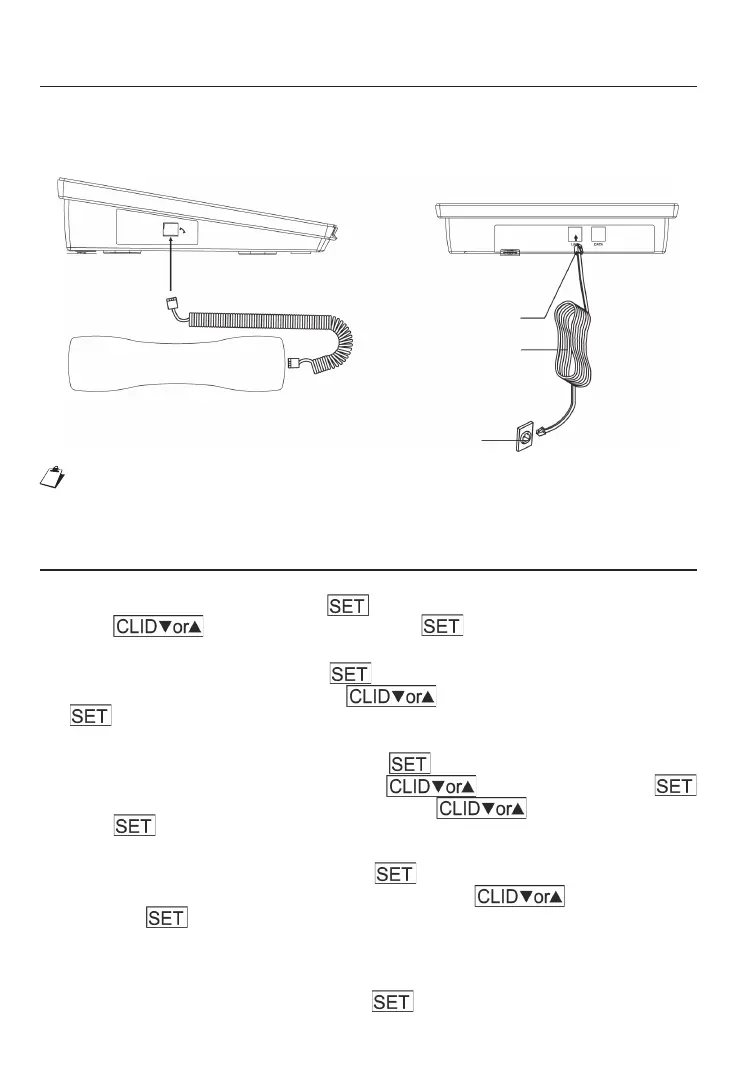
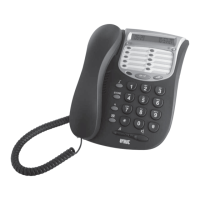
1. Connect one end of handset coil cord into the jack of the handset and connect the other
end into the handset jack of the base unit.
2. Plug one end of phone line into the line cord jack of the base unit and connect the other
end to the wall jack.
Plug into handset Jack
Plug into Wall Jack
Plug into
Telephone Jack
Phone Line Cord
A specifi c fi lter may be needed between the telephone and the telephone socket
when connecting to an ADSL line.
For more information, please contact your telephone company desk.
FUNCTION SETUP
1. Set the Language
In on-hook status, press and hold for 3 seconds to enter LANGUAGE SETUP.
Press to select the language. Press to confi rm.
2. Set the Contrast
After set up the LANGUAGE, press to access SET LCD CONTRAST setup. LCD
display SETTING CONTRAST. Press to select the contrast (1-5). Press
to confi rm.
3. Set Year, Date and Time
After set up the SET LCD CONTRAST, press to access the YEAR, DATE and TIME
setup. The digits of the year will fl ash. Press to select the year.Press
to confi rm. Then digits of the month will fl ash. Press to select the month and
press to confi rm. Use the same method to set up the date and time.
4. Set Local Code
After set up YEAR, DATE and TIME, press to access the SET LOCAL CODE (area
code) setup, and the fi rst of fi ve codes will fl ash. Press to select the digit
and press to confi rm. Use the same method to set up the other codes. If you set
up an area code, eg: 248-1234567, when you receive a telephone number from this area
code 248, Caller ID will show 1234567 only.
5. Set Prefi x Code
After set up the SET LOCAL CODE, press to access the PREFIX setting.




 To Next Page