
 Need help?
Do you have a question about the US Robotics USR5670 and is the answer not in the manual?
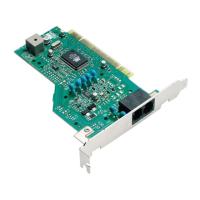
Prepare your computer and physically install the modem into the PCI slot.
Connect the modem to a phone line and install drivers for Windows XP, 2000, Me, 98, 95.
Install modem software, Instant Update, and Internet Call Notification features.
Register your USRobotics modem online for product support and updates.
Instructions to remove modem drivers from Windows XP, 2000, and 95/98/Me.
Steps to physically detach the modem hardware from the computer's PCI slot.
Resolve problems with physical installation, driver recognition, and system detection.
Fix modem performance, software conflicts, and slow connection speeds.
Solutions for modems unable to dial out or answer incoming calls.
Access product information, downloads, and frequently asked questions online.
Get direct assistance from dealers or USRobotics technical support.
 General
| Maximum Download Speed | 56 kbps |
|---|---|
| Maximum Upload Speed | 48 kbps |
| Standards | V.92, V.90, V.34, V.32bis, V.32, V.22bis, V.22, V.21, Bell 212A, Bell 103 |
| Data Transmission Rate | 56 kbps |
| Fax Transmission Rate | 14.4 kbps |
| Error Correction | V.42, MNP 2-4 |
| Data Compression | V.44, V.42bis, MNP5 |
| Dimensions | 4.7 in x 6.1 in x 1.1 in |
| Type | External |
| Compliance Standards | FCC Part 68 |
| Protocols | V.92 |













 To Next Page
