9. Refilling the Steam Cleaner
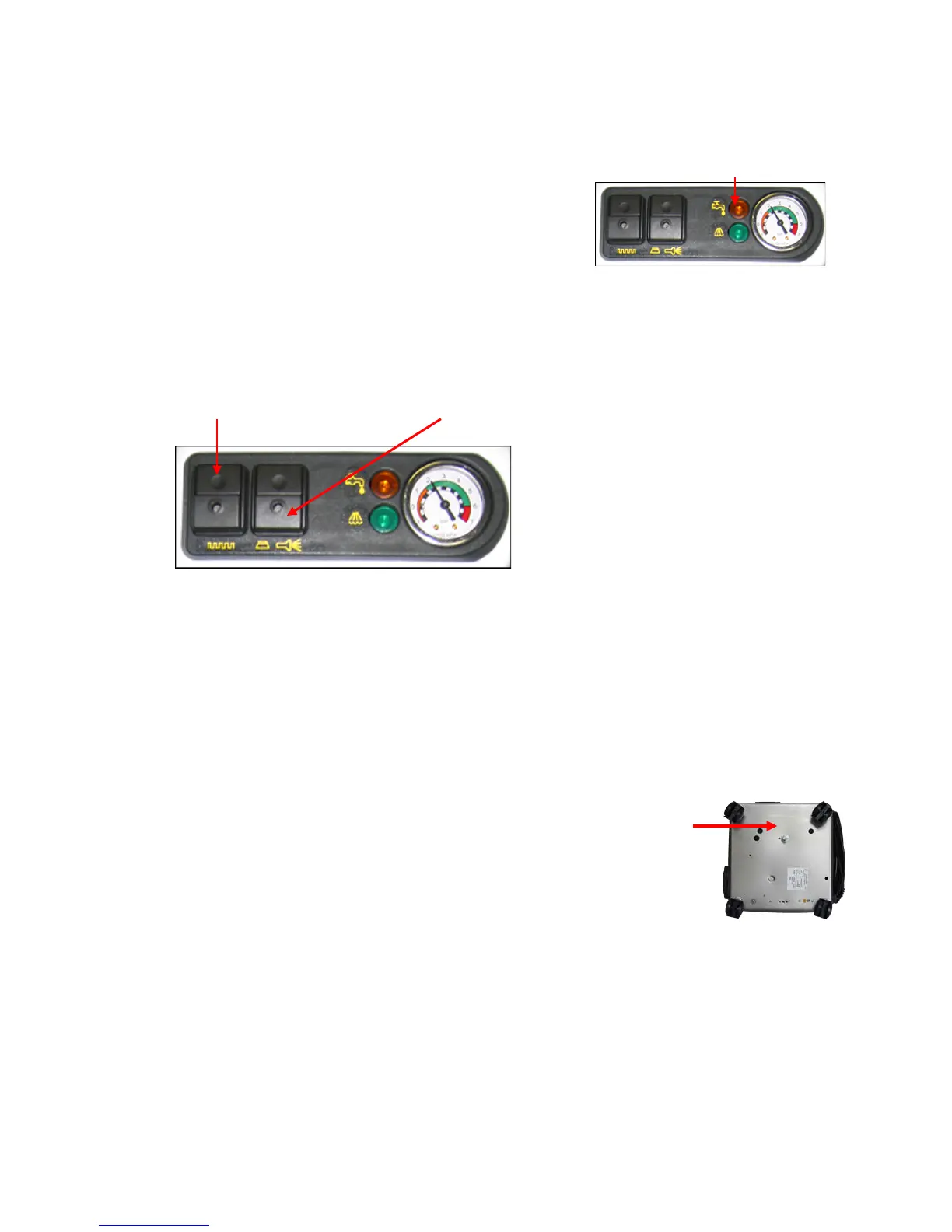
When one of the following happens, your steam cleaner is low on water:
Ø The orange Low Water Indicator Light turns on.
Ø The pressure drops fast (below 2 bars) and pressure
gauge stays low.
Ø Amount of steam is very light and moisture content is low.
How to refill your steamer:
1. Press the power button to the OFF position. The orange light on the button will turn off.
2. Leave Steam Release Button “on”
3. Pull the spray trigger handle until pressure gauge reads ”0” (zero).
Push Turn Power to Off Leave “Steam Release” in the “On” Position
4. WARNING - DO NOT ATTEMPT TO ADD WATER WHILE THE BOILER TANK IS STILL
HOT. LET THE STEAM BOILER COOL AT LEAST 15 MINUTES BEFORE ADDING
WATER.
5. Cover the safety cap with a towel, press down on cap and turn cap very slowly counter-
clockwise. You may hear some steam escaping. Keep the towel over the cap. Remove the
safety cap.
6. Replace safety cap and hand tighten the cap turning clockwise. Plug the steam cleaner in and
press the On/Of (the orange light on the button should illuminate).
Cleaning and Accessory Maintenance
TANK CLEAN TO REMOVE MINERAL DEPOSITS (Do once a month)
1. When the steam cleaner is cold and unplugged, use a13MM wrench and
remove the drain plug, allowing water to drain from the system.
2. Mix 3 cups of vinegar and 3 cups of water together and pour into the steam
cleaner tank.
3. Leave safety cap off and turn on steamer by pushing the power button and
let the steamer heat for 5 minutes.
4. Turn the power button off and let vinegar and water mixture sit in the steamer for 15 minutes.
Remove drain plug allowing mixture to drain from the steamer.
5. Add clean water and drain again.
6. Steamer is now ready for cleaning.
NEVER ADD CHEMICALS INTO THE TANK! Adding any form of chemicals or fragrance to the tank
will void the warranty and could result in malfunction or damage to the system.


 To Next Page