
 To Next Page
S
Sarah WardSep 18, 2025
How to test USAutomatic PATRIOT Gate Opener battery?
- GGeorge WillisSep 18, 2025
It is highly recommended that the battery be load tested at a battery store to verify that it is good.

How to test USAutomatic PATRIOT Gate Opener battery?
It is highly recommended that the battery be load tested at a battery store to verify that it is good.
Why is my USAutomatic PATRIOT Gate Opener opening and closing so slowly?
Determine which situation your operator falls into. If accessories are connected, verify that the current draw needed to power them does not exceed the charging power of the solar panel. If none of the above check bad, then remove the battery and have it load tested at a battery shop. Replace if bad.
Why does my USAutomatic PATRIOT reverse direction immediately after opening or closing?
Identify the limit switch which is out of adjustment and adjust it so that the gate stops earlier.
Why does my USAutomatic PATRIOT Gate Opener start to move, then stop and reverse?
The sensitivity adjustment potentiometer needs to be turned in a clockwise direction to increase force.
What to do if the emergency release knob on my USAutomatic PATRIOT Gate Opener is stuck?
Try pulling the emergency release knob while agitating the gate (shake gate in direction of travel). If the gate still won’t roll, check the gate wheels and guide rollers. Verify the chain is on all the rollers and not twisted or overly tight.
Why is my USAutomatic Gate Opener not closing automatically?
The gate will only automatically close if the 'retract limit' for right hand installation or 'extend limit' for left hand installation is ON. Verify that DS1 switch 1 is on. If both DS1 switch 3 or 4 are on, turn off the one that is not being used and recheck gate operation.
What to do if my USAutomatic PATRIOT Gate Opener won't work with monitored entrapment devices?
If monitored entrapment devices are installed, first verify that dip switch DS2 switch 4 (contact edge monitor) is ON. Activate the contact edge by depressing it and verify the D5 LED is ON or the voltage drops to 0 Vdc. If the reading is 5 Vdc, check the wire connections from the contact edge. If wire connections are correct, disconnect the contact edge wires from the J2 connector. If D11 does not turn OFF when the beam is broken, the photo eye is likely bad.
Why does the USAutomatic PATRIOT's fuse blow when I try to open or close it?
Fuses blow primarily when something keeps the gate from moving. Check for obstructions or mechanical issues preventing free movement.
How to fix USAutomatic PATRIOT inconsistent stop positions?
To fix inconsistent stop positions on your USAutomatic Gate Opener, remove the five 5/16 bolts from the back of the actuator to expose the limit assembly. Loosen the 4 screws holding the limit assembly in place. Gently push the limit assembly over, reducing the spacing between the small white gear and the blue gear. While holding the limit assembly in place, tighten the 4 screws. Reinstall the rear housing and adjust the retract and extend limits to your desired stop positions.
How do I check if the USAutomatic PATRIOT charge system is working?
To verify that the USAutomatic Gate Opener charge system is operating correctly, disconnect the black lead from the battery. Set your multimeter to read DC current. Connect the red meter lead to the black wire from the charger and the black meter lead to the negative battery post. If the charger shows External power or Solar power and detection after 5 seconds, the fuse in the meter is blown. For solar, expect a reading of about 250 milliamps when the solar panel is in full sun, with no shading. For AC, expect about 500 milliamps up to 2 amps, depending on the battery condition.
Details UL325 gate classes, solar compatibility, and battery requirements for operation.
Lists approved external devices (Type B1/B2) and defines device types for safety compliance.
Illustrates and describes key entrapment zones (A, B, C, D) requiring protection.
Provides critical warnings and instructions for safe gate operator installation and use.
Details safety precautions for installing Type B1 Photo Eyes, Type B2 Contact Edges, and Type D devices.
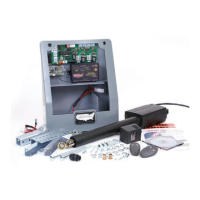
Lists all included operator parts, radio control components, and optional accessories.
Details various brackets, fasteners, and hardware required for mounting the gate operator.
Specifies gate size limits and emphasizes the importance of proper gate design for automatic systems.
Guides on evaluating the installation site for space, access, and potential issues before mounting.
Explains how to choose between "Pull to Open" and "Push to Open" installation configurations.
Provides guidance on selecting the optimal horizontal position for actuator mounting brackets on the gate.
Illustrates various methods for mounting actuator brackets for "Pull to Open" gate installations.
Illustrates various methods for mounting actuator brackets for "Push to Open" gate installations.
Details methods for mounting actuator brackets when gates are installed with columns.
Guides on correctly mounting the actuator support bracket in alignment with gate frame members.
Instructs on cutting and welding the actuator mounting tube for proper gate opening angles.
Details attaching the linear actuator to the bracket and installing the gate bracket onto the actuator.
Provides steps for determining and installing the gate bracket onto the gate itself.
Guides on securely mounting the control box, including its dimensions and mounting considerations.
Details how to remove and mount the Patriot control board onto the nylon standoffs within the control box.
Covers installing receiver, charge controller, siren, and routing the linear actuator cable.
Explains how to cut and splice actuator cables for dual gate systems or when using extension cables.
Details the installation of various monitored entrapment protection devices like photo eyes and contact edges.
Guides on connecting the recommended 12-volt battery to the charge controller harness.
Covers the installation of the smart charger/controller, powered by AC transformer or solar panel.
Details the setup and considerations for gate operators powered by a solar panel.
Covers connecting power sources, installing safety signs, and connecting actuator cables.
Explains how to align the photo eyes after power is applied to ensure proper operation.
Provides a checklist and steps for verifying correct gate operation after installation.
Explains how to set up the soft stop feature and activate the gate delay for dual gates.
Guides on adjusting the actuator's limit switches for precise gate open and close positions.
Covers adjusting sensitivity dials and understanding the entrapment alarm function.
Outlines tests to verify the proper function of the gate operator's built-in entrapment protection system.
Details how to test the operation of monitored Type B1 photo eyes for entrapment protection.
Details how to test the operation of monitored Type B2 contact edges for entrapment protection.
Details how to test the operation of Type D constant pressure devices for entrapment protection.
Describes the Patriot control board layout, including DIP switch functions and terminal connections.
Provides step-by-step instructions for programming transmitters to work with the gate operator receiver.
Explains keypad terminology, master password, access codes, and basic programming procedures.
Covers changing the master password, resetting to factory default, and deleting access codes.
Details how to program the receiver for a "Hold Gate Open" function using relay P2.
Outlines routine maintenance checks and the procedure for emergency manual gate release.
Describes gate locks (electric/magnetic) and the driveway exit sensor for enhanced functionality.
Details compatibility and programming for garage door receivers and wireless push-to-operate buttons.
Lists various accessories including specialized receivers, extension cables, entrapment modules, and timers.
Identifies key components on the Patriot control board, including LEDs, buttons, and connectors, for troubleshooting.
Covers initial checks and troubleshooting for single gate operation problems.
Addresses troubleshooting for dual gate systems and gates with monitored entrapment devices.
Provides specific steps to troubleshoot photo eye monitoring for both open and closed directions.
Diagnoses causes for slow gate movement, likely related to battery condition or accessory load.
Troubleshoots issues preventing the gate from automatically closing after opening.
Addresses gate behavior where it stops and reverses unexpectedly, often due to limit switch problems.
Troubleshoots dual gate reversal and blown control board fuses, indicating movement or wiring problems.
Addresses blown wiring harness fuses and problems with the transmitter not operating the gate.
Covers issues related to photo-eyes affecting gate closing and problems caused by the reset button.
Troubleshoots gate closing failures with transmitters and gate operation linked to the LED indicator.
Addresses issues with charger power lights and inconsistent gate open/close stop positions.
Diagnoses battery charging problems and verifies the overall charge system's functionality.
Guides on adjusting the actuator's limit assembly to correct inconsistent gate stop positions.
Details the installation and wiring of photo eyes for vehicular protection and entrapment prevention.
Provides instructions for installing non-monitored photo eyes for vehicular protection.
Explains how to extend AC or solar power source cables using appropriate wire gauges and junction boxes.
Explains the meaning of the LED indicators on the charge controller for diagnosing system status.
Lists possible solutions for common charge controller errors and failure modes.
Outlines the product warranty period, coverage, exclusions, and contact information for service.
 General
| Gate Type | Swing |
|---|---|
| Operating Voltage | 12V DC |
| Power Source | AC or Solar |
| Max Gate Length | 20 ft |
| Battery | 12V |
| Power Supply | AC Transformer or Solar Panel |
| Motor Type | DC |
| Remote Control | Included |
| Safety Features | Obstacle Detection |
| Warranty | 5 Years |