USR-G781 User Manual Technical Support: h.usriot.com
Jinan USR IOT Technology Limited www.usriot.com
There are two ways to configure USR-G781. They are Web Server configuration and AT command. Web Server
configuration mainly configure router functions and AT commands mainly configure DTU functions. We also
provide the setup software based on serial AT command. You can download the setup software in our website
http://www.usriot.com/usr-g781-setup-software-v1-0-0-0/.
3.1. Web Server Configuration
User can connect PC to G781 through LAN interface and set PC as DHCP. Then enter Web Server to configure.
Web Server default parameters as follows:
Figure 40 Web Server default parameters
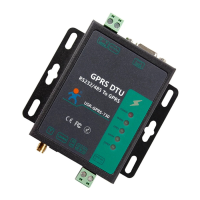
After connecting PC to G781, user can open browser and enter 192.168.1.1 into address bar, then log in user
name and password, user will enter into Web Server. Web Server screenshot as follow:
Figure 41 Web Server configuration



 To Next Page