USR-G781 User Manual Technical Support: h.usriot.com
Jinan USR IOT Technology Limited www.usriot.com
In transparent mode, SMS mode and HTTPD mode, you can enter AT command mode. Then you can send AT
command to module. Setup software is based on this function. For entering AT command mode, please refer to
this FAQ: http://www.usriot.com/enter-serial-command-mode/.
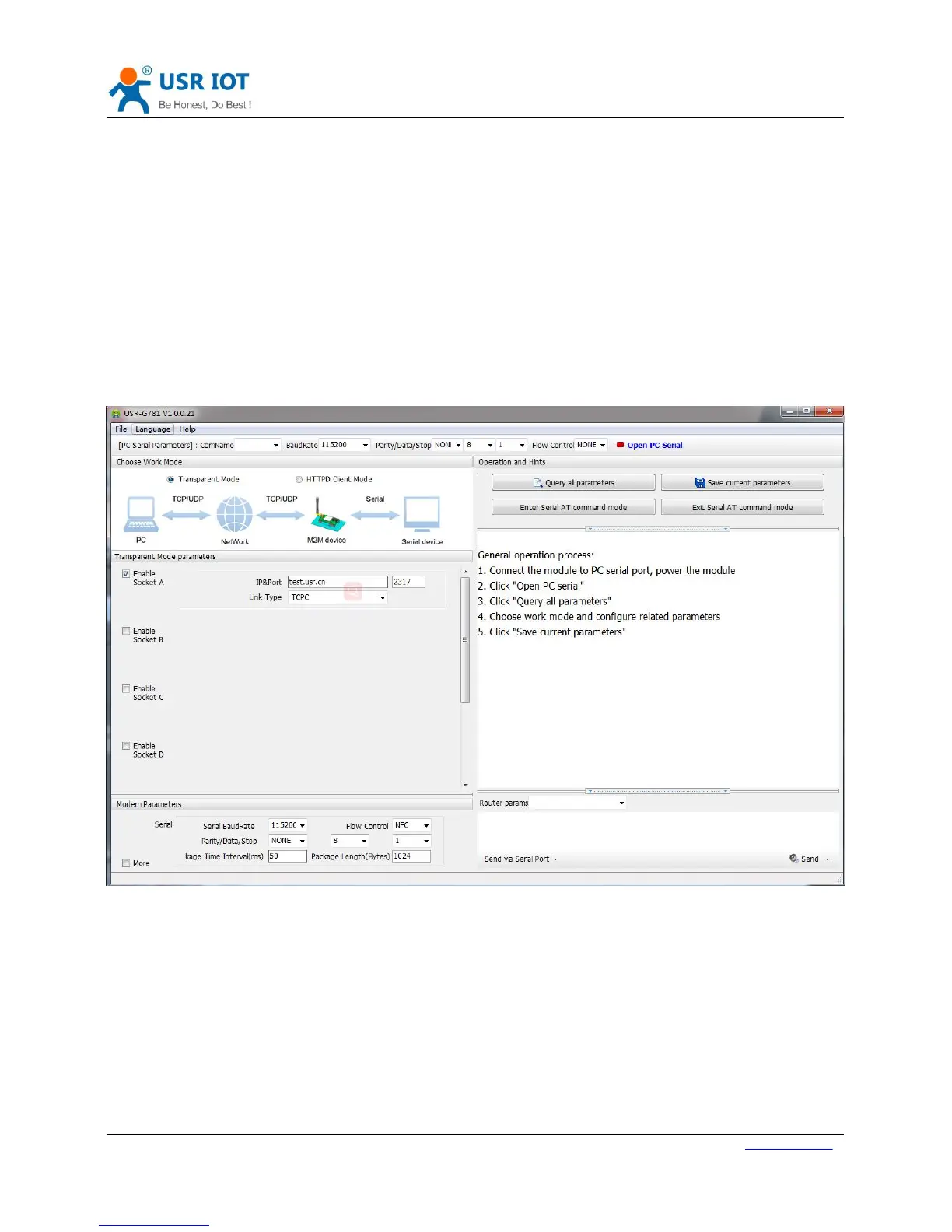
We also provide the setup software based on serial AT command. You can download the setup software in our
website http://www.usriot.com/usr-g781-setup-software-v1-0-0-0/. Software screenshot as follow:
Figure 42 Setup software
3.2.3.Transparent AT Command
When module in transparent mode, you can use “Password+AT command” format to send AT command via serial
or network. If you use transparent AT command, you needn’t enter AT command mode.
Default command password is www.usr.cn# and user can send AT command AT+CMDPW to change password.
Take querying firmware version with default password as an example, user need send www.usr.cn#AT+VER[0D]
([0D] represents carriage return and user must end the whole command with carriage return. It’s same as serial
AT command.).



 To Next Page