Home
USX-MOUNT
TV Mount
XML019-01
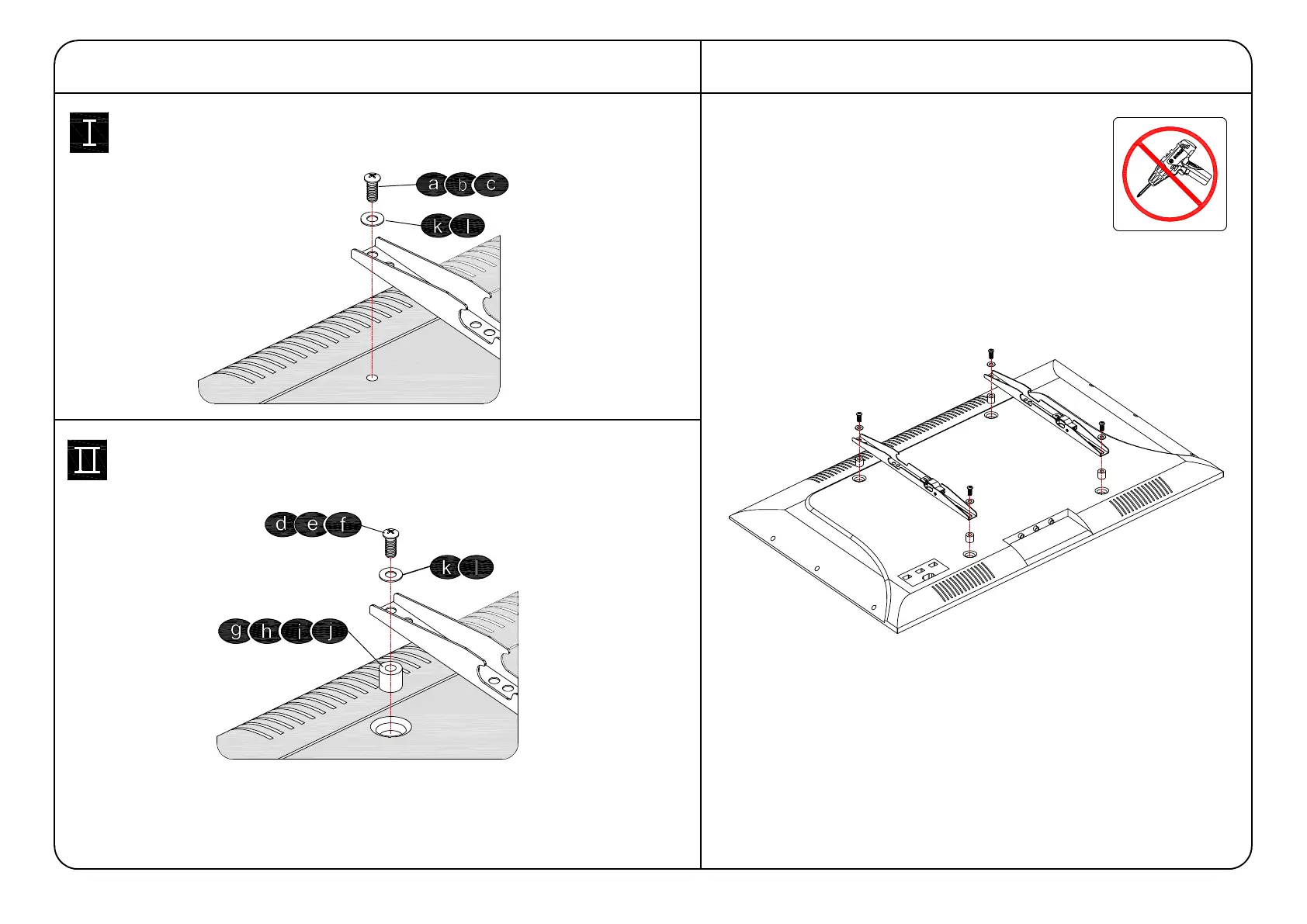
Page 8 (Use Spacers if Needed)
USX-MOUNT XML019-01 - Use Spacers if Needed; Attach the TV Plate
18 pages
Manual
Save Page as PDF
To Next Page
To Next Page
To Previous Page
To Previous Page
Loading...
Tips: If you
need to combin
e M6
/M8(c/e/f) scre
ws with
2.5mm space
rs( i ), you have to remove the inner c
irc
le.
Yes, choose suitable
screws, was
hers and spa
cer
s.
1-4
Attach the T
V Plate
No!
No, choose suitable scr
ews and was
her
s.
1-3 Need Space
r?
8
7
9
Table of Contents
Main Page
Before Getting Started
2
Dimensions
3
Tv Interface
3
Wall Plate
3
Fully Assembled Mount
3
Parts and Hardware
4
Attach Brackets to TV
6
Select TV Screws
6
Figure out the Suitable Position of Brackets
7
Low Mounting Holes
7
High Mounting Holes
7
Attach the TV Plate
8
Attach Wall Plate to Wall Wood Stud Option
9
Attach Wall Plate to Solid Concrete Wall
11
Extension Arms and End Support Assembly
13
Wall Plate Installation Integrity Test
14
Hang and Secure TV to Wall Plate
15
Adjustments
16
TV Leveling Adjustment
16
Tilting Angle Adjustment
17
Cables Manage
18
Related product manuals
USX-MOUNT XML019
18 pages
USX-MOUNT XML008-K
18 pages
USX-MOUNT XML032-K
18 pages
USX-MOUNT XML008-K-1
18 pages
USX-MOUNT XML008-K-09
18 pages
USX-MOUNT XML008-1K-01
18 pages
USX-MOUNT XTM009
16 pages
USX-MOUNT WMM008-01
18 pages
USX-MOUNT WML016-01
8 pages


 To Next Page