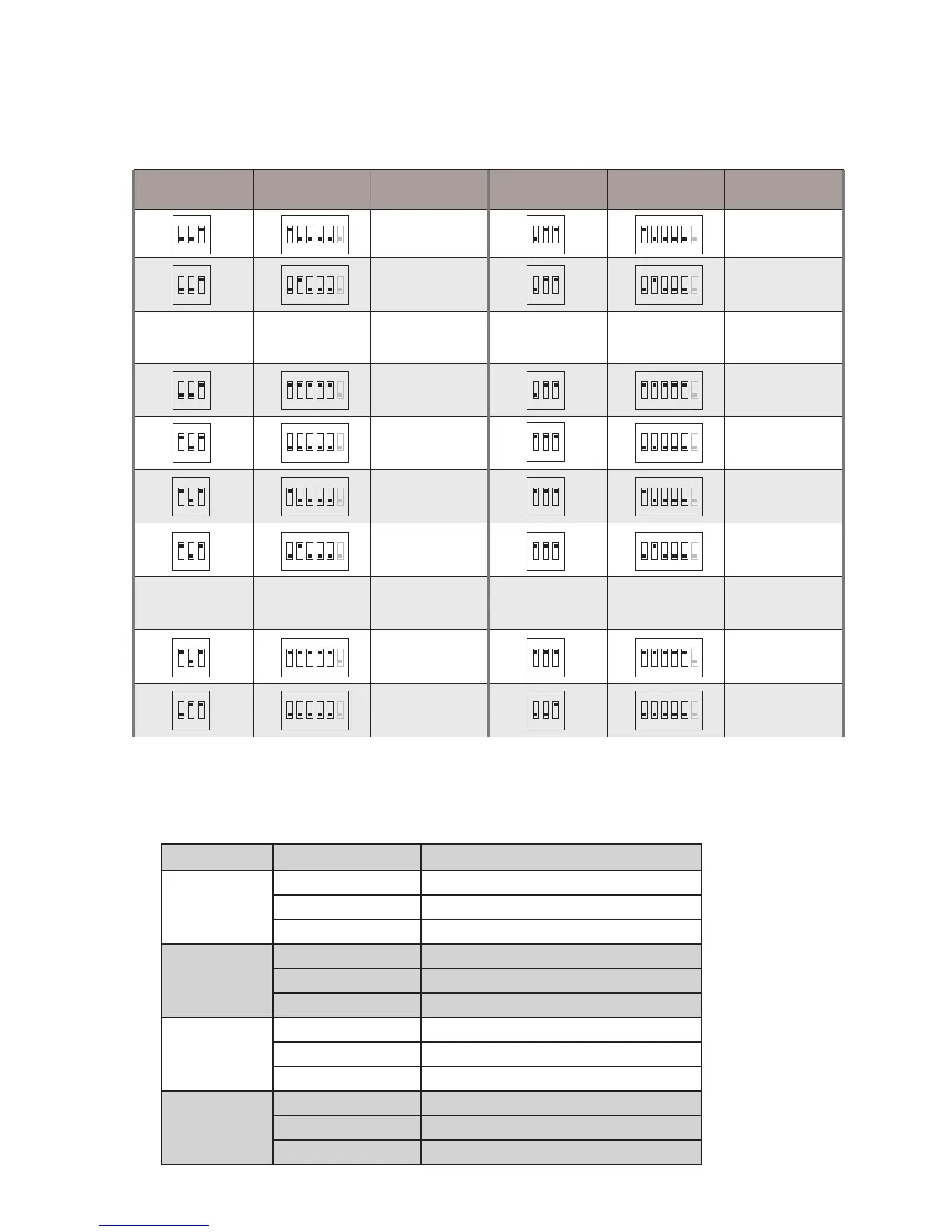
5.3 Ring Tone Setting
1). There are four groups ring tones to choose for you:
5.2.2 When Bit-3 of DIP2 set to ON, the Bit-1~2 of DIP2 and Bit-1~5 of DIP1 are
used to extended address setting:
1 2 3 4 5 6
ON
Code=33
1 2 3
ON
DIP2 state DIP1 state User Code
1 2 3 4 5 6
ON
Code=1
1 2 3
ON
1 2 3 4 5 6
ON
Code=2
1 2 3
ON
.........
1 2 3 4 5 6
ON
Code=31
1 2 3
ON
1 2 3 4 5 6
ON
Code=32
1 2 3
ON
1 2 3 4 5 6
ON
Code=34
1 2 3
ON
.........
1 2 3 4 5 6
ON
Code=63
1 2 3
ON
1 2 3 4 5 6
ON
Code=64
1 2 3
ON
.........
.........
1 2 3 4 5 6
ON
Code=65
1 2 3
ON
1 2 3 4 5 6
ON
Code=66
1 2 3
ON
1 2 3 4 5 6
ON
Code=95
1 2 3
ON
1 2 3 4 5 6
ON
Code=96
1 2 3
ON
1 2 3 4 5 6
ON
Code=97
1 2 3
ON
1 2 3 4 5 6
ON
Code=98
1 2 3
ON
1 2 3
ON
1 2 3 4 5 6
ON
Code=127
1 2 3
ON
1 2 3 4 5 6
ON
Code=128
DIP2 state DIP1 state User Code
Group name Items
Songs
Group1
Door Station DINGDONG
Intercom Call TELEPHONE_RING
Door Bell DINGDONG
Group2
Door Station JINGLE_DELL
Intercom Call CARMAN
Door Bell FOR_ALICE
Group3
Door Station HAPPY_BIRTHDAY
Intercom Call SONATINE
Door Bell CONGRATULATE
Group4
Door Station DOREME
Intercom Call RHYTHM_OF_THE
Door Bell EDELWEISS



 To Next Page