ENGLISH
- 48 -
12 - DETECTION OF OBSTACLES
(AMPEROMETRIC SENSOR / SAFETY
RIBBONS)
Thepresenceofanobstaclethatpreventsthemovementofthe
gatecanbedetectedinseveralways:
1. Amperometricsensor
2. Safetyribbons
m Following detection of an obstacle during closure,
the gate reopens and the behaviour of the power centre
depends on various parameters, with the following priority:
1. Iftheclockmodeisactive(
MODE
=
OROL
),countingofthe
pausetimeforautomaticclosureisactivated.
2. Ifthegateisclosedwithoutwithdrawing,orifclosureafterthe
obstacleismanual(
CH.OS
=
MAN
),countingofthepause
timeforautomaticclosureisNOTactivatedandthegatewill
startmovingagainafterthenextstart-upcommandisgiven
3. Ifclosureaftertheobstacleisautomatic(
CH.OS
=
AUTO
),
thecentrewillbehaveaccordingtothesettingsofthe
CH.AU
parameter
12.1 - AMPEROMETRIC SENSOR
Anunexpectedincreaseintheconsumptionofcurrentbythe
motorismeantastheresultofthepresenceofanobstacle.
Thisfeatureisautomaticandrequiresnosettings.
12.2 - SAFETY RIBBONS
Theunitdetectsthepresenceofanobstaclewhenasafetyribbon
ispressed.
Theunithastwoinputsfortheribbons,whichcanbe
independentlyenabledandassociatedwithdifferenttypesof
function.
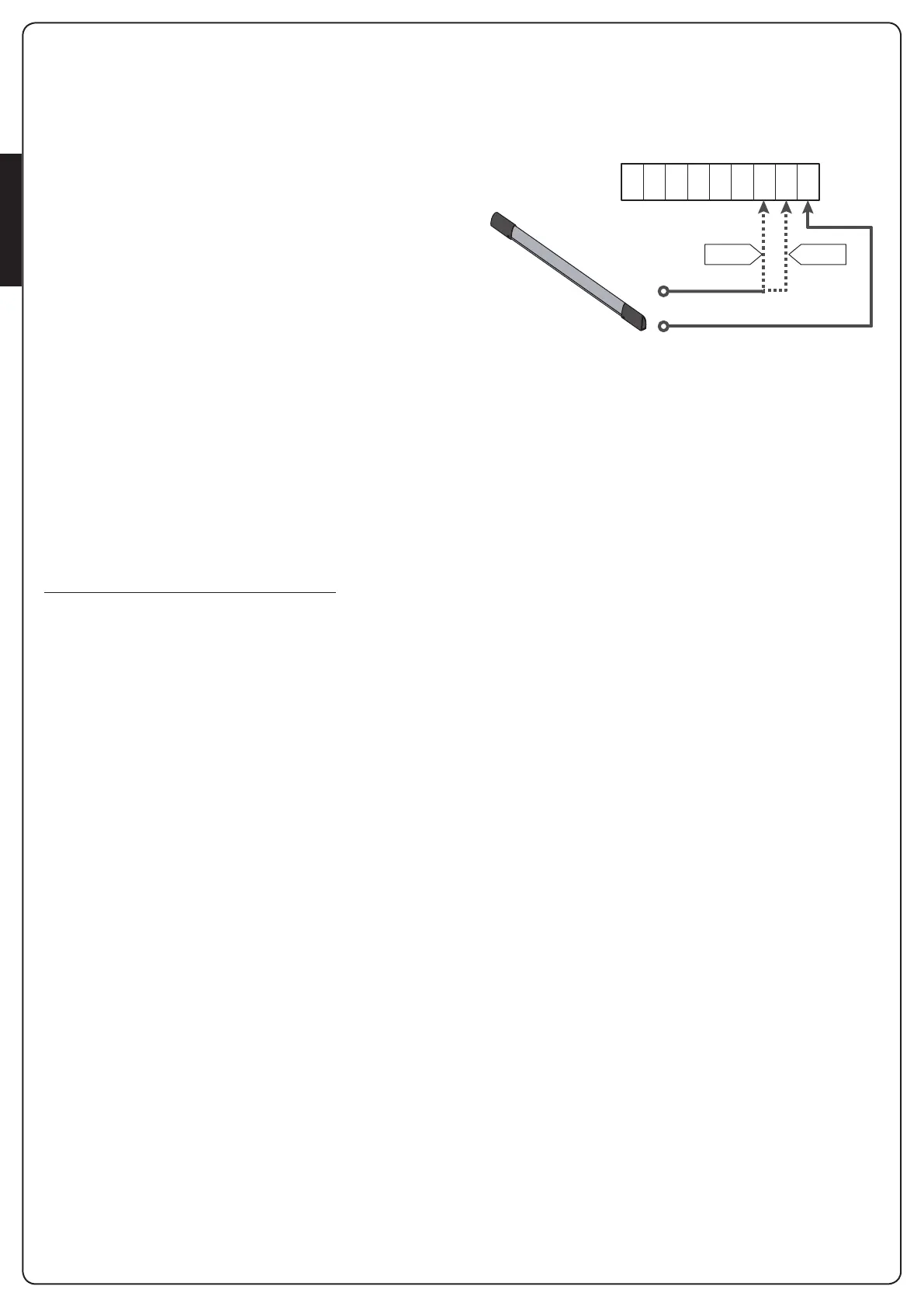
Connecttheactiveribbonsduringopeningbetweentheterminals
S7andS9.
Enabletheoperationoftheribbonsthroughtheparameter
COS1
:
• Ifyouset
AP
theoperationoftheribbonisdetectedonly
duringopeningandthegatereversesthemovementfor2.5
seconds
• Ifyouset
APCH
theoperationofribbonisdetectedduring
theopeningandclosing:whenopeningthegatereversesthe
movementfor2.5seconds,whilewhenclosingthegateis
stopped
ConnecttheactiveribbonswhenclosingbetweenterminalsS8
andS9.
EnabletheoperationoftheribbonsthroughtheparameterCOS2:
• Ifyouset
CH
theoperationoftheribbonisdetectedonly
duringclosingandthegatereversesthemovementfor2.5
seconds
• Ifyouset
APCH
theoperationoftheribbonisdetected
duringclosingandopening:whenclosingthegatereversesthe
movementfor2.5seconds,whilewhenopeningthegateis
stopped
m WARNING:
• IfyoudonotconnectanyribbontotheterminalS7,the
parameter
COS1
mustbesetto
NO
.
• IfyoudonotconnectanyribbontotheterminalS8,the
parameter
COS2
mustbesetto
NO
.
S1 S2 S3 S4 S5 S6 S7 S8 S9
COS1 COS2
COS1
parametera DEFAULT =
NO
(nofunction)
COS2
parametera DEFAULT =
NO
(nofunction)
Theunitcanoperatewithdifferenttypesofribbons;depending
onthetypeofribbonuseditisrequiredtocorrectlysetthe
parameter
CO.TE
NOTE:Youcannotusedifferenttypesofribbonsontwo
COS1
and
COS2
inputs.
a. Mechanical ribbons with normally closed contact
Settheparameter
CO.TE
withthevalue
NO
:nottestisrun
beforethemovements.
b. Optical ribbons
Settheparameter
CO.TE
withthevalue
FOTO
:beforeany
movementafunctionaltestsimilartothatofphotocellsis
carriedout.Ifyoudonotwantthetesttoberun,set
NO
.
Connectthepowersupplyoftheopticalribbonsfollowingthe
instructionsdescribedinchapter11.1
c. Ribbon with resistive rubber
Settheparameter
CO.TE
withthevalue
RESI
:theunitis
expectedtomeasureanimpedanceequalto8.2kohms,and
analarmistriggeredifalowerimpedance(pressedribbon)ora
higherimpedance(interruptedwire)aredetected,thereforeit
isnotnecessarytorunthetestbeforethemovements.
m WARNING: If you connect multiple ribbons to the
same terminal, the connection must be made in series,
except in the case of resistive ribbons which which must be
connected in parallel.


 To Next Page