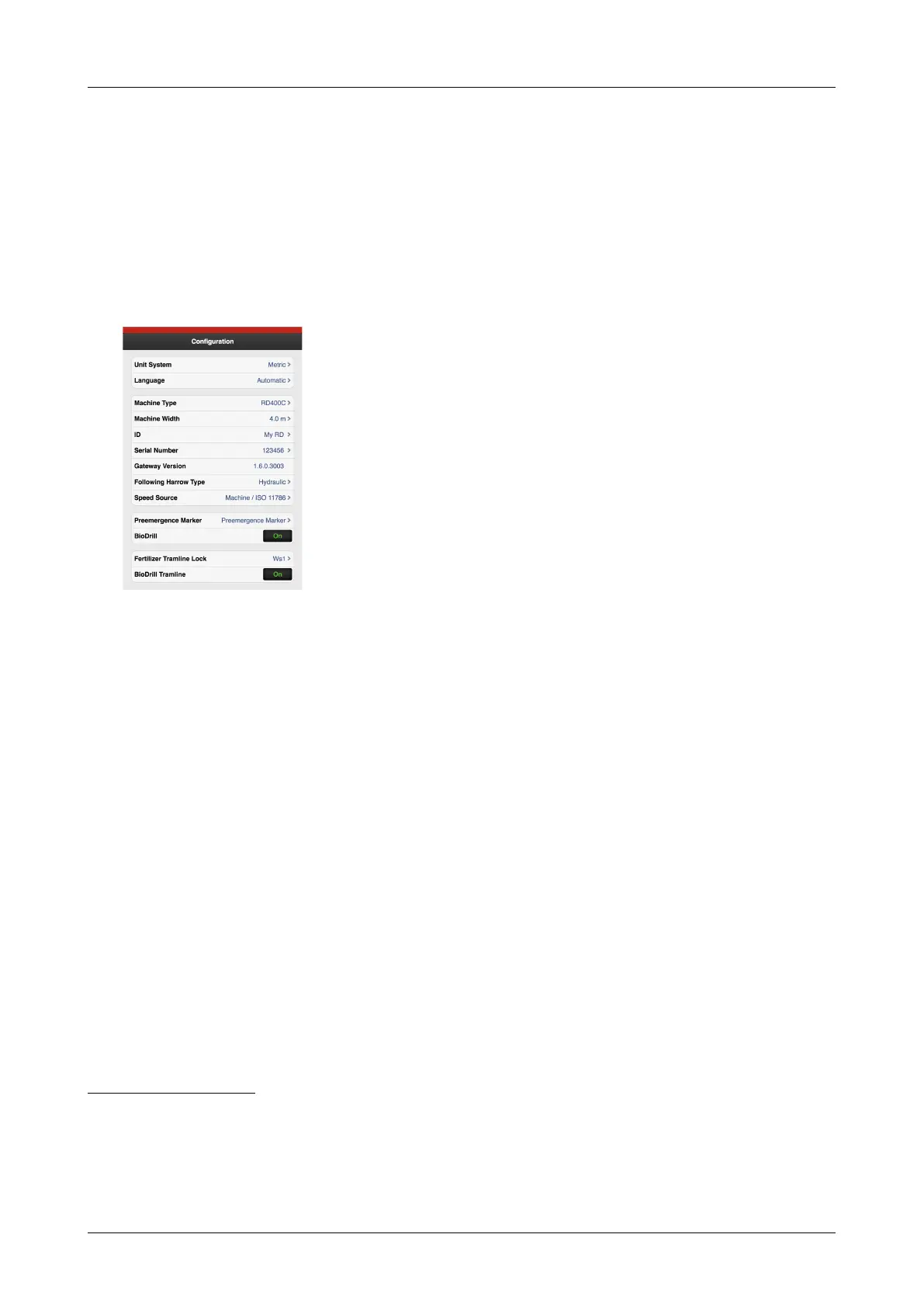
Configuration
8 Configuration
The seed drill always has basic factory configuration
settings with the correct machine type, size, etc. When the
Gateway device that contains the machine’s memory is
replaced, a new basic configuration must be made. In the
following screen, certain settings are made, such as the
equipment mounted on the machine.
Changes in this menu must not be made unless the
machine is modified.
Figure 8.1
A. Unit of measurement, select metric or imperial.
B. Language setting. Language settings are normally
selected in the menu for the control device.
2
. If the
desired language is not present in the control device,
the language can be selected in this menu
3
C. Specify machine type (see name plate).
D. Specify machine width (see name plate).
E. It is possible to enter user-specific information, e.g.
your name.
F. Record the machine’s serial number here.
G. Gateway software version.
H. Following harrow. Hydraulic or mechanical.
I. Speed source
• Radar on the machine or via ISO11786 connector.
• Ground speed (No Slip) via ISO11783 connector.
4
• Wheel-based speed (Slip) via ISO11783 connector.
56
J. Pre-emergence bout marker.
• OFF
• Pre-emergence bout marker (accessory)
• Side bout marker – Side bout marker as pre-
emergence bout marker. When selected, the side
bout marker will make a track in the centre of the
previous bout when tramlining is performed for
this bout
K. BioDrill (option).
• ON means that the machine has BioDrill.
• OFF means that the machine does not have
BioDrill.
If you do not want to use BioDrill, enter 0 in sown
amount in the calibration menu or press I in “Figure
5.2 Work display iPad“.
L. Tramlining lock fertiliser.
• WS1
• WS2
M. BioDrill tramlining.
• ON
• OFF
24 903099-en-gb; 19.01.2021
2. Please read the user guide for the control device to find out how to select the language settings.
3. Väderstad reserves the right to decide which languages will be available.
4. Note that when selecting a speed from ISO11783, it is a requirement that the tractor’s terminal is able to support the selected
speed source.
5. Note that when selecting a speed from ISO11783, it is a requirement that the tractor’s terminal is able to support the selected
speed source.
6. Note that wheel-based speed can lead to reduced accuracy, depending on the amount of slippage that the tractor experiences
when drilling.



 To Next Page