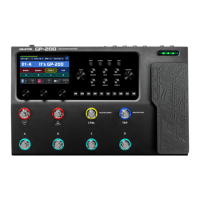
Panel Introduction
3
1. LCD Display
4.3" colour LCD shows GP-200LT's patch numbers,
patch names, and other operation information.
2. MASTER Knob
Turn to control GP-200LT's 1/4″ jacks output volume.
3. PHONES Knob
Turn to control headphones output volume.
4. PARA Knob (with enter button)
Turn to select menus and adjust parameters.
5. Module Buttons
Press to enter the Edit Settings menu of module,
hold for module on/o.
6. BACK Button
Press to return to the previous, hold to return to the
main display screen.
7. GLOBAL Button
Press to enter the Global Setting menu, where you
can edit the global parameters of the GP-200LT.
8. DRUM Button
Press to play the drum. Hold to enter the Drum
Machine Edit menu, where you can edit the drum
parameters (style, BPM, volume).
9. SAVE Button
Whenever a patch is modified, the main display will
show a symbol to indicate that the parameter has
been changed. Use SAVE button to store, rename, or
copy the patch. Press SAVE button again to store the
changed parameter.
10. Quick Access Knobs
Turn to adjust parameters on the lower part of the
screen. Each knob will vary in function according to
the parameter on the display.
11. 4 Footswitches
Use to change patches, turn on/o eects, set tap
tempo, bypass device, etc.



 To Next Page
 Loading...