26
USING THE UNIT
SETTINGS
FILTER SETTINGS
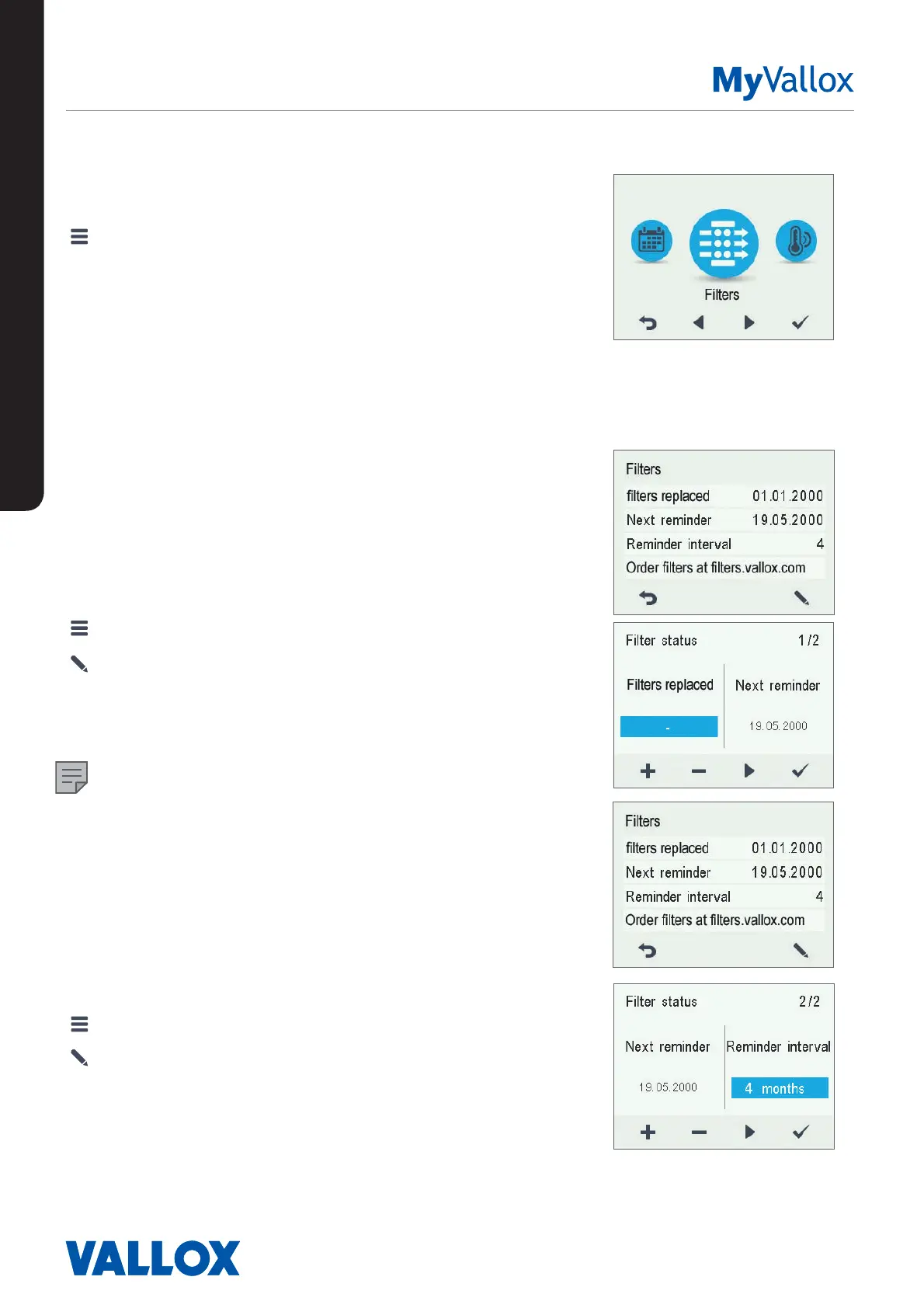
1. Select Settings > Filters.
2. Select OK.
3. The summary display of filter replacement shows the
following information:
• Filters replaced — Indicates the date when the filters were
last replaced.
• Next reminder — Indicates the date when a reminder to
replace the filters will next be shown.
• Reminder interval — Indicates the filter replacement interval
in months.
Setting the date the filters were last
replaced
Instructions for replacing the filters are provided in the
Maintenance section.
After replacing the filters, enter the replacement date.
1. Select Settings > Filters.
2. Select OK.
3. Select Edit.
4. Select Plus on the Filter replacement display. The Last
replaced field now reads Today.
5. Select OK.
NOTE
Based on the set reminder interval, the unit will automatically
set the service to provide a reminder to replace the filters at
the due time.
Setting the Filter replacement reminder
interval
1. Select Settings > Filters.
2. Select OK.
3. Select Edit.
4. Select Right arrow.
5. Use the Plus and Minus buttons to set the desired
reminder interval in months in the Reminder interval field.
The interval value can be between 1 and 12 months. The
default setting is 4 months.
6. Select OK.


 To Next Page