3
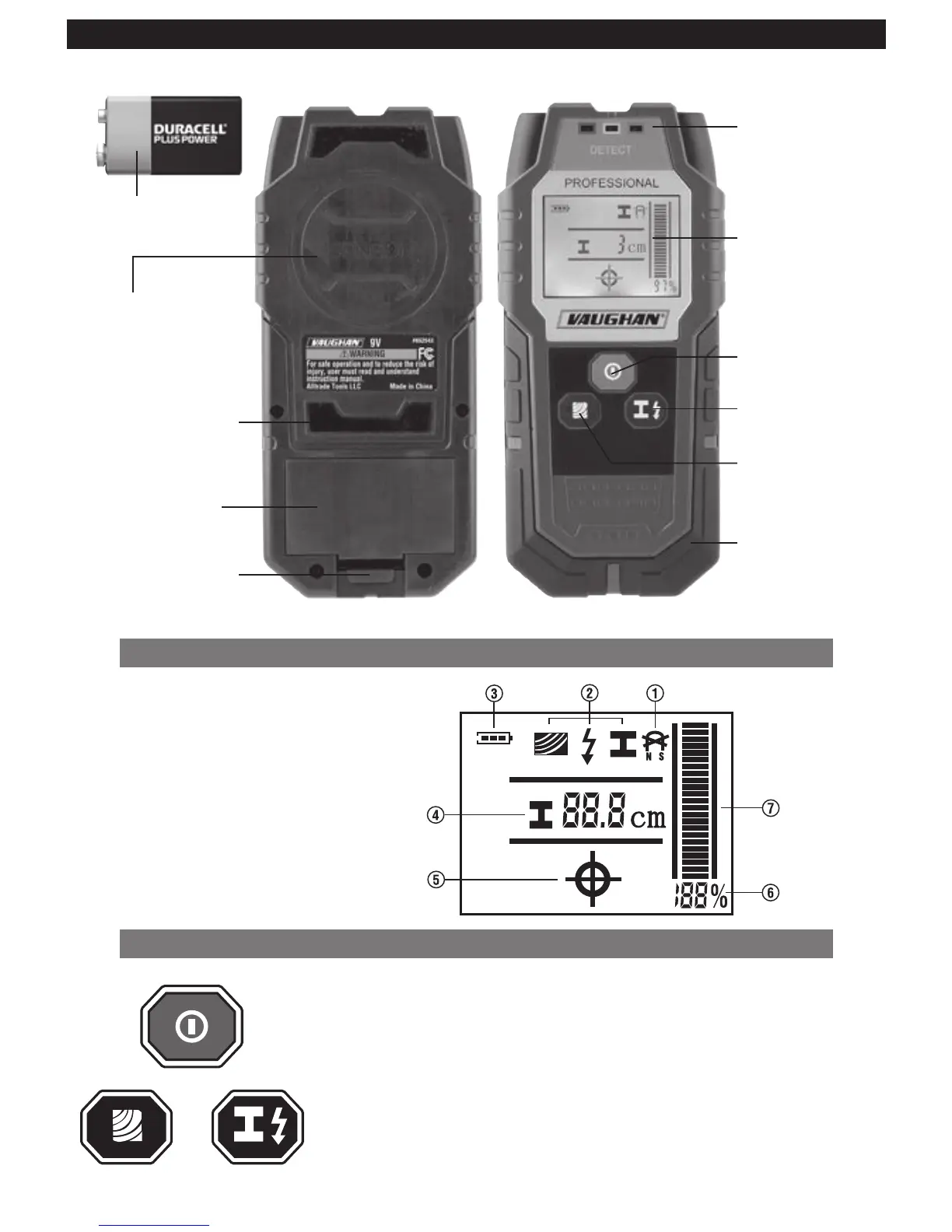
FUNCTIONAL DESCRIPTION
LCD INDICATIONS AND ICONS
1. Magnetic/non-magnetic Metal
2. Detection Modes (Wood/Live Wire/Metal)
3. Battery Status
4. Metal Detecting Depth
5. Detected Object Centerline (Cross-hair)
6. Signal Detection Strength (%)
7. Signal Detection Strength (Bar)
BUTTON FUNCTIONS
Red Button (Top): Press once to turn On and press again to turn Off sensor.
Black Button (Left): Press to set sensor for “Wood”(stud/joist) detection mode.
Black Button (Right): Press once to set sensor for “Metal” and press again for
“Live wire” detection mode.
Top
Left Right
9V Battery
Sensor Area
Bottom View Top View
Surface Protecting
Felt Pad
Battery Housing
Cover
Cover Release Tab
Red / Yellow /
Green Detection
LED’s
2 in. LCD Display
ON/OFF Button
Metal / Live Wire
Detection Button
Buzzer (Inside)
NOTE: Protective Pouch Not Shown
Wood Detection
Button


 To Next Page