6
DETECTING METALS & CALIBRATION
NOTE: The default detection mode of the sensor at the startup is “Metal” indicated by I beam icon (
) on LCD
display. Calibrate the sensor before use.
1. Press the On/Off (red) button to turn on the sensor. The green LED indicator turns on and followed by a short
beeping sound from the internal buzzer.
2. To calibrate, hold the sensor in the air and away from metal objects (including personal jewelry such as wrist
watch or rings) or strong magnetic field. DO NOT touch the bottom of the sensor during calibration.
3. Press and hold the metal/live wire (right black) button for a few seconds until the green LED turns off and then
turns back on and followed by a beeping sound.
4. Calibration has been completed. Release the button.
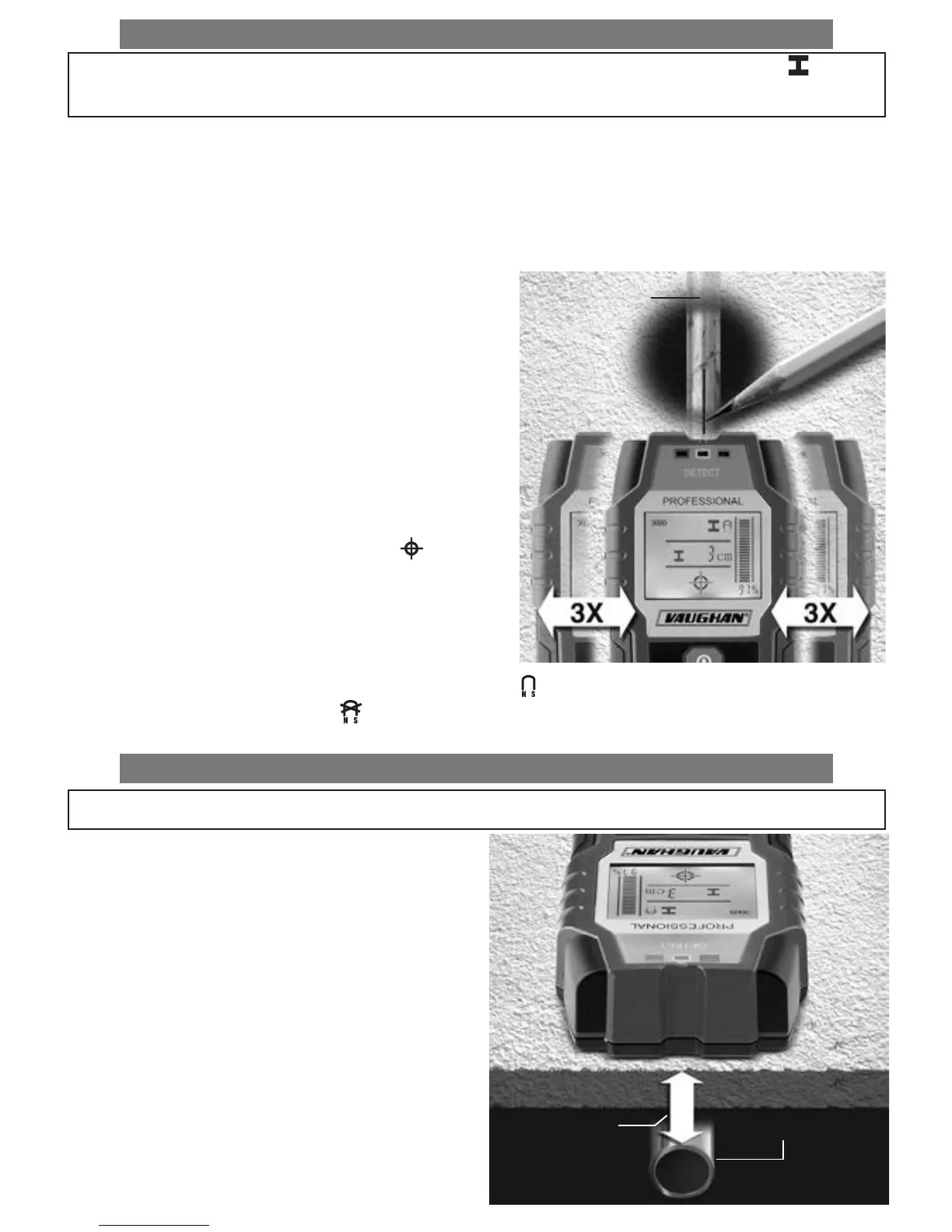
5. Place the sensor onto the surface to be scanned and
move the sensor side to side. As the sensor approaches/
moves away from the metal object under the surface, the
signal detection strength bar and % value indicators on
LCD display increase/decrease. To locate the object more
precisely, slowly move the sensor three times (3x) side to
side over the object. When object is located directly below
the center of the sensor, indications will be at their max
readings accompanied by cross-hair icon (
), constant
beeping sound of the internal buzzer and illumination of red
LED indicator. Mark the location with a pencil.
NOTE: Magnetic/non-magnetic (Ferrous/non-ferrous) icon
on LCD display indicates the type of metal object under the
surface. Magnetic metals include iron and steel identified by ( ) icon. Non-magnetic metals include aluminum,
copper, brass, lead, etc. identified by ( ) icon.
DETECTING METALS & DEPTH DETECTION
NOTE:
Use the depth value only as a general reference.
When scanning for metal objects, depth indicator dis-
plays the distance (in cm) between the bottom of the
sensor and the top of the object. The accuracy of the
displayed distance depends on the shape and position
of metal objects. The accuracy is at the optimum level
when the object is a standard 20 mm diameter rebar
and is in parallel relative to the sensor.
Metal Object
Surface
Surface
Surface Thickness
Depth
Metal Object


 To Next Page