4
INDICATIONS
*Large size wires in excess of 6 AWG can be detected as Ferrous/Non-Ferrous metal under ideal conditions.
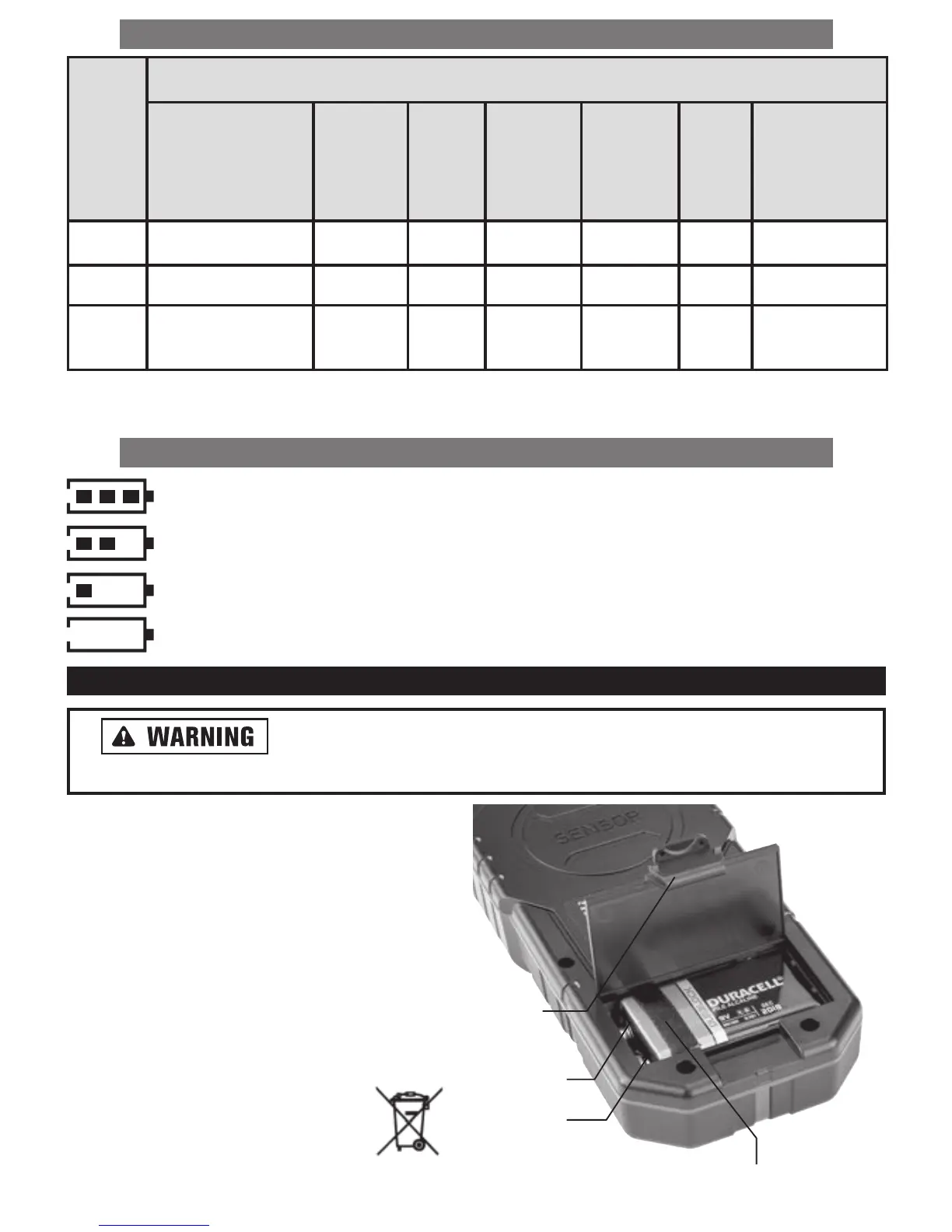
BATTERY SYMBOL STATUS
“Battery Full”
“Battery 2/3 Full”
“Battery Low”: Batteries MAY be replaced.
“Battery Empty”: Batteries MUST be replaced.
BATTERY INSTALLATION/REPLACEMENT
Do not mix old and new batteries. Do not mix alkaline, standard
(carbon-zinc), or rechargeable (ni-cad, ni-mh, etc.) batteries.
To install or replace the batteries:
1. In the bottom of the sensor, gently push the release
tab on battery housing cover forward and remove the
cover.
2. Remove old battery and insert a new 9V battery over
battery extraction ribbon and according to the battery
direction markings inside the battery housing.
3. Reinstall battery housing cover.
4. Properly dispose of old battery in accordance with local
regulations.
Note: Remove battery when storing for
an extended time (more than 3 months) to
avoid damage to the tool should the battery
deteriorate.
Mode
Sensing Indications
LED’s
Red - Strong
Yellow - Average
Green - Weak
Internal
Buzzer
Sound
Cross-
Hair
Signal
Strength
(%)
Signal
Strength
(Bar)
Depth
(cm)
Ferrous/
Non-Ferrous
Wood On Constant Yes 0 -100 Min-Max No No
Metal On Constant Yes 0 -100 Min-Max Yes Yes
Live
Wire
Blinking Repeating Yes 0 -100 Min-Max No No*
Cover
Release
Tab
Positive (+)
Negative (-)
Battery Extraction Ribbon


 To Next Page