04 Vaultek
®
Secure Access: How to open your Vaultek
®
LifePod
®
03 Vaultek
®
Secure Defense: How your Vaultek
®
LifePod
®
keeps people out
Keypad: The 4 digit capacitive keypad responds quickly for access and has a built-in proximity
sensor that lights up the keypad when the lock pad is touched.
See page 05 for more information.
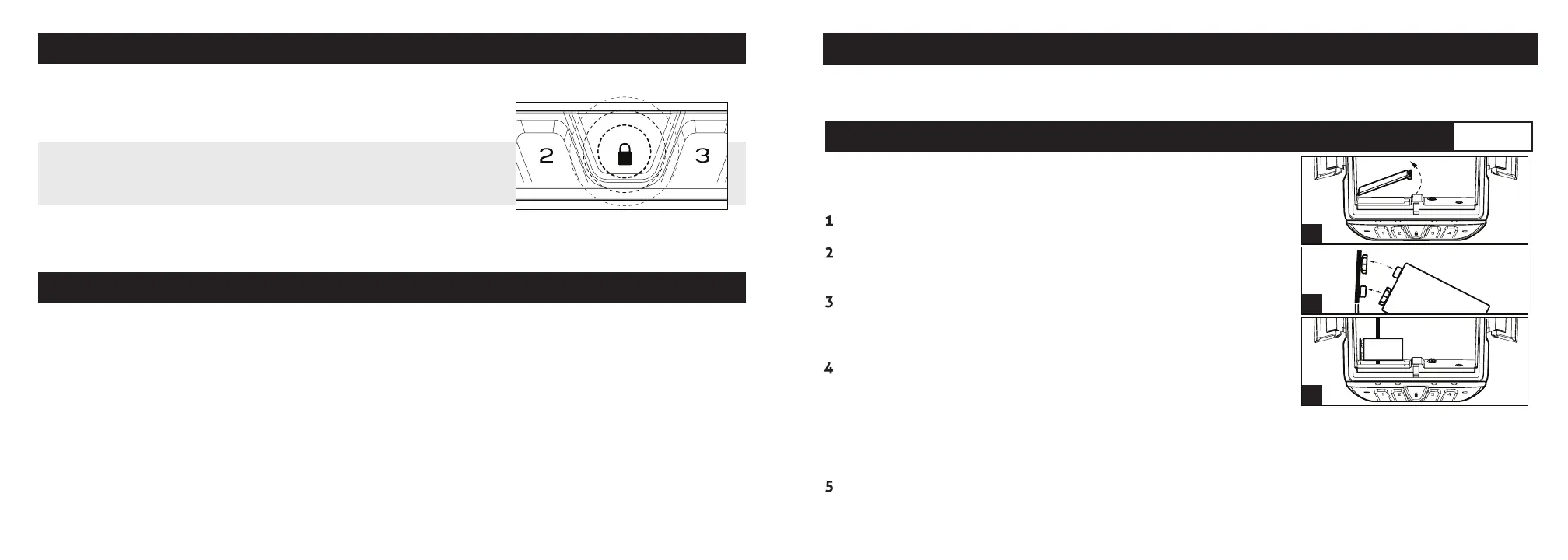
IMPORTANT! Before entering your master code you need to
wake the safe by placing your nger on the lock pad so all the
keys light up RED.
Key: Two keys are provided for manual access to the safe in the event the battery dies.
IMPORTANT! The manual key can not lock LifePod
®
.
Anti-Impact Latch: Built to withstand forceful
impacts.
High Impact Polymer: Engineered to be
extremely strong and impact resistant.
Anti-Pry Design: The interior channels and
gasket form a seal around the inner chamber
making it dicult for tools and other small
objects to penetrate.
Security Tether: An included security tether
and security cable can be used to secure
LifePod
®
to a stationary object.
Security Sleep Mode: Activates when (6)
consecutive incorrect keypad entries are
entered. LifePod
®
will not accept any entries
for four minutes. If a key is pressed during
this time, all of the keys will ash RED and
the alarm beeps. A backup key can be used to
open the unit.
Quick Start Guide Battery Installation
LifePod
®
is powered by a 9v Alkaline battery (not included).
Under normal use the battery can last up to one year.
Undo both side compression latches to open your LifePod
®
.
Locate the battery cover on the front wall and remove by
pressing on the outer tab (Fig B).
Pull out the 9v battery snap inside the battery compartment,
and connect an Alkaline 9V battery to the connector. Be sure to
snap the battery in the correct orientation (Fig C).
When the battery is snapped in you will hear a short welcome
tone and the keypad will light up.
B
C
D
Step 1
Quick Start Guide
Follow the quick start guide to get your safe up and running. If you have any questions or issues
please email support@vaulteksafe.com.
Troubleshooting! If you snap the battery in and the keypad is ashing then your battery is likely
low. Replace the battery with a new 9v Alkaline battery. We recommend a brand name battery
like Duracell or Energizer.
Once you hear the tone and see the keypad light up, slide the battery into its compartment being
mindful to place the battery ribbon underneath the battery rst (Fig D). This will make the battery
easier to remove when replacing.


 To Next Page