3
M1.1 WL
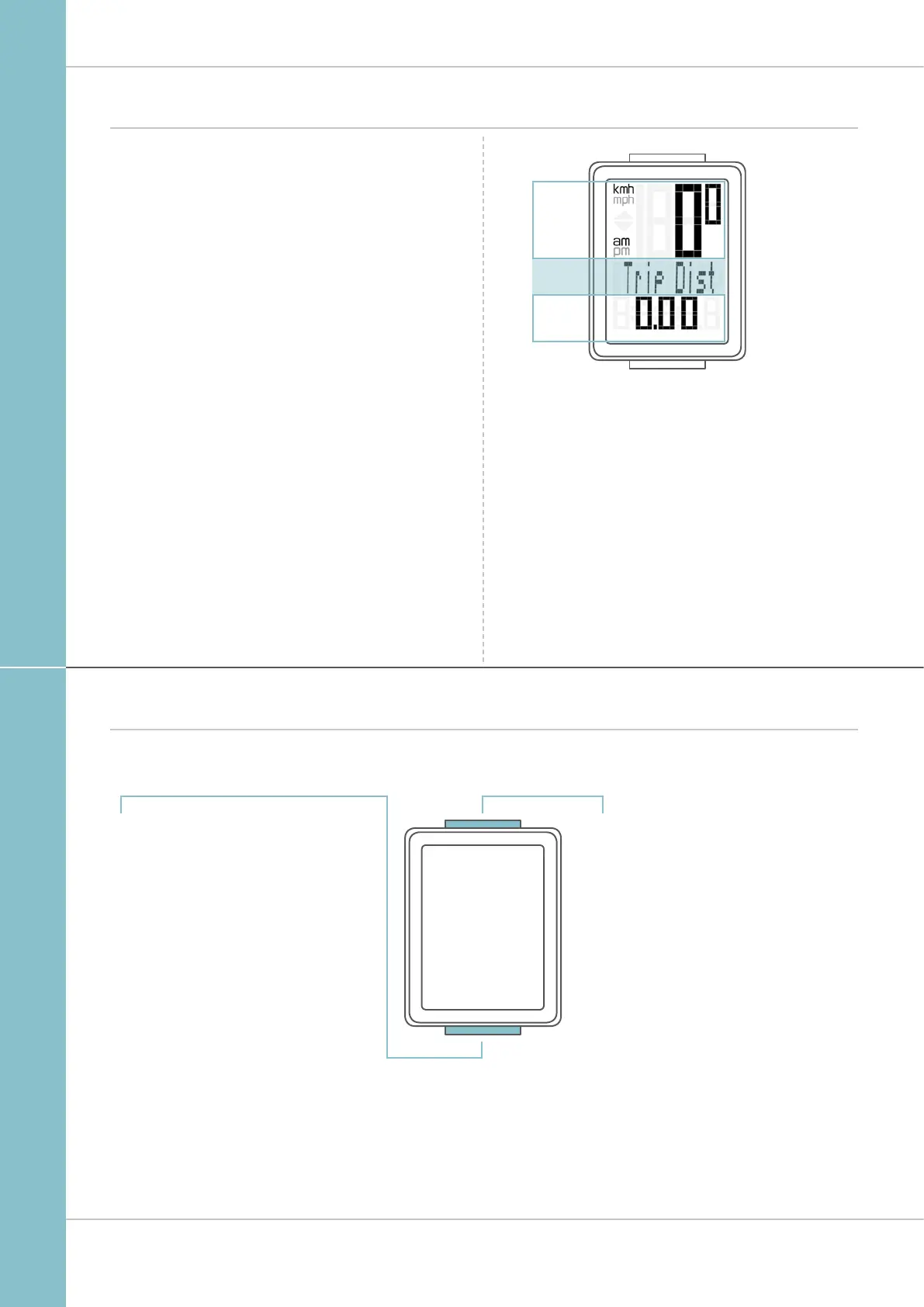
Display
Buttons
The VDO M1.1 WL has two buttons
SET
In function mode:
– Scroll backwards through the functions
– Open setting mode
(press and hold)
In setting mode:
– Open the setting
– Confirm the setting once ready
– Exit setting mode
and return to function mode
BIKE
In function mode:
– Access functions
– Reset trip data to zero
(press and hold)
In setting mode:
– Scroll in the setting menu
– Change the data to be set
The VDO M1.1 WL has a large, easy-to-read display that can
be divided into three areas.
– The top line of the display permanently indicates
the current speed. If the 12-hour clock format has been
selected, “am” or “pm” appears next to the speed.
It also displays whether kmh or mph has been selected
for the speed indicator.
– The middle line of the display shows the name
of the selected function in clear text.
– The bottom line of the display shows the value
for the selected function.
TOP
BOTTOM
MIDDLE



 To Next Page