13
M2.1 WL
How to set your wheel circumference:
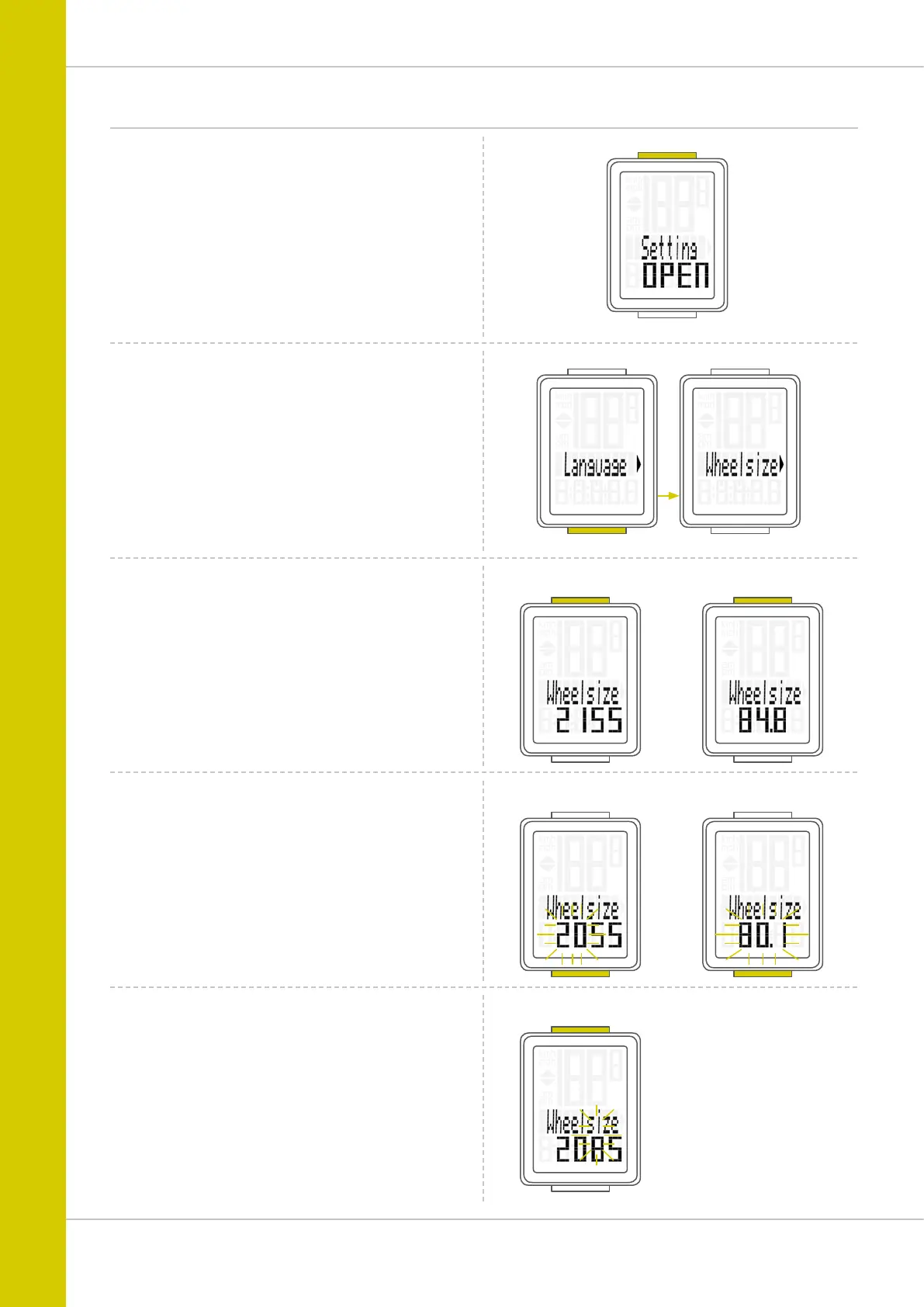
Press and hold the SET button until the settings menu
opens.
Settings – wheel circumference
“Language” appears on the display.
Press the BIKE button to scroll to the setting for the wheel
circumference.
Press the SET button to open the setting for the wheel
circumference.
Setting in mm for KM:
The first two digits flash.
Press the BIKE button to set these digits to the desired
value.
Setting in Inch for Miles:
All digits flash.
Press the BIKE button to set these digits to the desired
value.
Setting in mm for KM:
Press the SET button to confirm your setting.
The third digit now flashes and is ready to be set.
Press the BIKE button to set this digit.
Setting in mm for KM
Setting in mm for KM
Setting in mm for KM
Setting in Inch for Miles
Setting in Inch for Miles



 To Next Page