32
HPS10 PersonalScope
TM
*dB ref
Select dBref to set the user defined reference for
dB measurement, the selected meter will be set for
dB measurement.
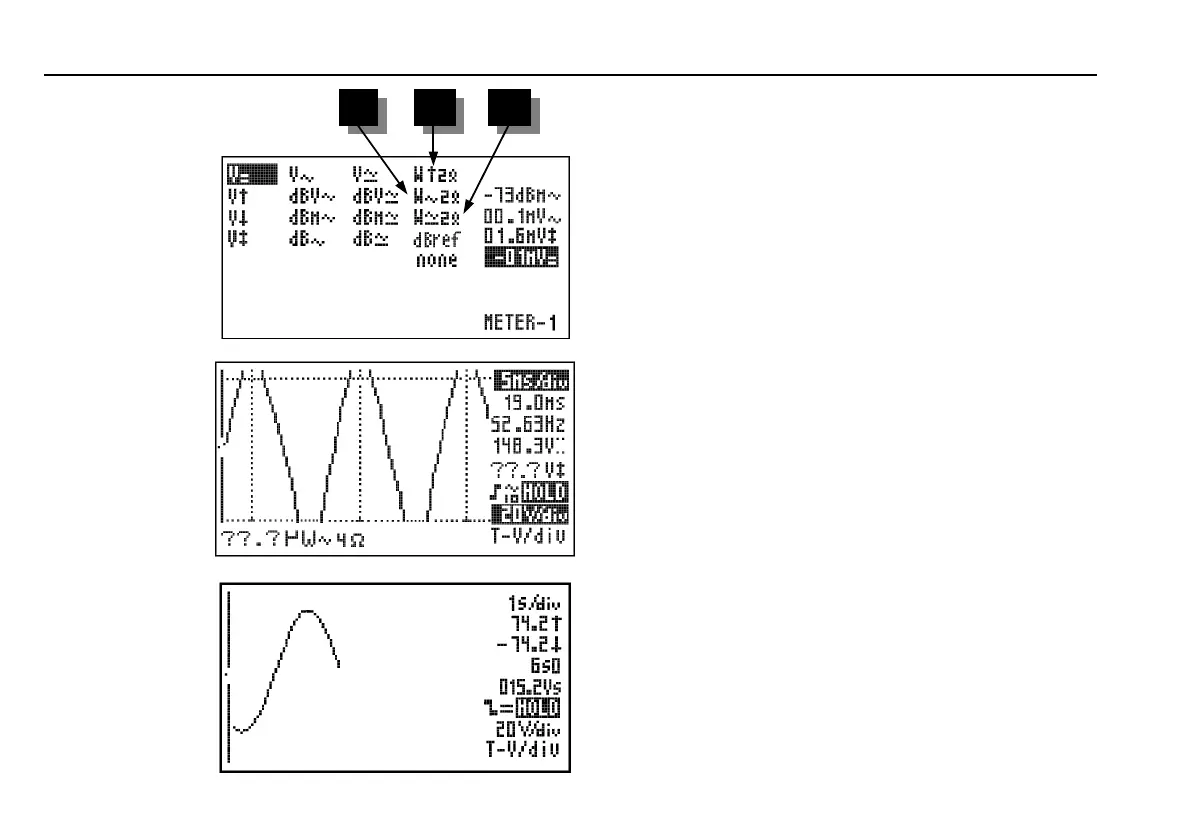
Audio power calculation.
The measured voltage is converted into power,
suposing that the voltage is measured across an
impedance. The calculated power can be displayed
for loads of 2, 4, 8, 16 or 32 Ohm. To choose the
different loads, first highlight the power readout
and then press the right cursor key.
13. W ac
AC rms power calculation into selected
impedance (most used).
14. W peak
Peak power calculation into selected impedance.
15. W ac+dc
AC+DC power calculation into selected
impedance (a normal audio signal can not have dc
component).
Notes:
• If the signal goes off-screen or when the signal
is too small for measurement, the readout will
show ??? (see fig 24)
• For all AC measurements: Make sure that at
least one or two periods are displayed or select
the auto-setup function.
• You can choose “none” to hide readouts.
• Depending on the selected screen layout one to
four different meter readouts can be displayed.
• Some readouts have more digits (accuracy)
when they are displayed on the left side of the
screen (change the screen layout, see “Display
set-up”).
Fig 23
13 14 15
Meter Readout
E
Fig 24
F
Fig 25
HPS10_man.pub
page 32
Wednesday, April 03, 2002 09:22
Composite













 To Next Page