16
For the Installer
11. TROUBLESHOOTING
If the unit does not work properly, reset the unit by unplugging it for one minute and then replug it. If it still not working properly,
refer to table below.
If the integrated control LED of is flashing, the unit sensors detected a problem. See the table below to know the nature of the problem.
LED SIGNAL ERROR TYPE ACTION UNIT STATUS
LED flashes
GREEN
Thermistor error Replace the entire motorized damper port assembly
(fresh air from outdoors port)
Unit works but will
defrost frequently
LED flashes
AMBER
Damper error Go to page 17 Unit does not work
LED flashes
RED
• The door is open and the
unit is not unplugged
• Exhaust motor error
• Put a magnet over the door switch or close the door and press
once on the integrated control push button to reset the unit.
• Go to page 18
Unit does not work
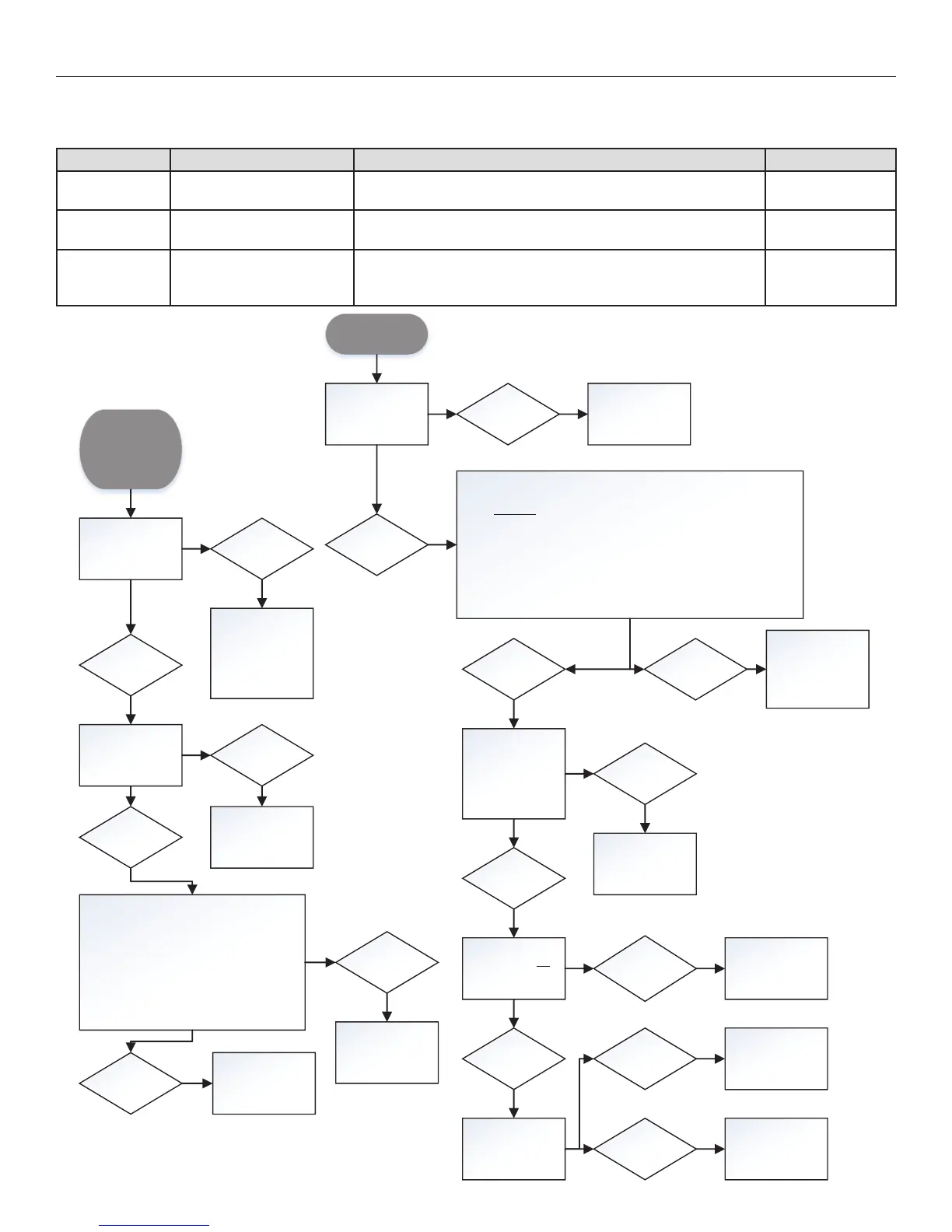
Altitude or
Platinum wall
control does not
display the outdoor
temperature
Is the unit’s
integrated push-
button set to off?
No
Push on the
integrated push-
button until the LED
indicator of the
integrated control
turns OFF
Yes
• Reset control: simultaneously press and hold
both arrow keys for 8 seconds
• Unplug unit
• Wa it 1 minut e
• Plug unit back
• Using the wall control, put unit in VENT
mode at MIN or MAX setting
• Wa it 5 minut es
Is temperature now displaying?
Are both ends of
the control’s RED
wire properly
connected?
Yes
No
Restore proper
connection
Yes
No
Change the wall
control
Problem solved
Wall control does
not work
Is the power outlet
energiz ed?
No
Refer to an
electrician
Yes
• Unplug auxiliary controls
• Uplug unit
• Wa it 1 minut e
• Plug unit back
• Wait 30 seconds – Unit performs booting sequence: LED lights up, you
hear the relays, you s ee the dampers move
• Once booting sequence is over (after 30 sec.), try operating the unit
using the integrated push-button.
When hitting the integrated push-button multiple times, does the LED go
fro m OFF to A MBER to GREEN and back to OFF?
Yes
Are the wall control
wires properly
connected? Pay
special attention to
the BLACK and
YELLOW wires.
No
The probl em is not
the wall control.
Proceed to
appropriate
troubleshooting.
No
Restore connections
Yes
Use a voltmeter. Is
there 8-12 VDC
betwee n BLACK an d
YELLOW?
Yes, but
problem not
solved.
Change the wall
control.
No
Test the wall control
usin g a ne w wi re.
Does the wall
control now work?
No
Change the wall
control.
Yes Change the wire.



 To Next Page