3
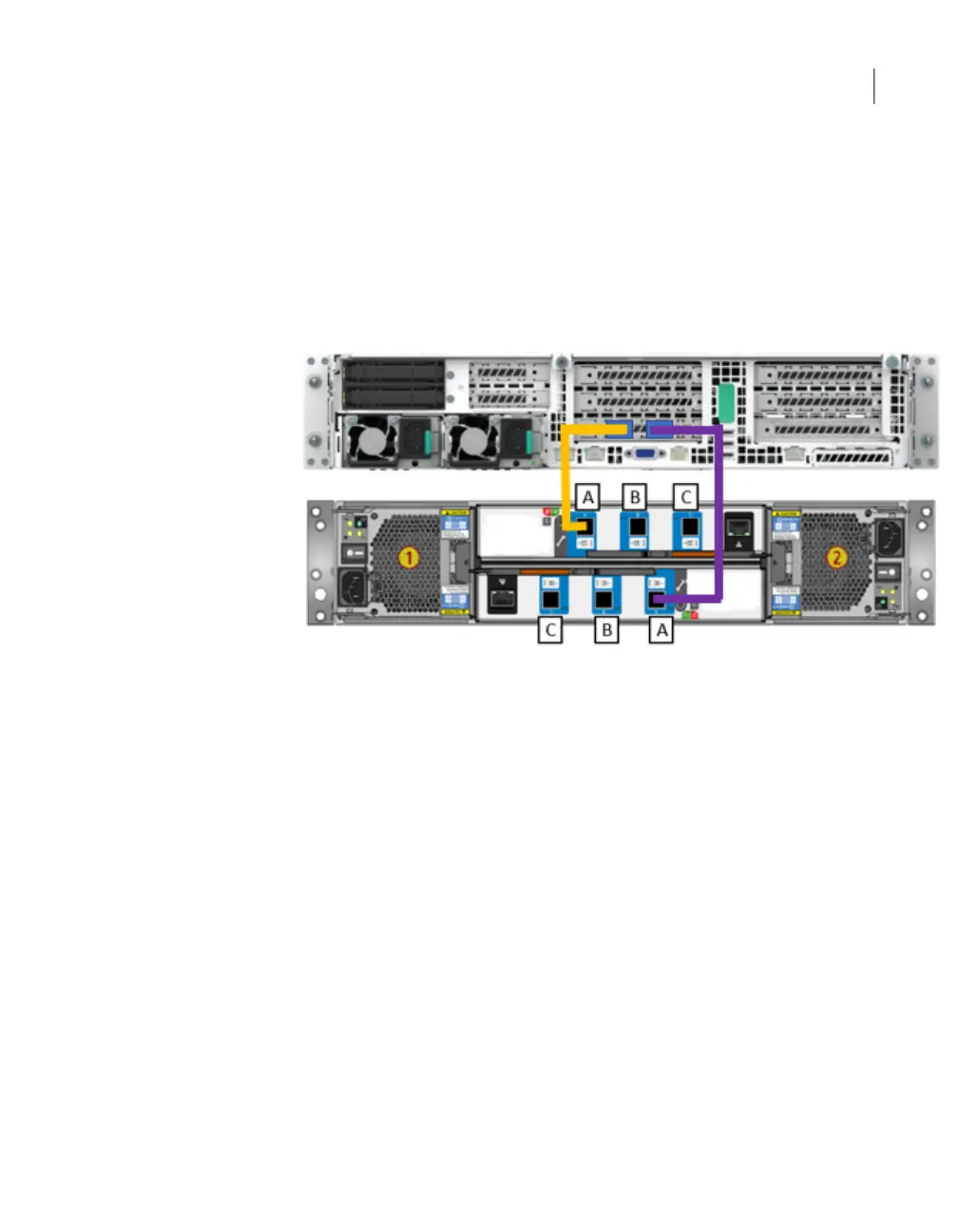
Connect one end of the other SAS-3 cable to port A in the bottom canister of
the storage shelf. Be sure that you orient the SAS-3 connector in the storage
shelf port A so the blue tab faces up, or is on the same side of the cable as
the SAS-3 label.
4
Connect the other end of this cable to the right-hand port in the External RAID
PCIe card on the appliance. The blue tab on the SAS-3 connector should be
facing down.
See “Connecting the network cables” on page 82.
See “Connecting the power cords” on page 83.
Connecting an appliance to more than one storage
shelf
The steps in this section assume that the appliance and the storage shelves are
shipped together and installed at the same time. You can install up to six storage
shelves with a 5250 appliance.
You can add storage shelves to an operational appliance. Refer to one of the
following appendices for instructions.
■ Appendix A - Adding one or more storage shelves to an operating appliance
that does not have any storage shelves
See “Overview ” on page 110.
■ Appendix B - Adding storage shelves to an operating appliance that has at least
one storage shelf attached
45S Series Appliance installation procedures
Connecting an appliance to more than one storage shelf


 To Next Page