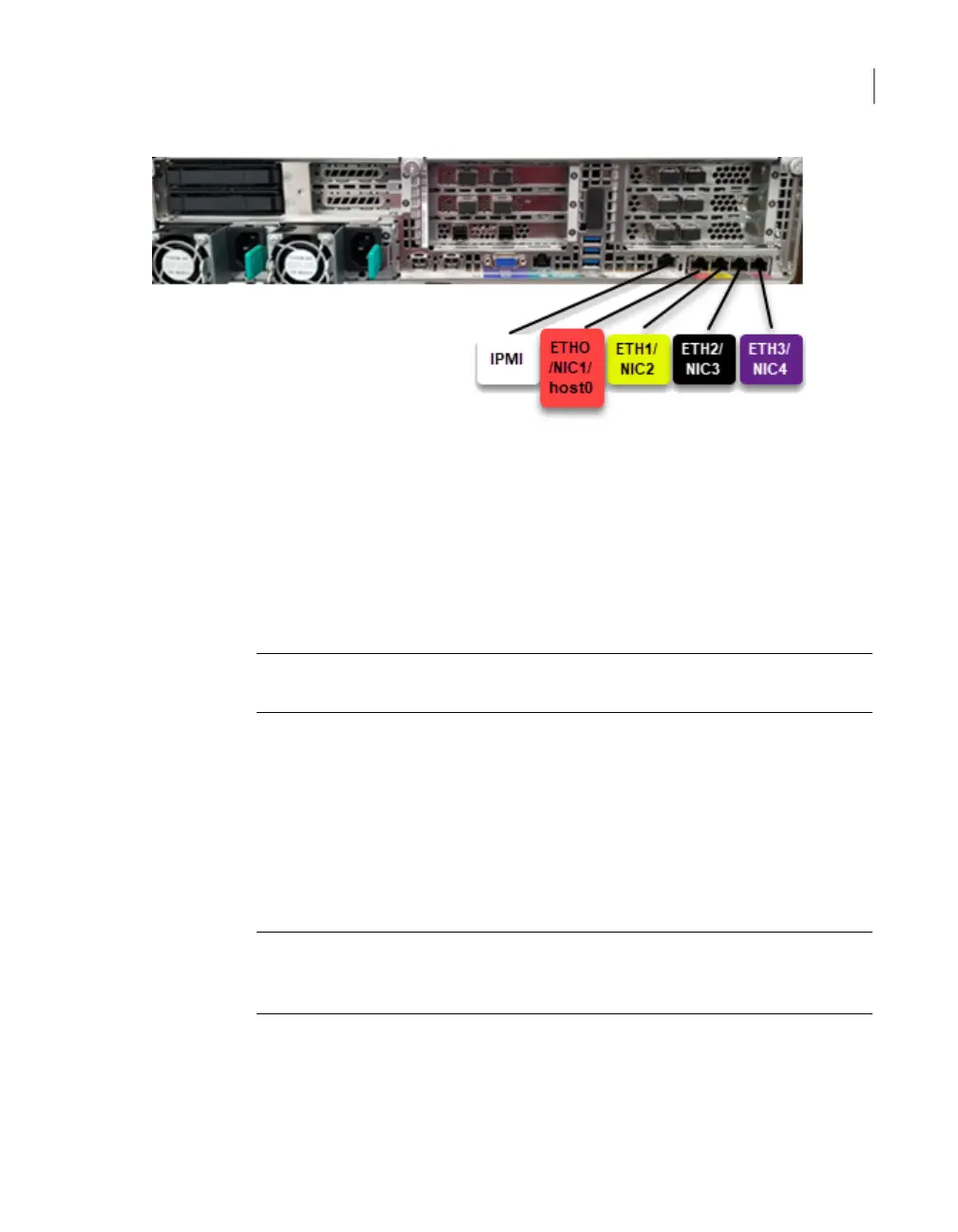
In a NetBackup appliance, by default, NIC1 (eth0) is factory set to IP address
192.168.229.233. This private network address is reserved to provide a direct
connection from a laptop to perform the initial configuration. NIC1 (eth0) is typically
not connected to your network environment.
In a Flex appliance, by default, host0 is used to perform all the network management.
Once the initial configuration has been completed, you can connect NIC1 (eth0) to
an administrative network that does not provide any backup data transfer.
Note: You cannot bond the copper 1 GbE ports that are installed in the appliance
chassis with optical ports on PCIe 10/25 GbE cards.
See “Connecting the power cords” on page 83.
Connecting the power cords
Each appliance and each storage shelf contains two AC power supplies. To ensure
power redundancy, connect the power supplies on each component to separate
AC power sources.
Caution: Do not turn on the power to any components while connecting the power
cords. The components must be turned on in a specific sequence to ensure correct
communication.
To connect the power cables
1
Verify that the AC power supply input for the appliance and for the storage
shelf is within one of these ranges.
■ 100 - 127 VAC at 50/60 Hz
83Next steps after installation
Connecting the power cords


 To Next Page