64 bytes from 172.16.10.141: icmp_seq=3 ttl=62 time=1.0 ms
64 bytes from 172.16.10.141: icmp_seq=4 ttl=62 time=1.1 ms
--- 172.16.10.141 ping statistics ---
5 packets transmitted, 5 packets received, 0% packet loss
round-trip min/avg/max = 1.0/1.1/1.6 ms
localhost:%
Now you can access the VX-MD4024 via Telnet on port 23 (for using CLI) or Web GUI by
entering its IP address in your browser’s URL/address field.
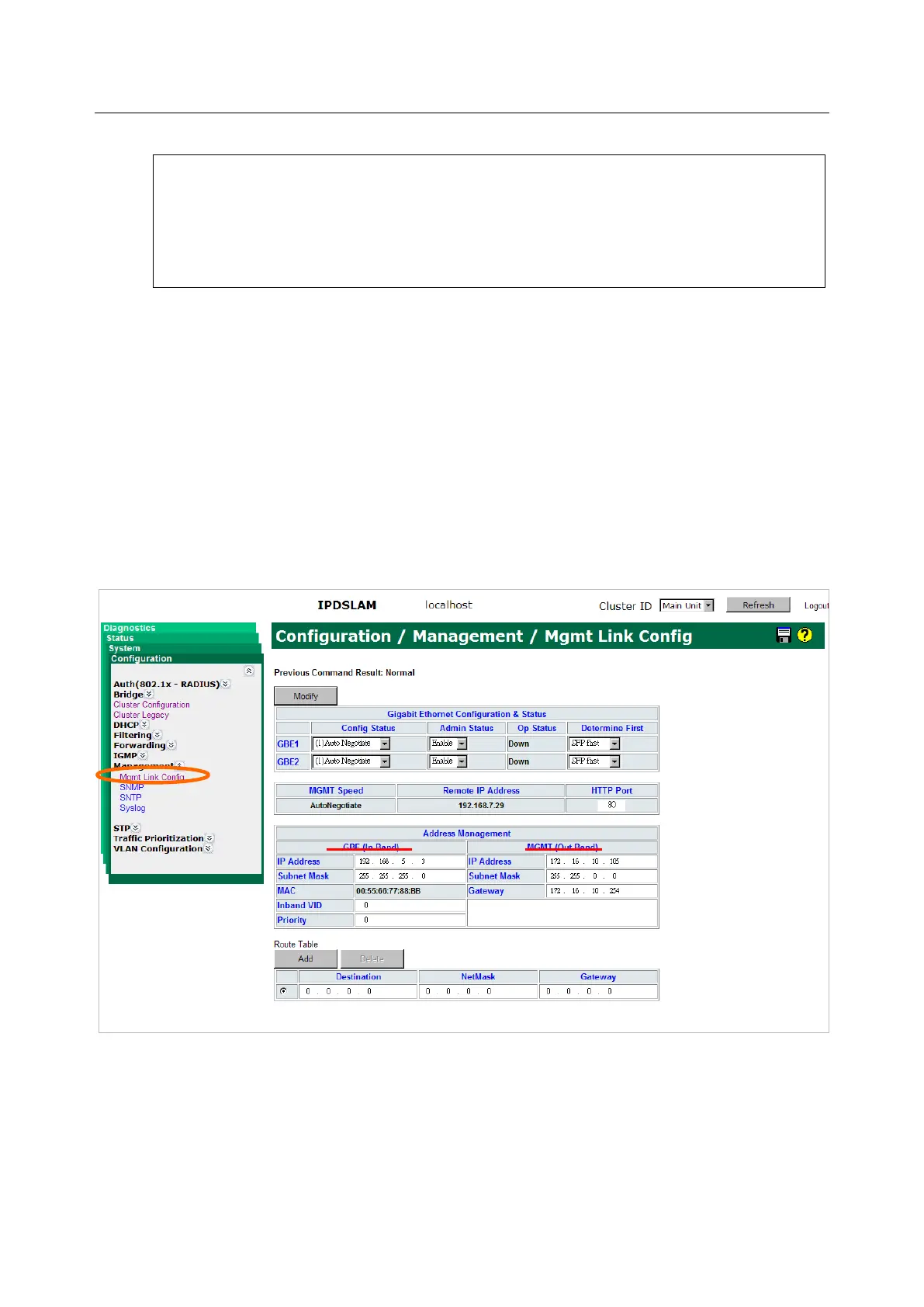
Besides CLI, you can also change the in-band/out-band management IP of the VX-MD4024 in
the Web GUI:
a. On the menu tree, click on Configuration → Management → Mgmt Link Config.
b. Enter new IP setting in the GBE (In Band) section for in-band IP configuration.
c. Enter new IP setting in the MGMT (Out Band) section for out-band IP configuration.
d. Click on Modify button to apply the modification.
Please remember to save new settings to flash memory:
On the menu tree, click on System → Save & Restore. Click on the Database Control Action
drop-down list and select (A) Save runtime config. and set to new active DB and then click on
Submit button (you can specify the DB filename to be saved or let the system determine). This


 To Next Page