3 — Troubleshooting the VX-MD4024
3.1 Introduction to Troubleshooting
This chapter describes instructions for troubleshooting the VX-MD4024. These procedures may
require the presence of technicians at remote VX-MD4024 system sites and an additional operator
at PC to monitor system alarms by console or EMS during maintenance.
3.2 Resolving Problems Indicated Through LEDs
This section describes what to do to solve problems indicated by LEDs on the system front panel.
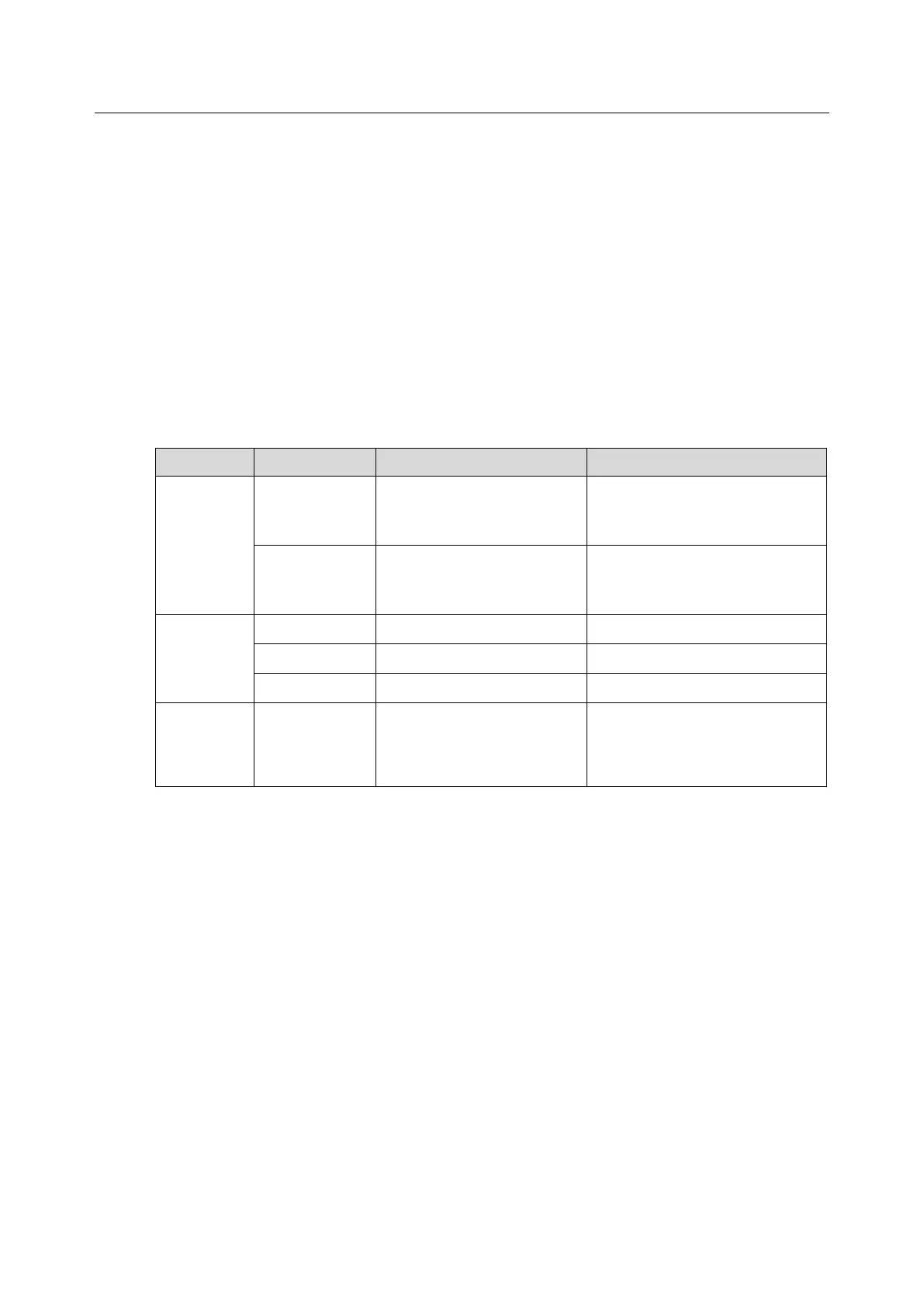
Table 3-1 Problems Indicated by LEDs
Not lit even
though DSLAM
is powered up
There is a power up problem
with the system.
Troubleshoot the DSLAM for
power up problems; see section
3.4.
Self-test failed. There is a
functional problem with the
system.
Major and Minor alarm set
GBE1/GBE2
(If SFP
interface is
activated)
Not lit even
though DSLAM
is powered up
Troubleshoot the DSLAM for
fiber optics problems; see section
3.4.


 To Next Page