VM-3500EPage 52
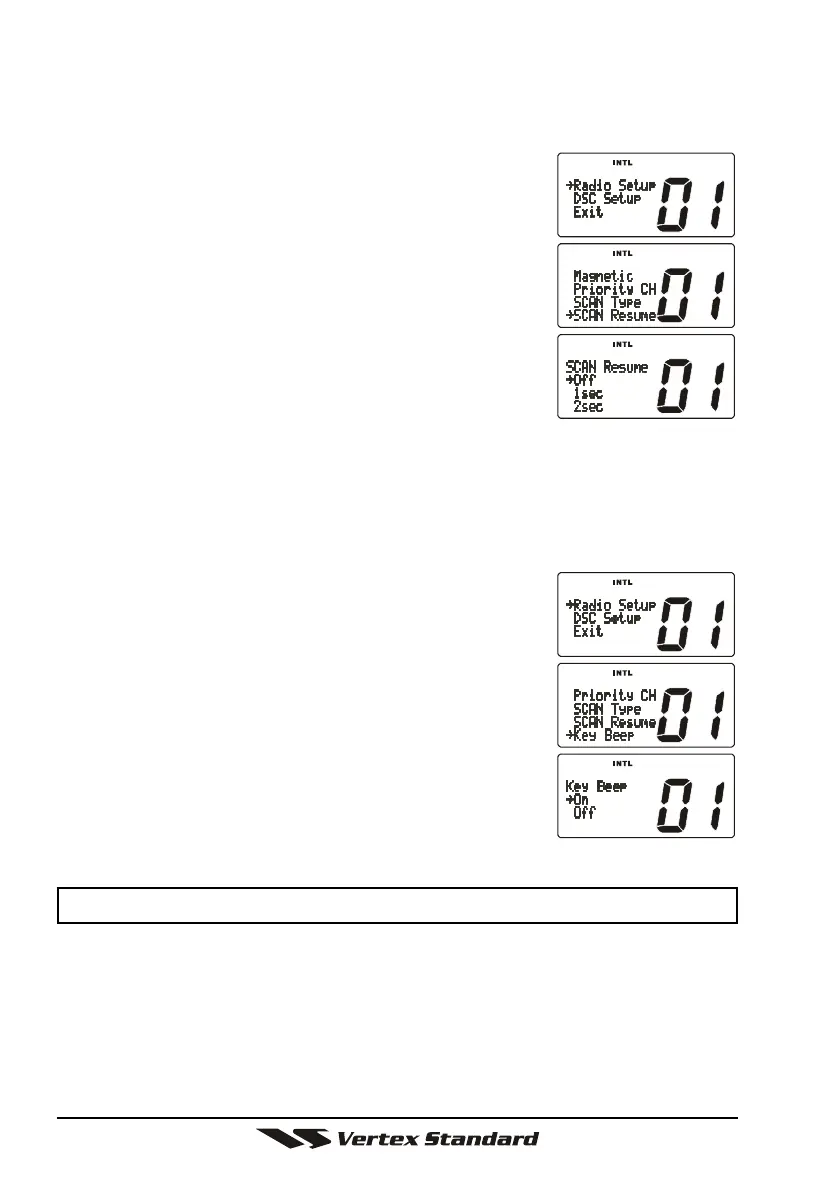
10.7 SCAN RESUME TIME (Depends on the transceiver version)
This selection is used to select the time the VM-3500E waits after a transmis-
sion ends before starting scanning.
1. Press and hold down the
[
CALL
(
MENU
)]
key until
“Radio Setup” menu appears.
2. Press the
[
ENT
]
key, then select “SCAN Resume” in
the “Radio Setup” menu with the CHANNEL selec-
tor knob.
3. Press the
[
ENT
]
key.
4. Turn the CHANNEL selector knob to select the de-
sired resume time. The resume time can be set to
“1sec,” “2sec,” “3sec,” or “Off.” In the “Off” selec-
tion, the scanner will resume after the other station
stops transmitting (carrier drops).
5. Press the
[
ENT
]
key to store the selected setting.
6. To exit this menu and return to radio operation mode press the
[
16/9
]
key.
10.8 KEY BEEP
(
ON/OFF
)
This selection allows the beep tone when a key is pressed to be turned off.
1. Press and hold down the
[
CALL
(
MENU
)]
key until
“Radio Setup” menu appears.
2. Press the
[
ENT
]
key, then select “Key Beep” in the
“Radio Setup” menu with the CHANNEL selector
knob.
3. Press the
[
ENT
]
key.
4. Turn the CHANNEL selector knob to select “On” or
“Off.”
5. Press the
[
ENT
]
key to set the key beep condition.
6. To exit this menu and return to radio operation mode
press the
[
16/9
]
key.
NOTE
Emergency alarm and beeps for DSC operation cannot be turned OFF.






 To Next Page