VX-150 OPERATING MANUAL 15
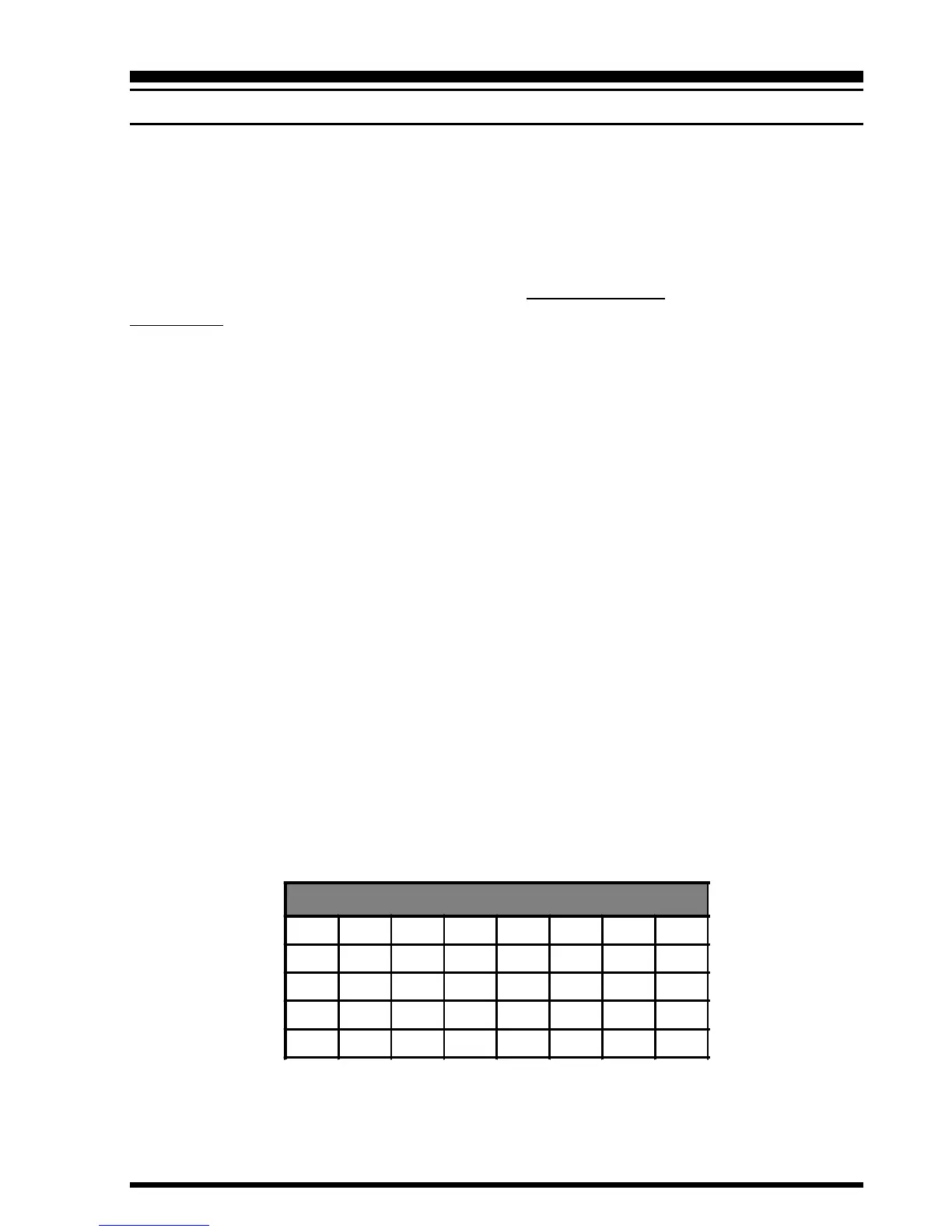
CTCSS T
ONE
F
REQUEN CY
(Hz)
67.0 69.3 71.9 74.4 77.0 79.7 82.5 85.4
88.5 91.5 94.8 97.4 100.0 103.5 107.2 110.9
114.8 118.8 123.0 127.3 131.8 136.5 141.3 146.2
151.4 156.7 162.2 167.9 173.8 179.9 186.2 192.8
203.5 210.7 218.1 225.7 233.6 241.8 250.3 -
Advanced Operation
CTCSS OPERATION
Many repeater systems require that a very-low-frequency audio tone be superimposed on
your FM carrier in order to activate the repeater. This helps prevent false activation of the
repeater by radar or spurious signals from other transmitters. This tone system, called
“CTCSS” (Continuous Tone Coded Squelch System), is included in your VX-150, and is
very easy to activate.
CTCSS setup involves two actions: setting the Tone Frequency and then setting of the
Tone Mode. These actions are set up by using the
[
1
(
SQ TYP
)
]
and
[
2
(
CODE
)
]
keys, or
Menu Items #25 and #26.
Press the
[
F
]
key, then immediately press the
[
1
(
SQ TYP
)]
key. This provides a “Short-
cut” to Menu #25 (“SQL TYP”).
Rotate the DIAL so that “T” appears on the display; this activates the CTCSS Encoder,
which allows repeater access.
You may notice an additional “DCS” icon appearing while you rotate the DIAL in this
step. We’ll discuss the Digital Code Squelch system shortly.
Rotation of the DIAL in step
above will occasionally cause “SQ” to appear adjacent
to the “T” icon. When “T SQ” appears, this means that the Tone SQuelch system is
active, which mutes your VX-150’s receiver until it receives a call from another radio
sending out a matching CTCSS tone. This can help keep your radio quiet until a spe-
cific call is received, which may be helpful while operating in congested areas.
When you have made your selection of the CTCSS tone mode, press the PTT key.
Press the
[
F
]
key, then immediately press the
[
2
(
CODE
)]
key. This provides a “Short-
cut” to Menu #26 (“TN SET”).
This Menu selection allows setting of the CTCSS tone frequency to be used.
Rotate the DIAL until the display indicates the Tone Frequency you need to be using
(ask the repeater owner/operator if you don’t know the tone frequency).
Press the
[
F
]
key to save the new settings and exit to normal operation.






 To Next Page