11
oPeration
noiseandresumenormal
(quiet)monitoring.
r
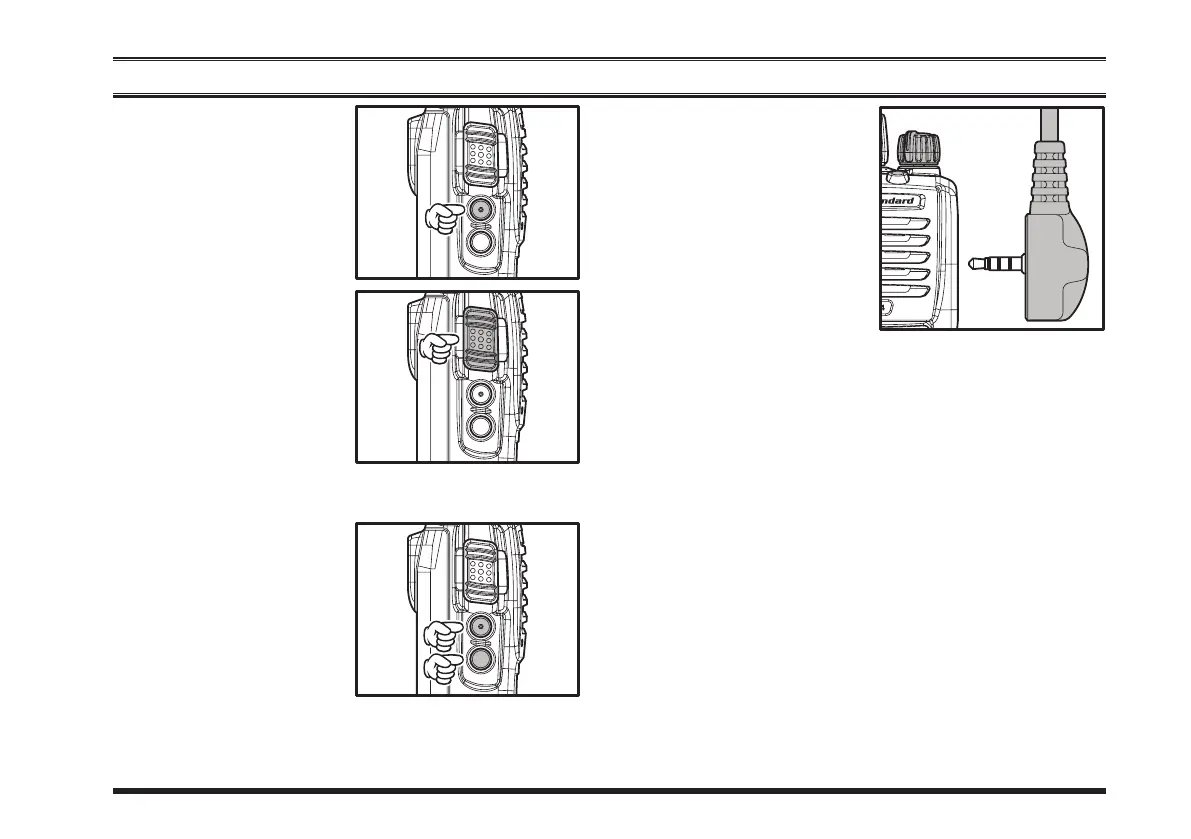
Totransmit, monitor the
channelandmakesureit
isclear.
Press and hold the
PTT
switch. Speak into the
microphone area of the
front panel grille in a
normalvoicelevel.ToreturntotheReceivemode,re-
leasethe
PTT
switch.
r
Press(orpressandhold)
the
SIDE-1
or
SIDE-
2
button to activate one
of the pre-programmed
functions which may
havebeenenabledatthe
timeofprogrammingby
the dealer. See the next chapter for details regarding
featureavailabilityforthisradio.
r
IfaSpeaker/Microphone
is available, remove the
plastic cap and its two
mounting screws from
t he r ig ht s id e o f t h e
transceiver, then align
th e c on ne ctor o f t he
Speaker/Microphone on
theradio;securethecon-
nectorpinusingthescrewssuppliedwiththeSpeaker/
Microphone. Hold the speaker grille up next to your
earwhilereceiving.Totransmit,pressthe
PTT
switch
ontheSpeaker/Microphone,justasyouwouldonthe
main transceiver’s body, and speak into the micro-
phoneonanormalvoicelevel.
Note 1): Save the original plastic cap and its mount-
ing screws. They should be reinstalled when not us-
ing the Speaker/Microphone.
2) When you press the PTT switch on the Speaker/
Microphone, it disables the internal microphone, and
vice versa.
r
IftheBCLO(BusyChannelLockout)featurehasbeen
programmedonachannel,theradiowillnottransmit
whenacarrierispresent.Instead,theradiowillgener-
ateshortbeepthreetimes.Releasethe
PTT
switchand
waitforthechanneltobeclearofactivity.







 To Next Page