VX-450 SerieS Operating Manual
37
user set mode
The
VX-454/-459
includes a “User Set (Menu)”
Mode which allows the user to define or configure
various settings, such as Beep On/Off, Squelch, etc.
To activate the “User Set (Menu)” Mode:
r
Press (or press and hold) the programmable key
assigned to the “
SET
” function.
r
Select the User Set Mode Item you wish to
change using the
[
A
]
/
[
B
]
keys, then use the
[
SIDE-1
]
/
[
SIDE-2
]
button to adjust the setting of
the selected item.
r
Press the
[
D
]
key to store the new conguration.
The display indicates “
- SET -
” briey, then exits
to normal operation.
You may cancel the selection by pressing the
[
C
]
key. The display indicates “
- CANCEL -
” briey,
then exits to normal operation.
Note: The menu “14: REC Mode” and “15: Play
Mode” will appear only when the Voice Re-
cording Unit is installed.
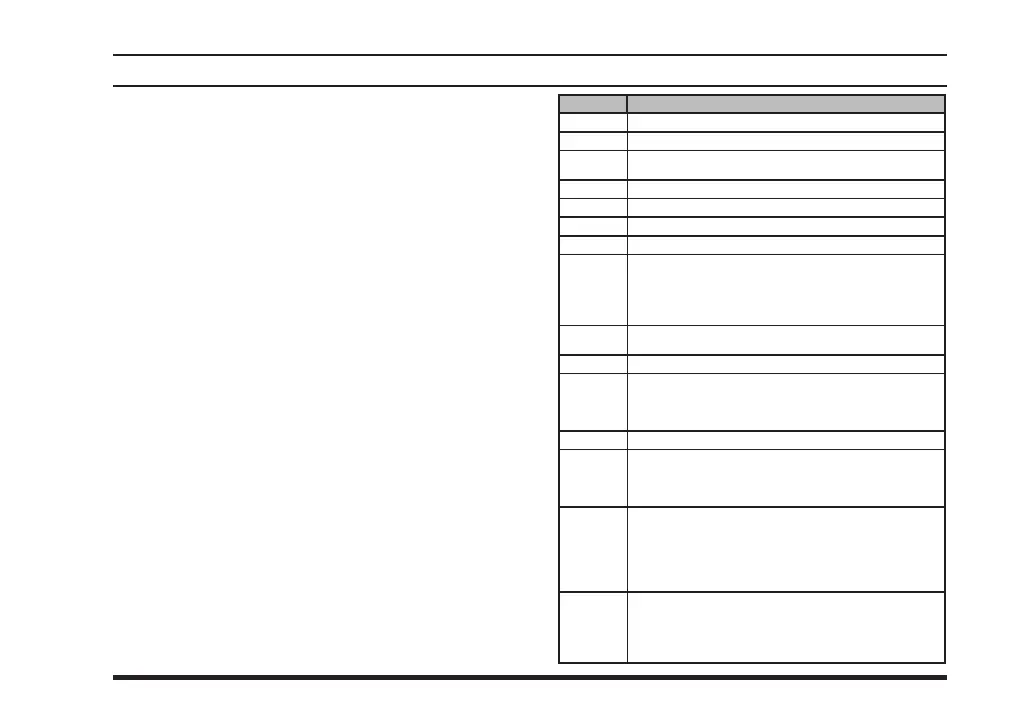
dIsplay descrIptIon
1 SQL
Select the Squelch Threshold Level (–15 to +15)
2 BEEP
Set the Beep ON / OFF
3 BELL
Set the Bell ON / OFF
(Bell engaged by sub-audible CTCSS/DCS)
4 LIGHT
Set the BUSY/TX LED and Lamp ON / OFF
5 KEY
Set the Key Lock function ON (Lock) / OFF (Free)
6 DIAL
Set the DIAL Lock function ON (Lock) / OFF (Free)
7 PTT
Set the PTT Lock function ON (Lock) / OFF (Free)
8 SCAN
Set the Scan status
OFF: Stop the Scan
ON: Start the Scan
GRP: Start the Group Scan
FM: Start the Follow-Me Scan
9 DW
Set the Dual Watch ON / OFF
(same function as DW key)
10 AF
Set the Minimum Volume level (000 to 255)
11 VOX
Set the VOX level (–2 to +2)
(This menu will appear only when the VOX setting
of the current channel is set to “Key ON” or “Power
ON”)
12 TX SV
Set the TX Saver ON / OFF
13 ENCR
Set the Encryption ON / OFF
(This menu will appear only when the Encryption set-
ting of the current channel is set to “Key ON” or “Power
ON”)
14 REC
Select the recording mode.
ONE: Enables recording one message (max. 120
seconds), and playback from the beginning of
the message.
ROL: Enables recording whenever squelch opens,
and playback of the last 120 seconds.
15 PLY
Set the priority audio on playback mode.
PLY: Playback audio is higher priority than received
signal.
SIG: Received signal is higher priority than play-
back audio.













 To Next Page