Edge IP 9800 Series Phone User Guide 7
LCD display
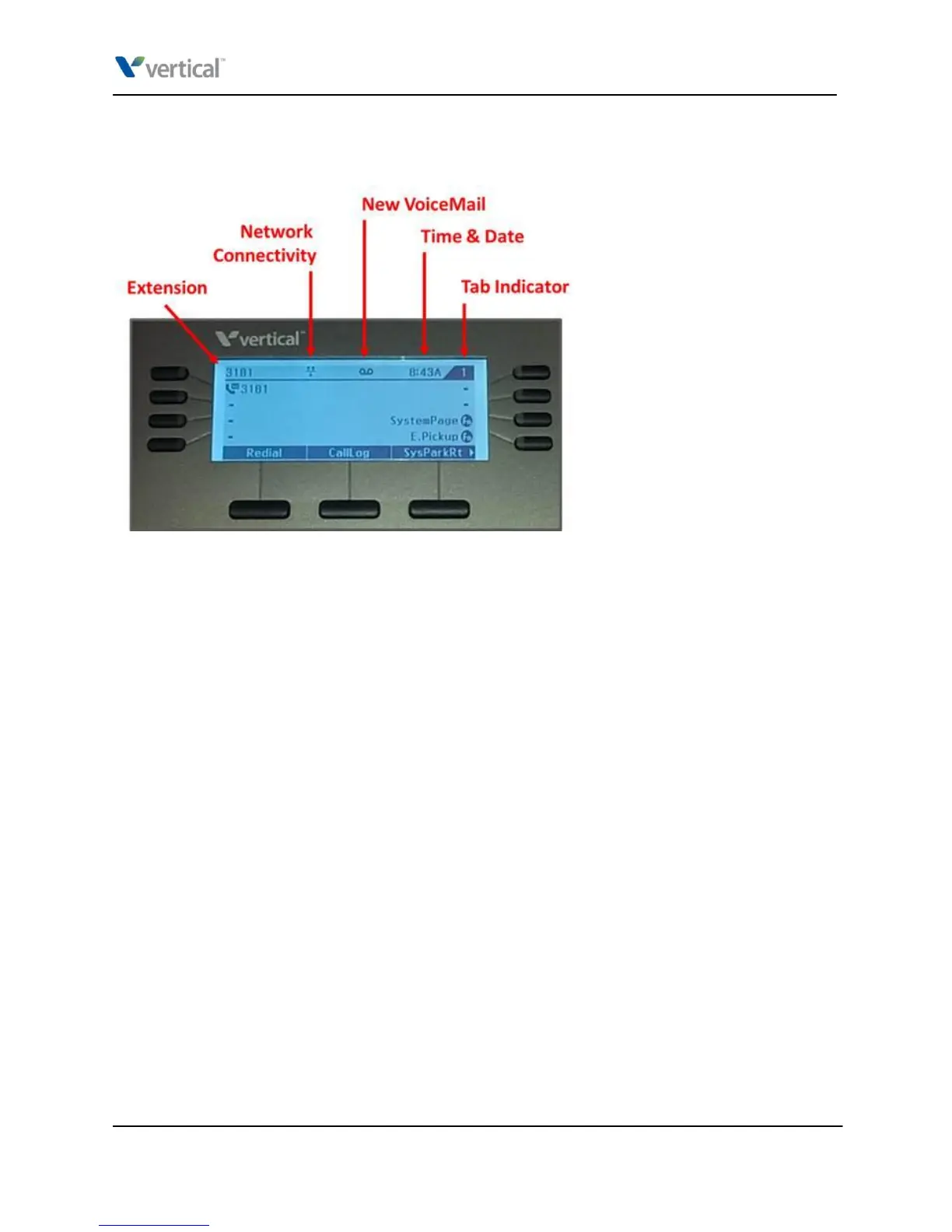
The top line of the phone’s LCD displays information about the current state of your phone:
Extension: Extension that this phone is logged on to.
Network Connectivity icon: Indicates that the phone is actively connected to the network. If this
icon includes a slash, then no network connection is present.
New VoiceMail icon: Displayed when one or more unheard voice messages are in the voice
mailbox for this extension. The Message button will flash as well. Press the Message button to
login and listen to your voicemail.
Time & Date: Time and date cycle continuously.
Tab Indicator: The 9830 and 9840C models support assigning a second set of features to the
programmable feature buttons. The tab indicator shows if the LCD is currently displaying feature
set 1 or 2. See “Programmable feature buttons”.
Vertical Edge IP 9800 Series Phone User Guide



 To Next Page