41
User Manual 10H52258UM60 - Rev. 3 - 01/2019
Operation Control and Display APM 400/600
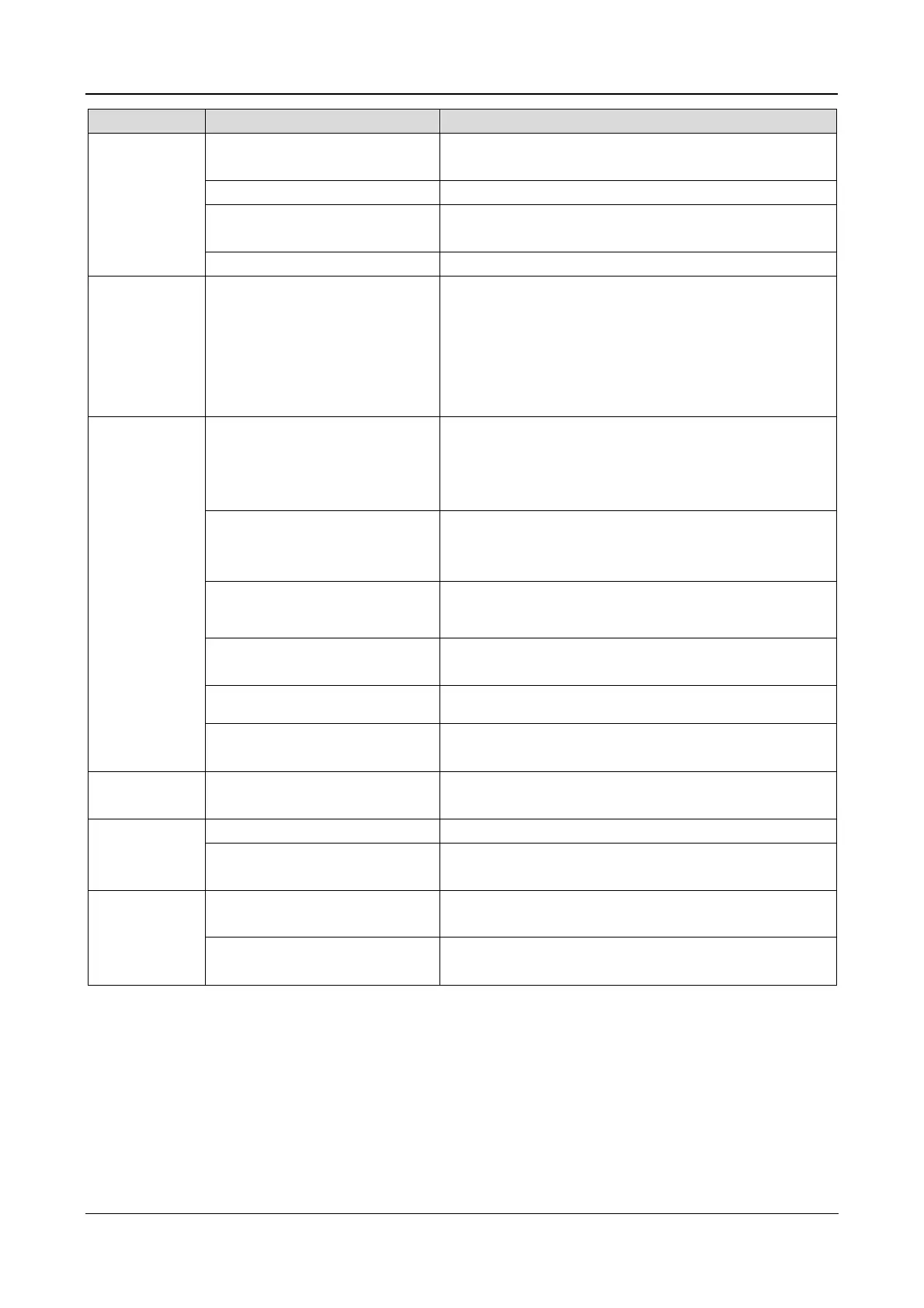
Menu Item Description
Output Voltage Level Indicates the voltage between phase line and phase line
LBS Function NONE, SLAVE, MASTER
Command password Enables the user to modify the command password
Protocol Velocity
Command
(initiate, stop
battery,
system test or
top-up charge)
Battery maintenance test
The battery is operated at 20% battery capacity during
the battery maintenance test. The load must be between
20% and 100%
Command
(initiate, stop
battery,
system test or
top-up charge)
Battery capacity test
The battery is discharge fully in order to obtain a precise
indication of the battery capacity. The load must be
between 20% and 100%
System test
UPS self-test. When the user activates this function, a
window displaying the outcome of the test appears after
about 5 seconds
Stop testing
This command may be used to interrupt
maintenance test, battery capacity test or system test
manually
Top-up charge
This command may be used to initiate a battery top-up
charge manually
Stop top-up charge
This command may be used to interrupt
charge manually
Modem automatic response
activated
Modem automatic response activated setting
Eff.Curve Eff. Curve Displays the system efficiency at current load
Run Time
UPS Run time Displays the accumulated UPS run time
Byp. Run time Displays the accumulated UPS run time on bypass
Version
UPS version
Provides UPS inverter, rectifier and monitoring software
version information
UPS model
Provides UPS model information, for example,
400V-60Hz
5.8.3
Keypad Window
The control key functions (ranging from F1 to HELP) have already been explained in the Control Keys section of
this chapter. The Keypad Window illustrates the icons assigned to the keys (F1 to HELP) on the current screen.
5.8.4
Prompt Window
A prompt window or dialog box appears for various reasons during the operations and workflow. It may contain
alerts or notifications for the users, or prompt the user to confirm changes applied to settings or functions.
Table 5.8 lists the prompts that users encounter during operations:
Table 5.8





 To Next Page