VESDA-EVEP-A00-P Product Guide
62 www.xtralis.com
5.5.4 WiFi Options
The WiFi options provide the ability to configure the detector to join an existing WiFi network using the normal
building network connection process.
After the WiFi parameters have been entered and the user selects Apply or OK, the detector will connect to
the access point and remain connected while the access point is available. The WiFi LEDinside the detector
is continuously lit while the detector is connected to the access point, and is turned off if the detector is not
connected to the access point.
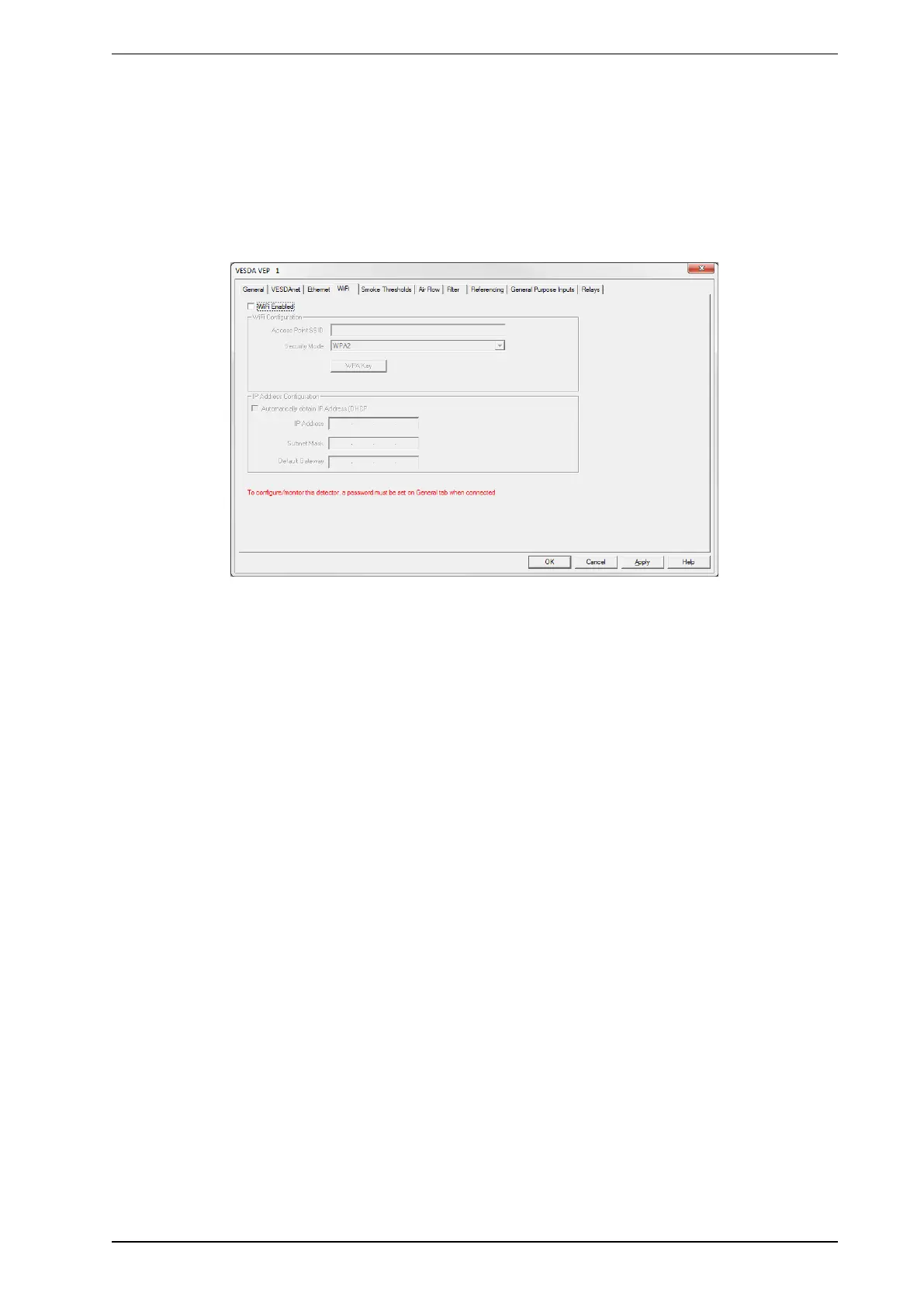
Figure5-15: WiFi options
WiFi Network ConnectionParameters
The following parameters are required to join the detector with an existing WiFi network:
l WiFi Enabled:Controls whether detector attempts to use WiFi and connect to an access point.
l Access Point SSID: Set by installer to suit building access point.
l Security mode:Set by installer to suit building access point
l Key:WPAor WEP Key required to join the VEP-A00 to the building network. This field is disabled if the
Security Mode is set to Open. If the security mode is set to WPA then the password for the access point
is set using the WPAKey button shown.
WiFi IPConfiguration Parameters
The following parameters allow setting of a dynamic or static IP address for the VEP-A00 on the WiFi
network:
Dynamic IPAddress Configuration
l Automatically obtain IPAddress: Controls whether the VEP-A00 uses a static IP address or
automatically obtains an address from a DHCPserver. If this option is selected, the IP address, Subnet
Mask and Default Gateway fields are disabled. When the detector is joined to the network, the IP
address that has been allocated to the detector by the DHCPserver can be viewed on the detector
status screen in Xtralis VSC by using a USB connection.
Static IPAddress Configuration
l IP Address:IPV4 static address
l Subnet Mask:Subnet mask for static address
l Default Gateway:Gateway for static address










 To Next Page